Form SSA-3441-BK (01-2021) UF Discontinue Prior Editions Social Security Administration Page 1 of 10 OMB No. 0960-0144 DISABILITY REPORT - APPEAL PLEASE READ THIS INFORMATION BEFORE COMPLETING THIS.

Open form follow the instructions

Easily sign the form with your finger

Send filled & signed form or save
How to fill out the disability report - appeal - social security online
Completing the disability report - appeal is a crucial step in the process of appealing a decision made by the Social Security Administration regarding your disability benefits. This guide will provide you with supportive and clear instructions to help you navigate the form with confidence.
Follow the steps to fill out the disability report - appeal online.
- Click ‘Get Form’ button to obtain the form and open it in the editor.
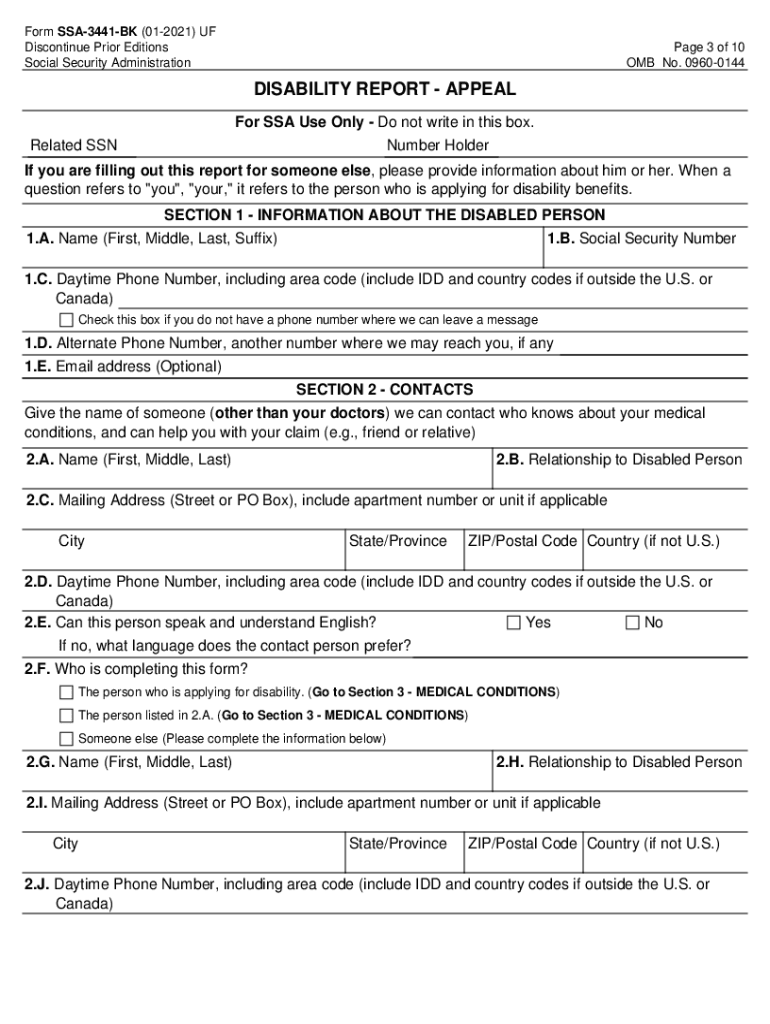
- Begin by filling in the personal information of the disabled person in Section 1. This includes their name, social security number, daytime phone number, and optionally an email address.
- In Section 2, provide information about a contact person who can speak to your medical conditions. Ensure to include their name, relationship, mailing address, and if they can communicate in English.
- Move to Section 3 to update any changes in your medical conditions since your last report. Indicate if there has been an improvement or deterioration and provide details if applicable.
- In Section 4, list any medical treatment received since your last report. This includes details about healthcare providers, types of conditions treated, and any scheduled appointments.
- Continue in Section 5 to disclose if other organizations or individuals possess relevant medical information and provide their contact details.
- Proceed to Section 6 to detail any medications you are currently taking. Be sure to include the name of the medicine, prescribing doctor, and any side effects experienced.
- In Section 7, describe any changes in your daily activities that have occurred due to your condition.
- Section 8 asks about any changes in your work status and education. Provide updated information as necessary.
- In Section 9, disclose any participation in vocational rehabilitation or support services. Include organization names and contact persons.
- Utilize Section 10, the Remarks section, for any additional information or explanations related to any questions in the form.
- After completing the report, ensure all information is accurate. Finally, save changes, download, print, or share the form as necessary.
Complete the disability report - appeal online to ensure your appeal is processed smoothly.
Experience a faster way to fill out and sign forms on the web. Access the most extensive library of templates available.
Related content
Form SSA-3441, Disability Report - Appeal; · Form SSA-827, Authorization to Disclose...
DISABILITY REPORT - APPEAL - Form SSA-3441-BK. READ ALL OF THIS ... this form is needed by...
SSI or SSDI Denial and All Appeals have been Exhausted. 222 ... A. The disabled 16-17 year...
Get answers to your most pressing questions about US Legal Forms API.
How do I win a social security disability appeal?
Request Appeal on Time. After every decision, you have only 60 days to submit your appeal in writing. ... Write an Appeals Letter. ... Get a Supportive Opinion From Your Doctor. ... Be Completely Honest. ... Consider Getting Representation.
What should I say to my disability appeal?
Indicate Your Name and Claim Number at the Top. ... Point Out Any Mistakes or Oversights. ... Supply Missing Medical Information. ... Attach Medical Records or Any Additional Evidence. ... Stick to the Point. ... Be as Detailed as Possible. ... Be Polite and Professional.
What percentage of disability appeals are approved?
Fewer people still decide to continue pursuing disability benefits after an ALJ hearing and with varying success. Statistics indicate that the Appeals Council approves only 13 percent of cases reviewed, while those who file lawsuits in federal district court may have up to a 40 percent chance of prevailing.
How long does a social security disability appeal take?
A reconsideration appeal can usually be decided in as little as four weeks or as long as twelve weeks; whereas an application for disability can take as long as six months (usually, if it takes this long it is due to difficulties in procuring medical records from various doctors and other medical providers).
How long does it take for the Appeals Council to make a decision?
Time It Takes for the Appeals Council to Reach a Decision Historically, the Appeals Council has been arguably the slowest parts of the Social Security Administration. Normally, it takes anywhere from 18 to 24 months to receive a decision from the Appeals Council.
What are the chances of winning social security appeal?
The chances of winning an appeal in federal court are barely better than at the appeals council 2% but a large number of cases are at least given a second chance.
Use professional pre-built templates to fill in and sign documents online faster. Get access to thousands of forms.
If you believe that this page should be taken down, please follow our DMCA take down process here.
This form is available in several versions. Select the version you need from the drop-down list below.