Loading
Get Co Dr 2460 2019-2026
How it works
-

Open form follow the instructions
-

Easily sign the form with your finger
-

Send filled & signed form or save
How to fill out the CO DR 2460 online
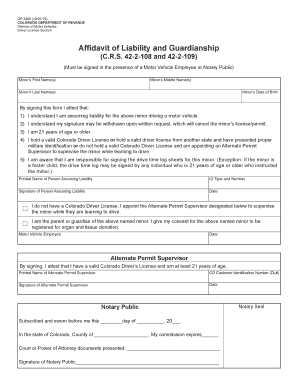
This guide provides clear and comprehensive instructions on how to properly complete the CO DR 2460, the affidavit of liability and guardianship, online. Whether you are filling this form out for the first time or need a refresher, this step-by-step approach will support you throughout the process.
Follow the steps to complete your CO DR 2460 online.
- Press the ‘Get Form’ button to access the CO DR 2460 and open it in your preferred editing tool.
- Begin by entering the minor’s first name(s) in the designated field.
- Fill in the minor’s middle name(s) if applicable.
- Provide the minor’s last name in the appropriate section.
- Input the minor’s date of birth in the specified format.
- Read through the statements regarding assumption of liability, and ensure you understand them before proceeding.
- In the section provided, print your name (the person assuming liability) clearly.
- Indicate your ID type and number as requested.
- Sign the document to attest that the information is accurate and reflect your consent.
- Enter the date of your signature in the designated space.
- If you do not hold a Colorado Driver License, indicate that you are appointing an Alternate Permit Supervisor for the minor.
- If applicable, provide the name of the Alternate Permit Supervisor and their CO Customer Identification Number.
- Ensure the Alternate Permit Supervisor signs the form, confirming they have a valid Colorado Driver's License and are at least 21 years old.
- If required, arrange for a Motor Vehicle Employee or a Notary Public to witness the signature.
- Complete any remaining sections related to drive time logs, if necessary.
- Review the completed form for accuracy, save any changes, and then download, print, or share the completed CO DR 2460.
Complete your CO DR 2460 online today and ensure a smooth process.