Loading
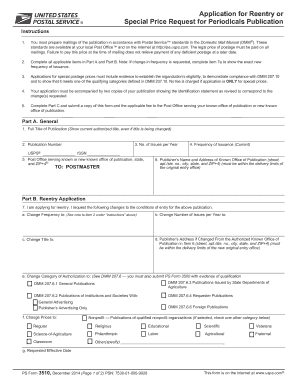
Get Usps Ps 3510 2006
How it works
-

Open form follow the instructions
-

Easily sign the form with your finger
-

Send filled & signed form or save
How to fill out the USPS PS 3510 online
The USPS PS 3510 is an essential document for individuals or organizations applying for reentry or special postage prices for periodicals. This guide will provide you with step-by-step instructions to fill out the form correctly and efficiently online.
Follow the steps to complete the USPS PS 3510 online.
- Click 'Get Form' button to obtain the form and open it in the editor.
- In Part A, fill out the general information regarding your publication. Enter the full title of the publication, publication number, number of issues per year, and the frequency of issuance. Make sure to provide the Post Office serving your known office of publication along with the state and ZIP+4.
- Continue to Part B, which contains the reentry application information. Indicate if you are applying for reentry and specify any changes you are requesting for the publication, such as changes to frequency, number of issues per year, title, or publisher's address.
- In Part B, indicate the category of authorization and select the appropriate type of publication. Be sure to include evidence of eligibility if you are applying for special postage prices.
- Complete Part C by entering the applicant's name, title, date, signature, email address, and telephone number.
- Submit a copy of the completed form along with the applicable fee to the Post Office serving your known office of publication or new known office of publication.
- Review all information for accuracy and completeness before submitting. Once reviewed, proceed to save changes, download, print, or share the completed form as necessary.
Encourage others to fill out their forms online for a streamlined process.
Get form
Experience a faster way to fill out and sign forms on the web. Access the most extensive library of templates available.
Get This Form Now!
Use professional pre-built templates to fill in and sign documents online faster. Get access to thousands of forms.