Loading
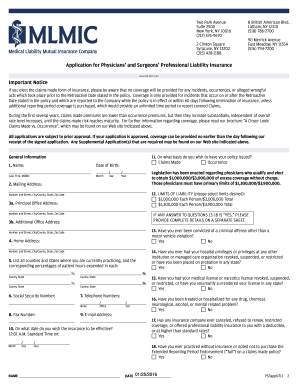
Get Mlmic Application For Physicians And Surgeons Professional Liability Insurance 2011
How it works
-

Open form follow the instructions
-

Easily sign the form with your finger
-

Send filled & signed form or save
How to fill out the MLMIC Application For Physicians And Surgeons Professional Liability Insurance online
This guide provides step-by-step instructions for completing the MLMIC Application For Physicians And Surgeons Professional Liability Insurance online. Ensuring accurate completion of this form is crucial for obtaining the appropriate professional liability coverage.
Follow the steps to successfully complete the application.
- Use the ‘Get Form’ button to retrieve the application and access it in the online editor.
- Begin with the general information section. Provide your full name, including last name, first name, and middle initial, along with your date of birth. Make sure to format the date in the MM/DD/YYYY structure.
- Fill in your mailing address, ensuring you include the number and street, city or county, state, and zip code.
- Complete the information regarding your principal office address if applicable, and include details about additional office addresses if you operate from multiple locations.
- Indicate whether you have ever faced any criminal convictions, license revocations, or malpractice claims in the relevant sections. If so, provide detailed explanations as required.
- Specifically, answer all questions related to your practice, such as your social security number, contact numbers, email address, and desired effective date for the insurance coverage.
- Complete the education section by listing the medical schools you have attended along with the years graduated and degrees obtained.
- If applicable, fill in any residency, fellowship, and other training details as requested in the form.
- In the practice information section, detail your current hospital staff appointments and provide information about prior affiliations.
- Carefully review the section regarding any claims or incidents, ensuring that you have disclosed all relevant information truthfully.
- Once all sections are completed, save your changes and download or print the application for your records.
- Sign the application in the designated areas and submit it through one of the provided options: fax, email, or by mailing a hard copy to the appropriate address.
Take action now to complete your application for Physicians And Surgeons Professional Liability Insurance online and ensure your practice is protected.
Get form
Experience a faster way to fill out and sign forms on the web. Access the most extensive library of templates available.
Get This Form Now!
Use professional pre-built templates to fill in and sign documents online faster. Get access to thousands of forms.