Loading
Get Ssa-7050-f4 2020
This website is not affiliated with any governmental entity
How it works
-

Open form follow the instructions
-

Easily sign the form with your finger
-

Send filled & signed form or save
How to fill out the SSA-7050-F4 online
Filling out the SSA-7050-F4 form online is a straightforward process that enables you to request Social Security earnings information efficiently. This guide provides step-by-step instructions to help you complete the form accurately and address any specific needs you may have throughout the process.
Follow the steps to complete the SSA-7050-F4 form online.
- Click ‘Get Form’ button to obtain the form and open it in the editor.
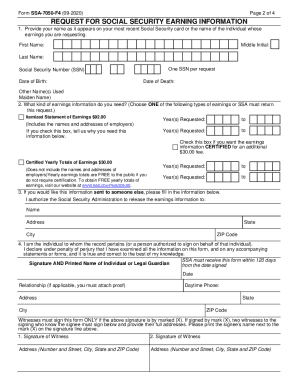
- Enter your name as it appears on your Social Security card or the name of the individual whose earnings you are requesting. Be sure to provide the first name, middle initial, and last name in the designated fields.
- Input the Social Security number (SSN) of the individual associated with the request. Remember, only provide one SSN per request for accurate processing.
- Fill in the date of birth and, if applicable, the date of death of the individual whose earnings information you are seeking.
- Specify any other names used, such as a maiden name, in the provided section.
- In the next section, choose the type of earnings information you need by selecting one of the options provided. Make sure to check the box for either an itemized statement of earnings or certified yearly totals of earnings, as only one choice is permissible.
- If requesting an itemized statement, indicate the years of earnings you need by filling out the corresponding fields. You can list multiple years, ensuring clarity on what information is requested.
- If you require the earnings information to be certified, check the appropriate box and note the additional fee associated with this request.
- If you want the information sent to someone else, fill in their name and address in the section provided to give the Social Security Administration authorization to release the earnings information.
- Sign the form as the individual to whom the record pertains or as an authorized person. Include the date of the signature and print your name. If signing by mark (X), ensure it is witnessed by two individuals.
- Provide a daytime phone number where you can be reached, along with your address. Ensure all information is accurate to prevent processing delays.
- Lastly, review all provided information for accuracy. Once satisfied, save your changes, and prepare the form for submission. You may download, print, or share the completed form as necessary before mailing it to the Social Security Administration.
Start your online process for completing the SSA-7050-F4 form today!
Get form
Experience a faster way to fill out and sign forms on the web. Access the most extensive library of templates available.
You can get your personal Social Security Statement online by using your my Social Security account. If you don't yet have an account, you can easily create one. Your online Statement gives you secure and convenient access to your earnings records.
Get This Form Now!
Use professional pre-built templates to fill in and sign documents online faster. Get access to thousands of forms.