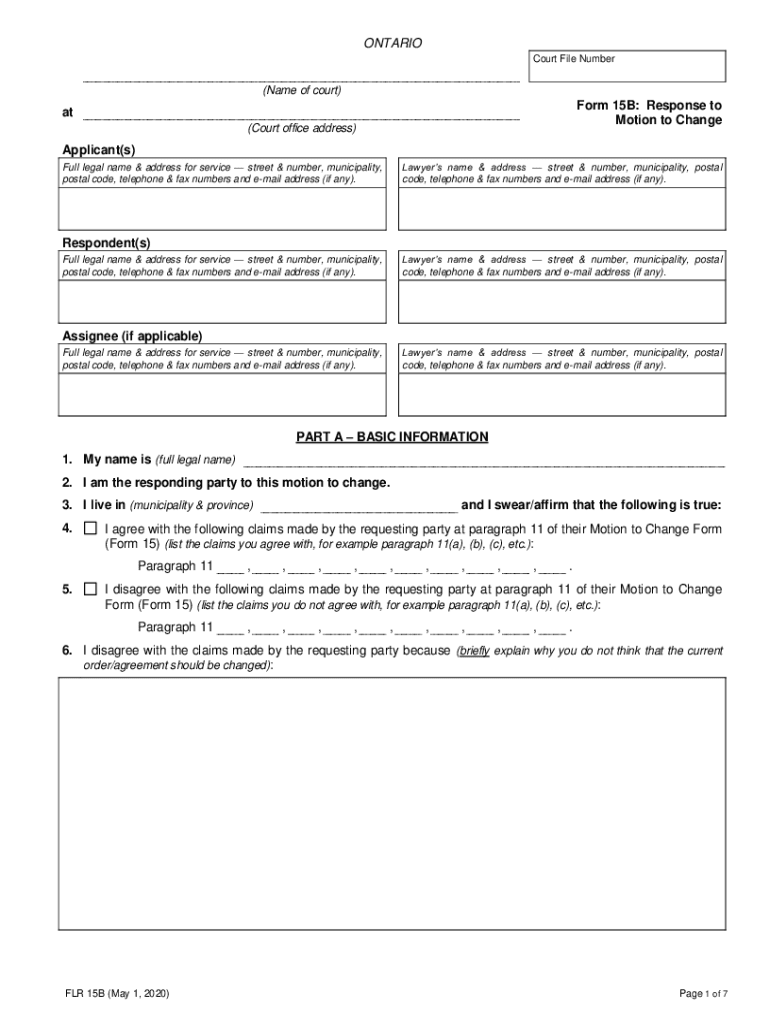
ONTARIO Court File Number Name of court Form 15B Response to Motion to Change at Court office address Applicant s Full legal name address for service street number municipality postal code telephone fax numbers and e-mail address if any. Je suis d accord avec les renseignements nonc s aux dispositions 1 10 de la Formule de renseignements visant une modification formule 15A dat e du L EXCEPTION de ce qui suit Donnez des pr cisions sur les renseignements avec lesquels vous n tes pas d accord et joignez tout document l appui de votre position. er FLR 15B 1 avril 2008 Suite la page suivante English on reverse Form 15B Response to Motion to Change page 2 in paragraphs of the Motion to Change Form 15 dated I disagree with the claims made by name of person bringing motion to change I am asking that the motion to change except for the parts with which I agree be dismissed with costs. I agree with the information set out in paragraphs 1 through 10 of the Change Information Form Form 15A dated. ....
Loading

Open form follow the instructions

Easily sign the form with your finger

Send filled & signed form or save
How to fill out the Ontario FLR 15B online
Filling out the Ontario FLR 15B form is an essential step for those responding to a motion to change. This guide provides step-by-step instructions to ensure you complete the form accurately and efficiently when submitting it online.
Follow the steps to successfully complete the Ontario FLR 15B online.
- Click the ‘Get Form’ button to obtain the FLR 15B form and open it in the online editor.
- Fill in the court file number and the name of the court at the top of the form. Ensure this information is accurate as it ties your response to the specific motion.
- Enter the applicant's information, including their full legal name, address for service, and contact details. Do the same for the respondent's details.
- In Part A, provide your full legal name, indicate that you are the responding party, and give your municipality and province of residence.
- List any claims from the requesting party’s motion that you agree with from paragraph 11 of Form 15, as well as those you disagree with, explaining your reasons.
- Complete the sections regarding any changes or requests for dismissal of the motion to change, including child support information if applicable.
- If relevant, document the changes you want under Part B, indicating specifics that require alteration.
- Explain your reasons for these changes in Part C, ensuring you provide sufficient details for the court.
- If you are changing support, complete Part D and provide details about any support owed under the current order.
- Once all sections are filled out, review the form for accuracy and completeness before signing.
- Save your changes, and choose to download, print, or share the completed form as necessary.
Complete your documents online to ensure a smooth and efficient process.
Experience a faster way to fill out and sign forms on the web. Access the most extensive library of templates available.
Related content
2008 www.irs.gov. Get a faster refund, reduce errors, and save paper. For more ... See the...
indicate that the Ontario business investment in intangible assets accounts on average for...
Oct 23, 2014 - Great for new construction or remodeling; no new wiring is needed. •...
Use professional pre-built templates to fill in and sign documents online faster. Get access to thousands of forms.
If you believe that this page should be taken down, please follow our DMCA take down process here.