Loading
Get For Security Reasons Do Not Submit This Form By Email
How it works
-

Open form follow the instructions
-

Easily sign the form with your finger
-

Send filled & signed form or save
How to fill out the FOR SECURITY REASONS DO NOT SUBMIT THIS FORM BY EMAIL online
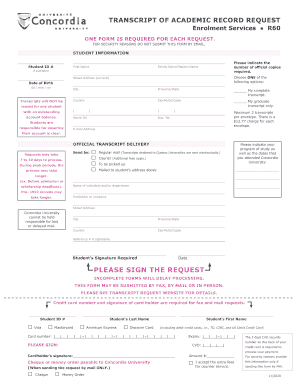
Filling out the form for your academic transcript request is a straightforward process. This guide will provide you with clear, step-by-step instructions to ensure that all necessary information is completed correctly.
Follow the steps to successfully complete your transcript request form.
- Click ‘Get Form’ button to access the transcript request form and open it for editing.
- Enter your Student ID in the designated field to identify your records correctly.
- Provide your first name and family name or maiden name (if applicable) to ensure accurate processing.
- Fill in your current street address, including city, province/state, country, and zip/postal code, to ensure delivery of your transcripts.
- Indicate the number of official copies you require and choose between a complete transcript or a graduate transcript only.
- Enter your home and business telephone numbers for contact purposes.
- Provide your date of birth in the format dd/mm/yy to assist with record verification.
- Select your preferred delivery method: regular mail, courier, to be picked up, or mailed to your address.
- Complete the section regarding your program of study and the dates attended at Concordia University.
- Fill in the name of the individual and/or department to whom the transcripts should be sent, along with the institution or company name and address.
- Sign the request to validate the submission and include the date of your signature.
- If paying by credit card, provide the required information, including card type, card number, expiry date, and CVD number, along with the cardholder's signature.
- If paying by cheque or money order, indicate this on the form and ensure it is payable to Concordia University.
- Review all entries on the form for completeness before submitting. Incomplete forms will delay processing.
- You may submit the completed form by fax, mail, or in person. Ensure you follow the proper submission guidelines as stated on the transcript request website.
Complete your transcript request online today for a smooth and hassle-free process.