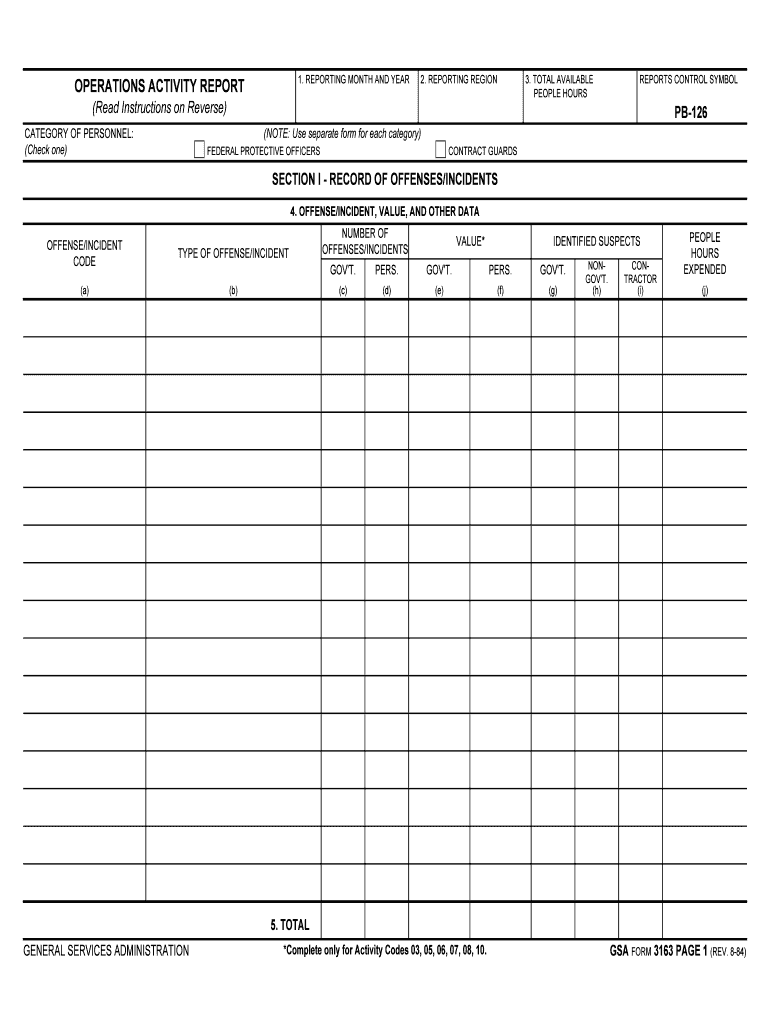
Tegory) CATEGORY OF PERSONNEL: (Check one) FEDERAL PROTECTIVE OFFICERS CONTRACT GUARDS SECTION I - RECORD OF OFFENSES/INCIDENTS 4. OFFENSE/INCIDENT, VALUE, AND OTHER DATA OFFENSE/INCIDENT CODE TYPE OF OFFENSE/INCIDENT (a) (b) NUMBER OF OFFENSES/INCIDENTS VALUE* IDENTIFIED SUSPECTS GOV'T. PERS. GOV'T. PERS. GOV'T. (c) (d) (e) (f) (g) NONGOV'T. (h) CONTRACTOR (i) PEOPLE HOURS EXPENDED (j) 5. TOTAL GENERAL SERVICES ADMINISTRATION *Complete only for Activity Codes 03, 05, 06.
Loading

Open form follow the instructions

Easily sign the form with your finger

Send filled & signed form or save
How to fill out the GSA Form 3163 online
Filling out the GSA Form 3163 online can streamline the process of reporting operational activities, allowing for accurate documentation of offenses and incidents. This guide provides detailed steps to help you navigate the form's components with ease.
Follow the steps to effectively complete the GSA Form 3163.
- Click ‘Get Form’ button to obtain the form and open it in the editor.
- Enter the reporting month and year in the format MM/YYYY, for instance, 01/80 for January 1980.
- Specify the reporting region by entering the appropriate region number or 'NCR' as required.
- Indicate the total available people hours for the reporting period.
- Select the category of personnel by checking either the 'Federal Protective Officers' or 'Contract Guards' box.
- In Section I, for each offense or incident reported, enter the corresponding offense/incident code in the provided column.
- Detail the type of offense or incident that aligns with the code entered in the prior step.
- Record the number of offenses or incidents reported for the month in the designated column.
- For each incident, provide the estimated dollar value related to government property and identified suspects, as applicable.
- Finalize entries by summing up the columns for identified suspects (government, personal, non-government, and contractor) and total people hours expended.
- Review all filled sections for accuracy and ensure totals are correctly calculated before concluding your input.
- Save your changes, download or print the form, or share it as needed.
Start filling out your GSA Form 3163 online today to ensure accurate and timely reporting.
Experience a faster way to fill out and sign forms on the web. Access the most extensive library of templates available.
Related content
DOWNLOAD THIS FORM: Choose a link below to begin downloading. GSA 3163.pdf [PDF - 572 KB...
May 27, 2010 — to sponsorship information found on the Student Registration Form,...
... Restricted Rights – Use, duplication or disclosure restricted by GSA ADP Schedule...
Get answers to your most pressing questions about US Legal Forms API.
What does GSA stand for?
GSA U.S. General Services Administration.
What is gsa for official use only?
The Federal Hierarchy “For Official Use Only” (FOUO) API allows U.S. Government users to obtain federal organization details down to the office level. As part of this API, organization information for all levels (departments/sub-tiers/offices) is provided by default.
How do I become a GSA contract holder?
How to Get a Contract Download the solicitation package. Download the latest revision (refresh) of the MAS Information Technology Solicitation. ... Prepare your offer. ... Submit your offer. ... GSA will review your offer. ... Maintain your contract.
What is a gsa form 300?
(a) GSA Form 300 , Order for Supplies and Services, is a multipurpose form that may be used for purchases of supplies or services, orders under existing contracts or agreements, and orders from required sources of supplies and services.
What does GSA stand for in?
GSA U.S. General Services Administration.
What does GSA stand for in business?
A general security agreement (GSA) represents a special agreement that allows you to secure a commercial business loan with certain types of collateral. If you default on the loan, your creditor may reclaim the asset noted in the security agreement as repayment.
What is GSA online?
GSA Global Supply® online ordering provides access to approximately 800,000 tools, office supplies, computer products and other items. Government Purchase Card (GPC) and Activity Address Code (AAC) or DoDAAC are accepted for payment.
Use professional pre-built templates to fill in and sign documents online faster. Get access to thousands of forms.
If you believe that this page should be taken down, please follow our DMCA take down process here.