Loading
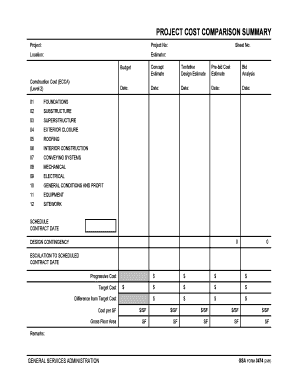
Get Gsa Form 3474 1981-2026
How it works
-

Open form follow the instructions
-

Easily sign the form with your finger
-

Send filled & signed form or save
How to fill out the GSA Form 3474 online
Filling out the GSA Form 3474 is an essential step in project cost comparison and management for various construction projects. This guide provides a clear, step-by-step overview on how to seamlessly complete this form online, ensuring you capture all necessary details.
Follow the steps to accurately complete the GSA Form 3474
- Click ‘Get Form’ button to access the GSA Form 3474 and open it for editing.
- Begin by filling in the project title in the ‘Project’ field, ensuring it accurately reflects the name of your construction project.
- In the ‘Project No’ section, enter the unique identification number assigned to the project, which helps in tracking and referencing.
- Specify the location of the project in the ‘Location’ field, providing complete details for clarity.
- Fill out the ‘Estimator’ section with the name of the person or team responsible for estimating the project costs.
- Proceed to the ‘Construction Cost (ECCA)’ section where detailed cost categories are listed. Fill out each category — Foundations, Substructure, Superstructure, Exterior Closure, Roofing, Interior Construction, Conveying Systems, Mechanical, Electrical, General Conditions and Profit, Equipment, and Sitework — with the appropriate cost estimates.
- Include the dates corresponding to each estimation phase in the respective ‘Date’ fields associated with Budget, Concept Estimate, Tentative Design Estimate, Pre-bid Cost Estimate, and Bid Analysis.
- Review and record the ‘Scheduled Contract Date’ in the designated field to clarify when project execution is expected to begin.
- Complete the remaining cost-related fields, including Design Contingency, Escalation to Scheduled Contract Date, Progressive Cost, Target Cost, and Difference from Target Cost, ensuring all financial data is accurately reflected.
- Enter the ‘Cost per SF’ and ‘Gross Floor Area’ in the provided fields as needed, adding clarity to the project’s cost-efficiency metrics.
- Finally, add any relevant remarks in the Remarks section to clarify any specifics about the project or cost estimates.
- Once all information has been entered and reviewed, save your changes, download the form, print it if needed, or share it with your team or relevant stakeholders.
Complete your documents online today with confidence and ease.
Related links form
Paper copies of Standard Forms (SF) and Optional Forms (OF) may be ordered online through GSA Advantage or by calling GSA Global Supply at 800-525-8027 and selecting option 3 on the phone menu. Please include form number, title, and quantity needed.