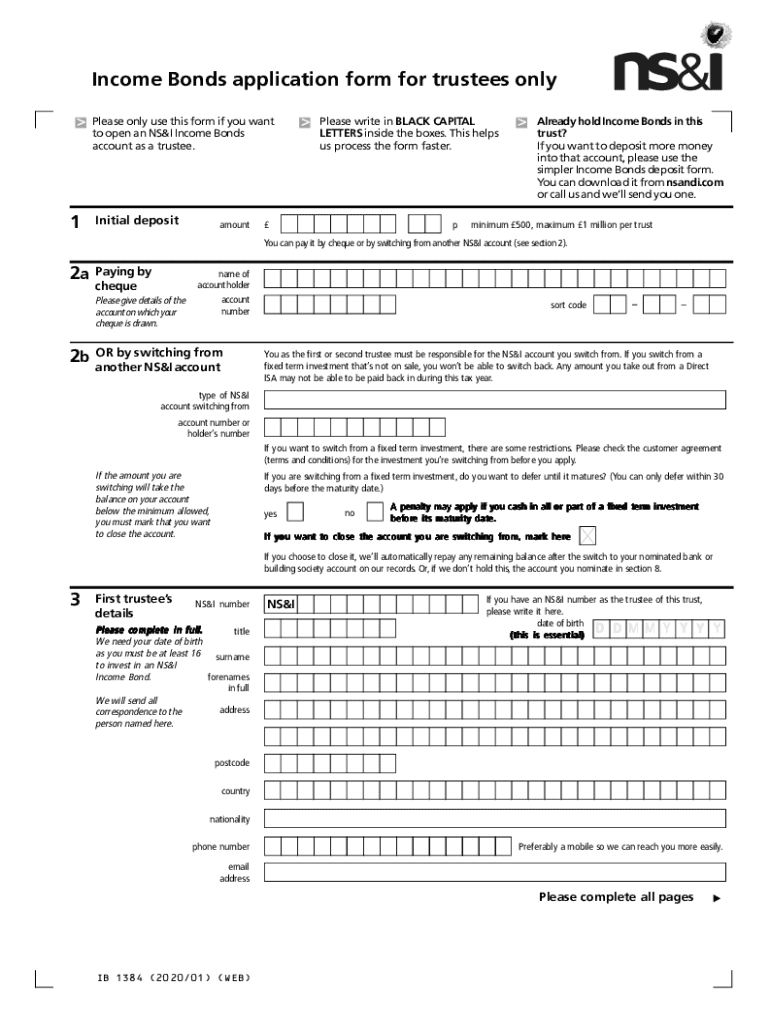
Income Bonds application form for trustees only 1Please only use this form if you want to open an NS&I Income Bonds account as a trustee.Initial depositamountPlease write in BLACK CAPITAL LETTERS.
Loading

Open form follow the instructions

Easily sign the form with your finger

Send filled & signed form or save
How to fill out the Fillable Online Income Bonds Application Form For Trustees online
This guide provides clear and user-friendly instructions for completing the Fillable Online Income Bonds Application Form intended for trustees. By following these steps, users can efficiently navigate the form and ensure all necessary information is accurately provided.
Follow the steps to complete the application form online.
- Press the ‘Get Form’ button to access and open the form for editing.
- In the initial deposit amount section, enter the amount you wish to invest in black capital letters as instructed. Remember the minimum deposit is £500 and the maximum is £1 million per trust.
- Indicate whether you already hold Income Bonds in this trust. If this is an additional deposit and you already have an account, you will need to use the simplified deposit form instead.
- Choose your payment method. If paying by cheque, provide the account details from which the cheque is drawn, including the account holder's name and account number. If switching from another NS&I account, include the type of account and the relevant account number.
- Fill in the first trustee's details completely, including NS&I number, title, date of birth, surname, forenames, address, nationality, phone number, and email address.
- If the first trustee is tax resident in any country outside the UK, complete additional tax residency information including country of birth and tax identification number.
- If applicable, provide details for a second trustee, including all necessary information similar to that of the first trustee.
- Provide the details of the trust, including its title and purpose, explaining why the trust is being set up.
- Enter the beneficiary's details fully, including title, date of birth, address, nationality, and phone number.
- Complete the settlor's information, specifying the source of funds for the investment.
- Fill in the nominated bank or building society account details, ensuring that all information is accurate to avoid delays in payments.
- All trustees must sign the form, and ensure the date is recorded. Include any additional signatures on a separate sheet if there are more than two trustees.
- After completing the form, review all information for accuracy, then save your changes. You can download, print, or share the form as necessary.
Complete your documents online today for a seamless application process.
Experience a faster way to fill out and sign forms on the web. Access the most extensive library of templates available.
Related content
Use the instructions to complete this application and for a definition of all bold items...
If you or your spouse are self employed or have self employment income, provide...
Dec 15, 2016 — and wish to claim the premium tax credit on line 69. ... Fillable Forms...
Use professional pre-built templates to fill in and sign documents online faster. Get access to thousands of forms.
If you believe that this page should be taken down, please follow our DMCA take down process here.
This form is available in several versions. Select the version you need from the drop-down list below.