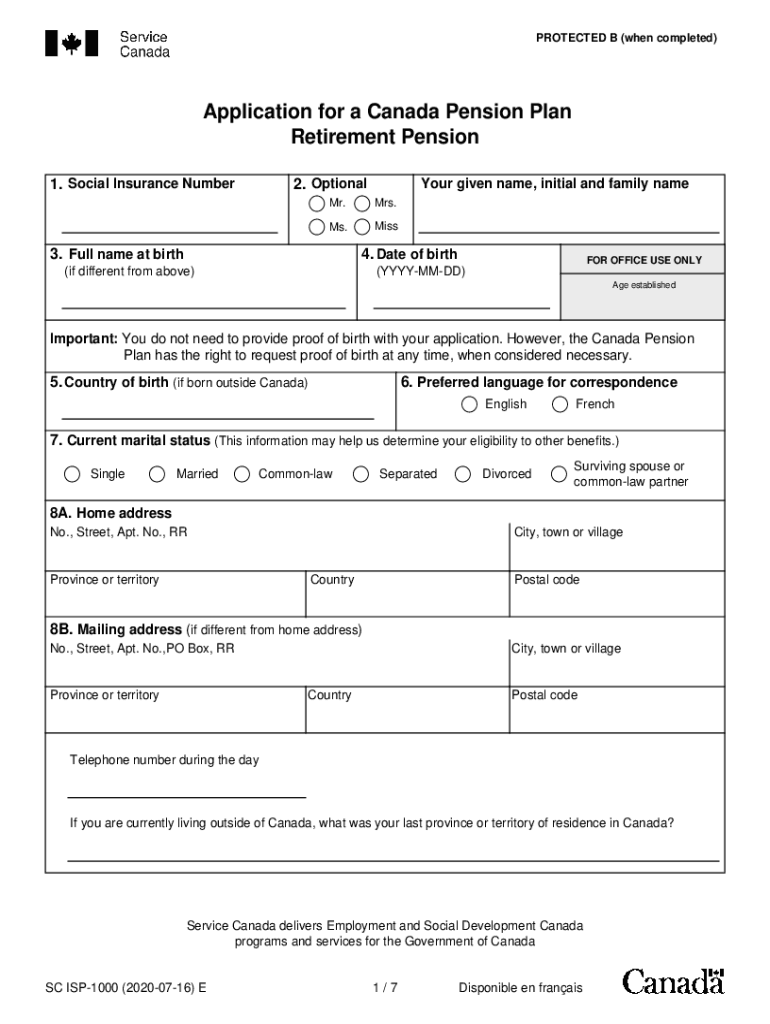
PROTECTED B (when completed) Application for a Canada Pension Plan Retirement Pension 1. Social Insurance Number Your given name, initial and family name 2. Optional Mr. Mrs. Ms. Miss 3. Full name.
Loading

Open form follow the instructions

Easily sign the form with your finger

Send filled & signed form or save
How to fill out the Application For A Canada Pension Plan online
Filling out the Application For A Canada Pension Plan online can seem daunting, but with clear guidance, you can navigate the process smoothly. This guide provides step-by-step instructions on how to complete each section of the application accurately.
Follow the steps to complete the application form.
- Press the ‘Get Form’ button to access the application form and open it.
- Enter your social insurance number in the designated field. Make sure it is correct to avoid processing delays.
- Provide your full name, including your given name, initial, and family name. Ensure that you use proper capitalization.
- Indicate your date of birth in the format YYYY-MM-DD.
- If different from your full name, enter your full name at birth in the corresponding field.
- Select your preferred language for correspondence from the options of English or French.
- Select your current marital status from the available options. This information will assist in determining your eligibility for additional benefits.
- Complete your home address, including the street number, apartment number (if applicable), province or territory, city or town, and postal code. If your mailing address differs, fill in that information in the provided section.
- If you wish to receive direct deposit payments, enter your banking information including branch number, institution number, account holder names, and account number.
- Select when you would like your pension to start. Options include as soon as you qualify, at age 65, or a specific date.
- Complete the section regarding children born after 1958, including their full names, social insurance numbers, and dates of birth. Specify if you were the primary caregiver.
- If applicable, indicate if you wish to waive rights to the child-rearing provision in favor of a spouse.
- Decide if you would like to set up a voluntary income tax deduction from your monthly pension payment.
- If you have insurance or have applied for benefits in another country, complete the relevant sections with the requested details.
- Provide your declaration and signature, affirming that the information is truthful and complete. Include the date of signing.
- If someone else signs on your behalf, they must provide relevant details and a signature confirming they signed in your presence.
- Review the entire application for accuracy and completeness before submission. Once finalized, proceed to save changes, download, print, or share the form as needed.
Complete your Canada Pension Plan application online today to secure your financial future.
Experience a faster way to fill out and sign forms on the web. Access the most extensive library of templates available.
Related content
When you apply for benefits––You may have some Social Security credits in both the...
by M Sarney · 2001 · Cited by 8 · Related articlesPension Plan (CPP), the...
Disability benefits are funds provided from public or private sources to a person who is...
Get answers to your most pressing questions about US Legal Forms API.
How many years do you have to work in Canada to get a pension?
To receive the maximum CPP amount you must contribute to the CPP for at least 39 of the 47 years from ages 18 to 65. You must also contribute the maximum amount to the CPP for at least 39 years based on the yearly annual pensionable earnings (YMPE) set by the Canada Revenue Agency (CRA). The YMPE for 2022 is $64,900.
Can I get CPP if I live outside Canada?
Canadian Government Income Security Programs As a non-resident of Canada, you may be entitled to apply for Canada Pension Plan (CPP) payments and Old Age Security Pension (OAS) payments. Canada also has agreements with a number of other countries that offer comparable pension programs.
How to apply for Canada Pension from USA?
You can apply for Canadian benefits (OAS, CPP or QPP) at any U.S. Social Security office by completing application form CDN-USA 1 (for OAS and CPP benefits) or QUE/USA-1 (for QPP benefits). Contact any Canadian or Quebec Social Security office.
Can you receive CPP and OAS outside Canada?
Receiving your OAS pension outside of Canada You can qualify to receive Old Age Security pension payments while living outside of Canada if one if these reasons applies to you: you lived in Canada for at least 20 years after turning 18. you lived and worked in a country that has a social security agreement with Canada.
How much is Canada Pension plan per month?
For 2023, the maximum monthly amount you could receive as a new recipient starting the pension at age 65 is $1,306.57. The average monthly amount paid for a new retirement pension (at age 65) in January 2023 is $811.21. Your situation will determine how much you'll receive up to the maximum.
How do I start a pension plan in Canada?
To qualify for the CPP, you must be at least 60 years old and have made valid contributions. How do I apply for my Canada Pension? If you qualify for CPP, you can apply online. You can also mail or drop-off a completed form to a Service Canada office.
How do I apply for Canada Pension from USA?
You can apply for Canadian benefits (OAS, CPP or QPP) at any U.S. Social Security office by completing application form CDN-USA 1 (for OAS and CPP benefits) or QUE/USA-1 (for QPP benefits). Contact any Canadian or Quebec Social Security office.
Can I get CPP outside Canada?
Canadian Government Income Security Programs As a non-resident of Canada, you may be entitled to apply for Canada Pension Plan (CPP) payments and Old Age Security Pension (OAS) payments. Canada also has agreements with a number of other countries that offer comparable pension programs.
Use professional pre-built templates to fill in and sign documents online faster. Get access to thousands of forms.
If you believe that this page should be taken down, please follow our DMCA take down process here.
This form is available in several versions. Select the version you need from the drop-down list below.