Loading
Form preview
  • US Legal Forms
  • Form Library
  • Other Forms
  • Wisconsin Other Forms
  • Wi Dnr 3400-187 2004

Get Wi Dnr 3400-187 2004-2026

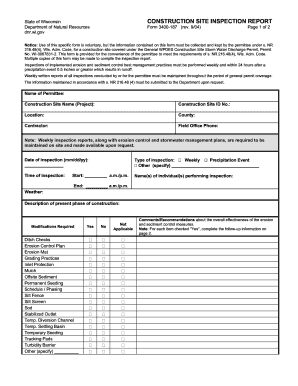
CONSTRUCTION SITE INSPECTION REPORT State of Wisconsin Department of Natural Resources dnr. wi. gov Form 3400-187 rev. 9/04 Page 1 of 2 Notice Use of this specific form is voluntary but the information contained on this form must be collected and kept by the permittee under s. NR 216. 48 4 Wis. Adm* Code for a construction site covered under the General WPDES Construction Site Storm Water Discharge Permit Permit No* WI-0067831-2. This form is provided for the convenience of the permittee to meet the requirements of s. NR 216. 48 4 Wis. Adm* Code. Multiple copies of this form may be made to compile the inspection report. Inspections of implemented erosion and sediment control best management practices must be performed weekly and within 24 hours after a precipitation event 0. 5 inches or greater which results in runoff* Weekly written reports of all inspections conducted by or for the permittee must be maintained throughout the period of general permit coverage. The information maintain....

How it works

  1. Open form

    Open form follow the instructions

  2. Easily sign form

    Easily sign the form with your finger

  3. Share form

    Send filled & signed form or save

How to fill out the WI DNR 3400-187 online

The WI DNR 3400-187 is an essential form used for documenting inspections of construction sites under the General WPDES Construction Site Storm Water Discharge Permit. This guide will walk you through the process of accurately completing the form online.

Follow the steps to fill out the WI DNR 3400-187 accurately.

  1. Press the 'Get Form' button to access the form and open it in your chosen editor for online completion.
  2. In the 'Name of Permittee' field, enter the full name of the individual or organization responsible for the construction site.
  3. Fill in the 'Construction Site Name (Project)' field with the title of the project being inspected.
  4. Complete the 'Construction Site ID No.' with the specific identification number assigned to the site.
  5. Provide the 'Location' of the construction site, including any relevant details that pinpoint the geographic area.
  6. Specify the 'County' where the construction site is located.
  7. Enter the name of the 'Contractor' managing the construction activities.
  8. Input the 'Field Office Phone' number for any contact related to the site.
  9. Select the type of inspection being conducted (Weekly, Precipitation Event, or Other) and specify if needed.
  10. Record the 'Date of inspection' in the format (mm/dd/yy) and ensure accuracy.
  11. Indicate the 'Time of inspection' by completing the start and end times, along with the appropriate a.m./p.m. designator.
  12. List the names of the individual(s) performing the inspection in the designated space.
  13. Describe the weather conditions at the time of the inspection.
  14. Provide a summary in the 'Description of present phase of construction' field to detail current activities.
  15. For the 'Modifications Required' section, check 'Yes', 'No', or 'Not Applicable' for each item and provide comments if necessary.
  16. In the comments section, write any recommendations regarding the overall effectiveness of the erosion and sediment control measures.
  17. On page 2, use the provided space for detailed follow-up action items, including exact locations, conditions observed, and necessary maintenance.
  18. After reviewing all entries for accuracy, save your changes, download, print, or share the completed form as needed.

Complete your documents online with ease and ensure compliance for your construction site inspections.

Get form

Experience a faster way to fill out and sign forms on the web. Access the most extensive library of templates available.
Get form

Related content

Construction site storm water permit forms...
Use these forms for site inspections and keep them in the project's files. Inspection...
Learn more
environmetal impacts when building an electrical...
This research states the importance of electrical substations to meet the increasing...
Learn more

Related links form

Frro Request Letter Format 2020 Perfectonline 2020 D D 5e Character Sheet Fillable Online 2020 Jph General English Book Pdf Download 2020

Questions & Answers

Get answers to your most pressing questions about US Legal Forms API.

Contact support

The DNR in Wisconsin plays a crucial role in protecting the state's natural resources. They manage wildlife, regulate hunting and fishing, oversee water quality, and maintain state parks. The agency also provides educational resources to help residents understand and conserve Wisconsin's environment, ensuring a thriving ecosystem for future generations.

To obtain your WI DNR customer number, visit the DNR's online services portal. You may need to provide your personal information, including a valid email address, to access your details. This number helps you manage permits, licenses, and other services provided by the department.

You can ask a question on the Wisconsin DNR by visiting their official website and using the contact form provided. Alternatively, you can reach out to them through their social media channels or call their main number. Engaging with the WI DNR ensures your questions are addressed and you stay informed about state resources and regulations.

To call the DNR of Wisconsin, dial their main phone number at 1-888-936-7463. This line is available for inquiries related to permits, licenses, and general information. You will find that DNR staff are ready to assist you while ensuring you receive the right information for your needs.

In Wisconsin, DNR stands for the Department of Natural Resources. This state agency is responsible for managing Wisconsin's environmental and natural resources, including wildlife, water, forests, and parks. The WI DNR 3400-187 form is a part of their numerous programs that support sustainable land use and conservation efforts.

The non-emergency number for the Wisconsin DNR is 1-888-936-7463. You can use this number for general inquiries and assistance regarding various DNR services. This line connects you to representatives who can provide helpful information or direct you to the correct department related to your needs.

To report someone to the WI DNR for violations or concerns, you can use the DNR's online reporting system or call their hotline. Make sure to provide specific details and any relevant information that may help in the investigation. Reporting is essential to maintaining the integrity of Wisconsin's natural resources, so do not hesitate to reach out.

Creating a Wisconsin DNR account is a straightforward process that you can accomplish by visiting their website. You will need to provide some personal information and agree to their terms of use. Once registered, you can easily manage your permits and licenses. Utilizing the WI DNR 3400-187 framework, you will have a personalized experience while accessing critical services.

To find your Wisconsin DNR number, visit the official DNR website or contact their customer service for help. Having your personal information handy will assist in the retrieval process. If your account details are missing, consider using resources like uslegalforms, which can guide you through the necessary steps efficiently. This process usually relates back to the WI DNR 3400-187 standards.

You can obtain a copy of your Hunter safety card through the Wisconsin DNR's official website. They provide a straightforward method for retrieving your card by entering your details. Alternatively, you could contact your local DNR office for assistance. Keeping track of your documentation is essential; the WI DNR 3400-187 offers vital resources to help you manage these requirements.

Get This Form Now!

Use professional pre-built templates to fill in and sign documents online faster. Get access to thousands of forms.
Get form
If you believe that this page should be taken down, please follow our DMCA take down processhere.
Get WI DNR 3400-187
Get form
  • Adoption
  • Bankruptcy
  • Contractors
  • Divorce
  • Home Sales
  • Employment
  • Identity Theft
  • Incorporation
  • Landlord Tenant
  • Living Trust
  • Name Change
  • Personal Planning
  • Small Business
  • Wills & Estates
  • Packages A-Z
  • Affidavits
  • Bankruptcy
  • Bill of Sale
  • Corporate - LLC
  • Divorce
  • Employment
  • Identity Theft
  • Internet Technology
  • Landlord Tenant
  • Living Wills
  • Name Change
  • Power of Attorney
  • Real Estate
  • Small Estates
  • Wills
  • All Forms
  • Forms A-Z
  • Form Library
  • Legal Hub
  • About Us
  • Help Portal
  • Legal Resources
  • Blog
  • Affiliates
  • Contact Us
  • Delete My Account
  • Site Map
  • Industries
  • Forms in Spanish
  • Localized Forms
  • State-specific Forms
  • Forms Kit
  • Real Estate Handbook
  • All Guides
  • Notarize
  • Incorporation services
  • For Consumers
  • For Small Business
  • For Attorneys
  • USLegal
  • FormsPass
  • pdfFiller
  • signNow
  • altaFlow
  • DocHub
  • Instapage
Form Packages
  • Adoption
  • Bankruptcy
  • Contractors
  • Divorce
  • Home Sales
  • Employment
  • Identity Theft
  • Incorporation
  • Landlord Tenant
  • Living Trust
  • Name Change
  • Personal Planning
  • Small Business
  • Wills & Estates
  • Packages A-Z
Form Categories
  • Affidavits
  • Bankruptcy
  • Bill of Sale
  • Corporate - LLC
  • Divorce
  • Employment
  • Identity Theft
  • Internet Technology
  • Landlord Tenant
  • Living Wills
  • Name Change
  • Power of Attorney
  • Real Estate
  • Small Estates
  • Wills
  • All Forms
  • Forms A-Z
  • Form Library
Customer Service
  • Legal Hub
  • About Us
  • Help Portal
  • Legal Resources
  • Blog
  • Affiliates
  • Contact Us
  • Delete My Account
  • Site Map
  • Industries
  • Forms in Spanish
  • Localized Forms
  • State-specific Forms
  • Forms Kit
Legal Guides
  • Real Estate Handbook
  • All Guides
Prepared for you
  • Notarize
  • Incorporation services
Our Customers
  • For Consumers
  • For Small Business
  • For Attorneys
Our Sites
  • USLegal
  • FormsPass
  • pdfFiller
  • signNow
  • altaFlow
  • DocHub
  • Instapage
Social Media
Call us now toll free:
+1 833 426 79 33
As seen in:
© Copyright 1999-2026 airSlate Legal Forms, Inc. 17 Station Street, Suite 303, Brookline, MA 02445
  • Your Privacy Choices
  • Terms of Service
  • Privacy Notice
  • Content Takedown Policy
  • Bug Bounty Program