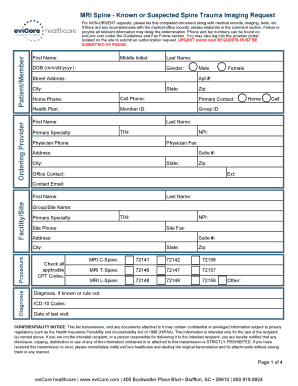
Get Evicore Healthcare Mri Spine - Known Or Suspected Spine Trauma Imaging Request
How it works
-

Open form follow the instructions
-

Easily sign the form with your finger
-

Send filled & signed form or save
How to fill out the EviCore Healthcare MRI Spine - Known or Suspected Spine Trauma Imaging Request online
Filling out the EviCore Healthcare MRI Spine Imaging Request form is essential for ensuring that the necessary imaging services are provided for individuals with known or suspected spine trauma. This guide offers step-by-step instructions to help users navigate the process of completing the form online accurately and efficiently.
Follow the steps to complete the imaging request form online.
- Press the ‘Get Form’ button to access and display the form in your preferred editing tool.
- Begin by entering the ordering provider's information. This typically includes the provider's first name, last name, primary specialty, and contact details such as the office phone and fax numbers.
- Next, provide patient/member details. Fill in the patient's first name, middle initial, date of birth, gender, address, and contact information, including home and cell phone numbers.
- Complete the facility/site section by entering the relevant details, such as the facility's name, TIN (Tax Identification Number), and contact information.
- In the procedure section, check the applicable CPT codes for the specific MRI scans being requested. Ensure you include the diagnosis and relevant ICD-10 codes.
- Provide clinical information including dates of visits, history of spine trauma, current symptoms, and details about any physician-directed treatment received.
- Answer specific questions related to the request, selecting the appropriate responses for each item regarding the patient's situation.
- Fill in any additional information or comments in the designated section. This can include clarifications or further details that may aid in the assessment process.
- Identify the submitter of the form by specifying whether it is the ordering physician, facility, or another party. Include their printed name, title, and date.
- Finally, review all the entered information for accuracy. Once confirmed, you can save your changes, download, print, or share the completed form as necessary.
Start completing your EviCore Healthcare MRI Spine Imaging Request form online today to ensure timely and accurate processing.
Information regarding appeal options, and with whom an appeal should be filed, can be found in the determination letter. You can also contact eviCore healthcare via the telephone number provided on the determination letter, to understand what appeal options are available at the time of your inquiry.
Industry-leading security and compliance
-
In businnes since 199725+ years providing professional legal documents.
-
Accredited businessGuarantees that a business meets BBB accreditation standards in the US and Canada.
-
Secured by BraintreeValidated Level 1 PCI DSS compliant payment gateway that accepts most major credit and debit card brands from across the globe.