Loading
Get Irs 7202 2020
This website is not affiliated with IRS
How it works
-

Open form follow the instructions
-

Easily sign the form with your finger
-

Send filled & signed form or save
How to fill out the IRS 7202 online
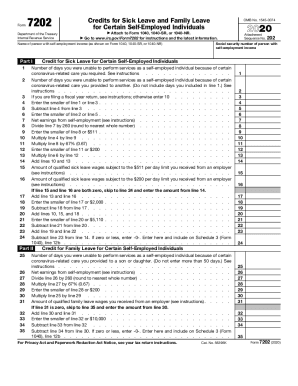
The IRS 7202 form is designed for certain self-employed individuals to claim credits for sick and family leave related to the coronavirus. This guide will help you navigate each section of the form effectively, ensuring you accurately report your qualified days and earnings.
Follow the steps to complete the IRS 7202 form online.
- Press the ‘Get Form’ button to access the IRS 7202 form and open it in your preferred digital editor.
- Enter the social security number of the person with self-employment income at the top of the form.
- In Part I, input the number of days you were unable to work due to your own illness or care required because of coronavirus. Refer to the instructions for any specific conditions.
- Next, note how many days you provided care for another individual due to similar reasons. Ensure you do not include days counted in Step 3.
- If applicable, for fiscal year returns, follow the relevant instructions; otherwise, enter 10 in the designated field.
- Calculate the smaller value between the figures you noted in Step 3 and Step 5, and enter it accordingly.
- Proceed to subtract the result from Step 6 from your total in Step 5.
- Document the smaller amount from the days counted in Step 4 and Step 7.
- Enter your net earnings from self-employment, making sure to follow the instructions closely.
- Divide the amount from Step 8 by 260, rounding to the nearest whole number.
- Identify the smaller of Step 10 and $511, and capture that amount.
- Multiply the number recorded in Step 4 by the figure you found in Step 11.
- Next, multiply the amount from Step 10 by 0.67, ensuring to note the smaller of that and $200.
- Multiply the value in Step 6 by the result from Step 13 and note the new total.
- Add values obtained from Step 12 and Step 14 for your final required figure.
- Document qualified sick leave wages that were received from an employer, as indicated in the instructions.
- Complete the necessary calculations involving your family leave credits from Part II, following similar steps as in Part I.
- If applicable, finalize by adding or subtracting totals to determine your final claim amount.
- Once all pertinent fields and calculations are complete, save your changes, and proceed to download, print, or share the completed form.
Complete the IRS 7202 form online now to claim your credits accurately.
Get form
Experience a faster way to fill out and sign forms on the web. Access the most extensive library of templates available.
Get This Form Now!
Use professional pre-built templates to fill in and sign documents online faster. Get access to thousands of forms.