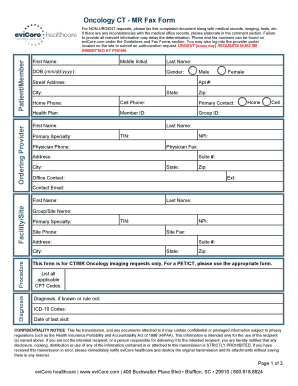
Oncology CT MR Fax FormOrdering ProviderPatient/MemberFor NONURGENT requests, please fax this completed document along with medical records, imaging, tests, etc. If there are any inconsistencies with.

How it works
  • Open form

    Open form follow the instructions

  • Easily sign form

    Easily sign the form with your finger

  • Share form

    Send filled & signed form or save

How to fill out the EviCore Oncology CT - MR Fax Form online

Filling out the EviCore Oncology CT - MR Fax Form online is a straightforward process that can lead to efficient management of oncology imaging requests. This guide offers step-by-step instructions to help you complete the form accurately and comprehensively.

Follow the steps to fill out the form online.

  1. Click the ‘Get Form’ button to access the EviCore Oncology CT - MR Fax Form and open it for editing.
  2. Provide the ordering provider's information, including their first name, middle initial, date of birth (in mm/dd/yyyy format), gender, street address, apartment number (if applicable), city, state, and zip code. Additionally, input their home phone, cell phone, primary contact name, health plan, member ID, and group ID.
  3. Fill in the physician's details, including their first name, last name, primary specialty, TIN, phone number, NPI, fax number, address, suite number, city, state, zip code, office contact name, extension, and contact email.
  4. Next, enter the facility or site information, including the group/site name, primary specialty, TIN, NPI, site fax, address, suite number, city, state, and zip code.
  5. Indicate the procedure by selecting the appropriate radio button for oncology imaging. Provide a diagnosis, including applicable CPT codes and ICD-10 codes, as well as the date of the last visit.
  6. Address clinical information, including questions about the cancer diagnosis, biopsy confirmation, tumor size, metastatic disease, and chemotherapy history. Complete the required checkboxes and enter specific information as applicable.
  7. In the final section, indicate who is making the request by selecting either the ordering physician, facility, or other options. Print your name and title, then provide your signature and the date.
  8. Once all sections are completed, review the form for accuracy. You may then save your changes, download the completed document, print it if necessary, or share the form with the relevant parties.

Begin completing your documents online today for a more streamlined approach.

Get form

Experience a faster way to fill out and sign forms on the web. Access the most extensive library of templates available.

Related content

New MassHealth Third-Party Administrator for ......

Mar 1, 2020 — Manual regarding new requirements for prior authorization (PA) for the...

Learn more
eviCore Adv Imaging PA list 012220.xlsx - OHSU

Feb 6, 2020 — C T angiography chest without contrast material, followed by contrast...

Learn more
Vermont Medicaid Provider Manual VTMedicaid...

43 5/23/2018 Green Mountain Care Provider Manual 7 Prior Authorization ... Requested...

Learn more
Questions & Answers

Get answers to your most pressing questions about US Legal Forms API.

Contact support

Does Medicare use eviCore?

Who is eviCore healthcare? eviCore healthcare (eviCore) is an independent specialty medical benefits management company that provides utilization management services for Cigna Medicare Advantage.

How can I check my authorization status? You have the ability to quickly do a status check on all of your case(s), regardless of platform, in front of the login on eviCore.com. Simply visit the link below to access real-time information on your case (Check Authorization Status).

eviCore healthcare will render a decision on a routine prior authorization request within 14 calendar days of the original request. However, the usual turnaround time is a few days.

eviCore brings together the broadest range of integrated and innovative care management solutions across the entire healthcare continuum, enabling better outcomes for our patients, providers, and plans. eviCore offers care management solutions on a flexible and scalable utilization management platform.

eviCore works with health plans to help their members like you avoid unnecessary care that is costly and potentially unsafe. We do that by applying the latest evidence-based medical guidelines through a process sometimes referred to as prior authorization.

eviCore is a medical benefits management company which helps patients avoid unnecessary care that can be expensive and potentially unsafe.

eviCore is a medical benefits management company who works with health plans to help their members, like you, avoid unnecessary care that is costly and potentially unsafe. We do that by applying the latest evidence-based medical guidelines through a process referred to as prior authorization.

You can also email us at portal.support@evicore.com, or reach us by phone at 800-646-0418, option 2.

Get This Form Now!

Use professional pre-built templates to fill in and sign documents online faster. Get access to thousands of forms.

If you believe that this page should be taken down, please follow our DMCA take down process here.

Get EviCore Oncology CT - MR Fax Form