We use cookies to improve security, personalize the user experience, enhance our marketing activities (including cooperating with our marketing partners) and for other business use.
Click "here" to read our Cookie Policy. By clicking "Accept" you agree to the use of cookies. Read less
Read more
Accept
Loading
Form preview
  • US Legal Forms
  • Form Library
  • Foreign Forms
  • Foreign South Africa Other Forms
  • Za Sars Vat101 2017

Get Za Sars Vat101 2017-2025

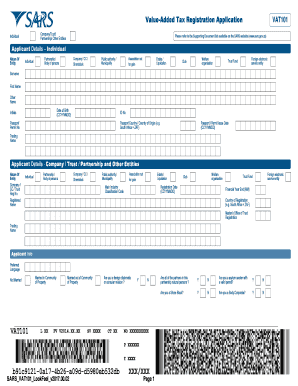
ValueAdded Tax Registration Application Company/Trust/ Partnership/ Other EntitiesIndividualVAT101Please refer to the Supporting Document list available on the SARS website (www.sars.gov.za)Applicant.

How it works

  1. Open form

    Open form follow the instructions

  2. Easily sign form

    Easily sign the form with your finger

  3. Share form

    Send filled & signed form or save

How to fill out the ZA SARS VAT101 online

This guide provides a clear and supportive approach to completing the ZA SARS VAT101 form online for value-added tax registration. It is designed to assist users of all backgrounds, ensuring understanding of each component of the form and making the process as seamless as possible.

Follow the steps to fill out the ZA SARS VAT101 online accurately.

  1. Click the 'Get Form' button to access the VAT101 form and open it in the online editor.
  2. Begin by filling out the applicant details section. Depending on your entity type, select whether you are an individual, company, trust, partnership, or another entity from the provided options.
  3. If applying as an individual, input your surname, first name, date of birth, ID number, and passport details if applicable. Make sure to include your trading name.
  4. For entities such as companies or trusts, enter the registered name, registration number, and main industry classification code. Also, include the financial year end and the country of registration.
  5. Next, complete the contact details section. You will provide phone numbers, email, and your physical and postal address. Ensure postal addresses are noted accurately and mark if they are the same.
  6. In the particulars of the representative taxpayer section, fill in the required information about the representative, including their capacity, ID details, and appointment date.
  7. If applicable, provide the particulars of members, trustees, beneficiaries, or partners. Confirm if each party is a natural person and include their details.
  8. Input your bank account information. Specify whether the account is in your name or a third party, and complete the bank account details such as account number and bank name.
  9. Fill out the VAT liability date and business activity code. Indicate whether taxable supplies exceeded the required amounts in the preceding or expected future 12 months.
  10. Review the VAT registration options and select any applicable diesel refund concessions. Complete your estimated turnover for the current financial year.
  11. Finally, read and agree to the declaration by signing electronically, confirming that the information provided is true and correct.
  12. Once you have filled in all required fields, you can save your changes, download the form, and print it for your records or share as necessary.

Complete your ZA SARS VAT101 form online today to ensure timely registration.

Get form

Experience a faster way to fill out and sign forms on the web. Access the most extensive library of templates available.
Get form

Related content

Industry classification in the South African tax...
by J Budlender · ‎Related articlesAug 2, 2020 — 8 Available at...
Learn more
CHAPTER 1 LAPD VAT G02 404 Guide For Vendors...
visit the SARS website at www.sars.gov.za;. • contact ... Persons that are liable to...
Learn more

Related links form

MT DoR AB-26 2017 MT DoR AB-26 2015 MT DoR AB-26 2013 MT DoR APLS101F 2017

Questions & Answers

Get answers to your most pressing questions about US Legal Forms API.

Contact support

A copy of a valid identity document, drivers licence, passport, temporary identity document, including the original identification of the appointed person (for those visiting a SARS office); A copy of a valid identity document, drivers licence, passport, temporary identity document of the parent or legal guardian.

How long does VAT registration take in South Africa? If you registered via the SARS eFiling system, your profile will be activated within 48 hours. If it takes any longer, you are advised to contact SARS.

If you were selected for an audit, don't expect it to be over in a flash. A SARS audit can take up to 90 business days to complete form the date all the necessary documents were received, assuming there are no other issues along the road.

Proof of residential address for the newly appointed members. Certified copy of a valid identity document, driving licence or passport, temporary identity document, asylum seekers certificate, permit of all three fiduciary responsible office bearers (as contained in Exemption of Income Tax (EI) application).

VAT is an indirect tax on the consumption of goods and services in the economy. Submit the registration form to your local SARS branch within 21 days from date of exceeding R1 million. VAT is levied at a standard rate of 15% on the supply of goods and services by registered vendors.

VAT registration at SARS can take between 10 days up to 2 months, depending on whether you already have a trading CIPC-registered company and how long SARS's processing takes. The South African revenue department (SARS) is responsible for VAT (Value-added Tax) administration.

If you need to add or change banking details it can be done: By completing the Registration, Amendment and Verification form (RAV01) on eFiling (excluding Customs and Excise) On the SARS MobiApp by tapping on the Profile Management tab.

Confirmation of Residential / Business. Address by Third Party. CRA01. Individual.

Most businesses can register online - including partnerships and a group of companies registering under one VAT number. By doing this you'll register for VAT and create a VAT online account (sometimes known as a 'Government Gateway account'). You need this to submit your VAT Returns to HM Revenue and Customs ( HMRC ).

Once you have registered for VAT, either online or using the paper form VAT1, HMRC states that you can expect to receive your VAT registration certificate, which contains your VAT number, in around one month from the date of submission. It expects to process 70% of applications within just 10 working days.

Get This Form Now!

Use professional pre-built templates to fill in and sign documents online faster. Get access to thousands of forms.
Get form
If you believe that this page should be taken down, please follow our DMCA take down processhere.

Industry-leading security and compliance

US Legal Forms protects your data by complying with industry-specific security standards.
  • In businnes since 1997
    25+ years providing professional legal documents.
  • Accredited business
    Guarantees that a business meets BBB accreditation standards in the US and Canada.
  • Secured by Braintree
    Validated Level 1 PCI DSS compliant payment gateway that accepts most major credit and debit card brands from across the globe.
Get ZA SARS VAT101
Get form
Form Packages
Adoption
Bankruptcy
Contractors
Divorce
Home Sales
Employment
Identity Theft
Incorporation
Landlord Tenant
Living Trust
Name Change
Personal Planning
Small Business
Wills & Estates
Packages A-Z
Form Categories
Affidavits
Bankruptcy
Bill of Sale
Corporate - LLC
Divorce
Employment
Identity Theft
Internet Technology
Landlord Tenant
Living Wills
Name Change
Power of Attorney
Real Estate
Small Estates
Wills
All Forms
Forms A-Z
Form Library
Customer Service
Terms of Service
Privacy Notice
Legal Hub
Content Takedown Policy
Bug Bounty Program
About Us
Help Portal
Legal Resources
Blog
Affiliates
Contact Us
Delete My Account
Site Map
Industries
Forms in Spanish
Localized Forms
State-specific Forms
Forms Kit
Legal Guides
Real Estate Handbook
All Guides
Prepared for You
Notarize
Incorporation services
Our Customers
For Consumers
For Small Business
For Attorneys
Our Sites
US Legal Forms
USLegal
FormsPass
pdfFiller
signNow
airSlate WorkFlow
DocHub
Instapage
Social Media
Call us now toll free:
+1 833 426 79 33
As seen in:
  • USA Today logo picture
  • CBC News logo picture
  • LA Times logo picture
  • The Washington Post logo picture
  • AP logo picture
  • Forbes logo picture
© Copyright 1997-2025
airSlate Legal Forms, Inc.
3720 Flowood Dr, Flowood, Mississippi 39232
Form Packages
Adoption
Bankruptcy
Contractors
Divorce
Home Sales
Employment
Identity Theft
Incorporation
Landlord Tenant
Living Trust
Name Change
Personal Planning
Small Business
Wills & Estates
Packages A-Z
Form Categories
Affidavits
Bankruptcy
Bill of Sale
Corporate - LLC
Divorce
Employment
Identity Theft
Internet Technology
Landlord Tenant
Living Wills
Name Change
Power of Attorney
Real Estate
Small Estates
Wills
All Forms
Forms A-Z
Form Library
Customer Service
Terms of Service
Privacy Notice
Legal Hub
Content Takedown Policy
Bug Bounty Program
About Us
Help Portal
Legal Resources
Blog
Affiliates
Contact Us
Delete My Account
Site Map
Industries
Forms in Spanish
Localized Forms
State-specific Forms
Forms Kit
Legal Guides
Real Estate Handbook
All Guides
Prepared for You
Notarize
Incorporation services
Our Customers
For Consumers
For Small Business
For Attorneys
Our Sites
US Legal Forms
USLegal
FormsPass
pdfFiller
signNow
airSlate WorkFlow
DocHub
Instapage
Social Media
Call us now toll free:
+1 833 426 79 33
As seen in:
  • USA Today logo picture
  • CBC News logo picture
  • LA Times logo picture
  • The Washington Post logo picture
  • AP logo picture
  • Forbes logo picture
© Copyright 1997-2025
airSlate Legal Forms, Inc.
3720 Flowood Dr, Flowood, Mississippi 39232