Please wait... If this message is not eventually replaced by the proper contents of the document, your PDF viewer may not be able to display this type of document. You can upgrade to the latest version.

How it works
  • Open form

    Open form follow the instructions

  • Easily sign form

    Easily sign the form with your finger

  • Share form

    Send filled & signed form or save

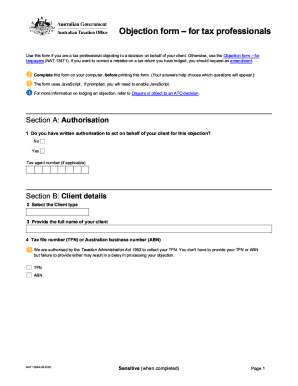
How to fill out the AU NAT 13044 online

The AU NAT 13044 form is essential for various official processes in Australia. This guide will provide you with clear, step-by-step instructions on how to complete the form online effectively and ensure that all necessary details are accurately filled out.

Follow the steps to complete the AU NAT 13044 online.

  1. Click the ‘Get Form’ button to access the AU NAT 13044. This will allow you to open the document in your browser for editing.
  2. Begin by entering your personal details in the designated fields. This typically includes your full name, address, and contact information. Double-check for accuracy to avoid delays.
  3. Carefully read through any statements or declarations required on the form. It is crucial to understand the implications of what you are signing. Ensure that you agree to the terms before moving on.
  4. Once all sections are filled out, review the entire form for completeness. Look for any missed fields or typographical errors.

Now that you have guidance on filling out the AU NAT 13044 online, begin the process today to submit your document efficiently.

Get form

Experience a faster way to fill out and sign forms on the web. Access the most extensive library of templates available.

Related content

National Archives Forms | National Archives

Aug 17, 2020 — Reproduction Services Suspended Until Further Notice due to COVID-19...

Learn more
COMPUTER SCIENCE & ENGINEERING - University of ...

12810 AU QZ Th 1130-1220 * * Borisova,Emilia Open 13/ 14 AU/BI OFFERED VIA REMOTE...

Learn more
Preliminary Series 5 User Manual

Feb 26, 1982 — APPROVED IN ITS PRESENT FORM. ... form current at the time the current...

Learn more
Questions & Answers

Get answers to your most pressing questions about US Legal Forms API.

Contact support

How do I set up an ATO?

Link your myGov account to the ATO Sign in to your myGov account. Select View and link services on the myGov home page. Under Link a service heading, select Link next to Australian Taxation Office. Select I agree to the terms and conditions of use. Enter or confirm your personal details.

Filing an Objection a statement giving the specific ground upon which the Objection is being filed; a detailed explanation of the validity of the Objection and why it should be upheld including copies of any documents that the Objector considers to be a basis for the Objection;

Disputes about how we manage your tax affairs. If you have concerns about how we have managed your tax affairs or are dissatisfied with the process involved in how we made a decision, you can: explore a dispute resolution option. contact the decision maker or discuss your concerns with ATO Complaints on 1800 199 010.

The law sets time limits for amending your tax assessment. The time limit is generally two years from the day after we give you the notice of assessment (taken to be the date on the notice). If you select a tax return that is within this time frame you will be eligible to lodge an amendment.

Login to Online services for agents and go to Reports and forms, then: select Submit further information for lodged private ruling/objection (the form will open) complete the required fields attach any additional evidence or supporting documents select the Declaration and Submit.

Get This Form Now!

Use professional pre-built templates to fill in and sign documents online faster. Get access to thousands of forms.

If you believe that this page should be taken down, please follow our DMCA take down process here.

Get AU NAT 13044