Loading

Open form follow the instructions

Easily sign the form with your finger

Send filled & signed form or save
How to fill out the AU SS284 online
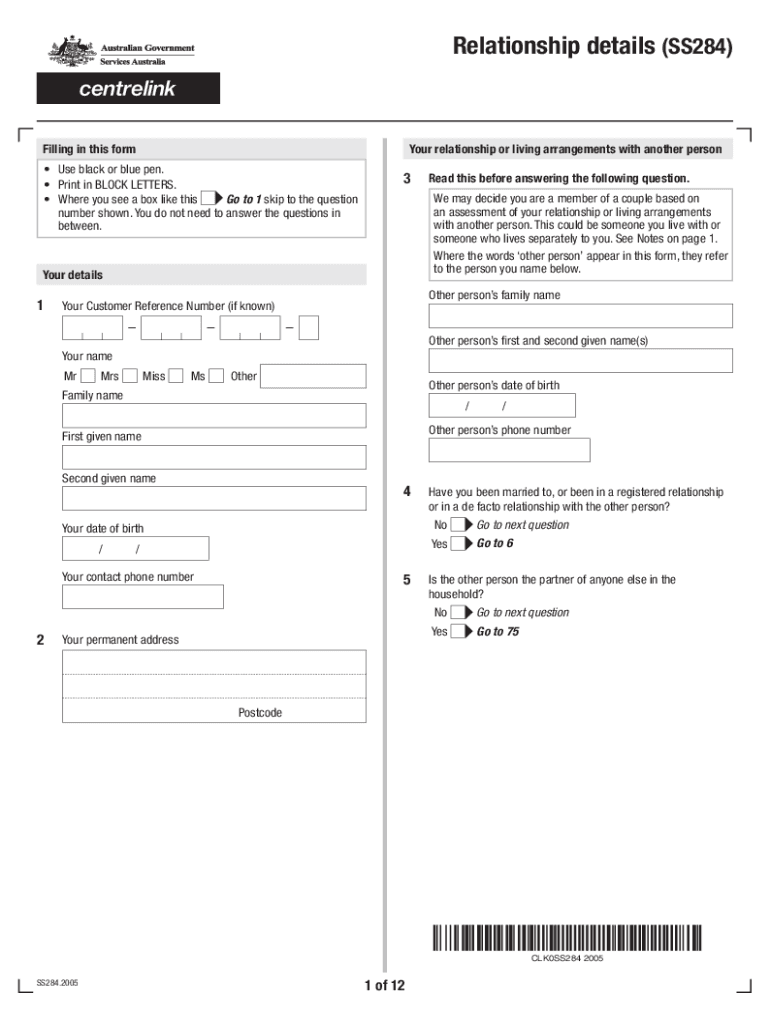
This guide provides clear instructions on how to complete the AU SS284 form online, which is essential for disclosing your relationship details for entitlement assessments. By following these steps, you can ensure that your information is accurately submitted to the relevant authorities.
Follow the steps to complete your form accurately.
- Click ‘Get Form’ button to obtain the form and open it in the editor.
- Begin by providing your personal details in the designated fields. Include your full name, Customer Reference Number (if known), date of birth, and contact phone number. Ensure all entries are in BLOCK LETTERS.
- Indicate your relationship status with the other person by selecting 'Yes' or 'No' in response to the marriage, registered relationship, or de facto relationship questions. Follow prompts based on your answers.
- Provide details about your current living arrangements. This includes personal addresses and any shared accommodation. Be specific regarding the circumstances of your shared living situation.
- Answer questions concerning the financial aspects of your relationship. This includes shared expenses, ownership of assets, and any joint accounts. Clarity in this section is crucial for accurate assessment.
- Complete the sections related to social interactions with the other person. Describe your shared activities, such as meals and leisure activities. This will help outline the nature of your relationship.
- Affirm the accuracy of the information by signing the declaration section. Ensure you understand the importance of providing complete and correct information.
- Submit the completed form along with any supporting documents online or as instructed at the end of the guide. Ensure submission is done promptly within the required time frame to maintain eligibility for assessment.
Take the next step and fill out the AU SS284 form online to ensure your entitlements are accurately assessed.
Experience a faster way to fill out and sign forms on the web. Access the most extensive library of templates available.
Related content
of redemption (SS-284, 92+1117). Where mortgagee was purchaser, and ... It presupposes the...
by M Worthing · 2020 · Cited by 1 · Related articles*Received 16 July 2019;...
Jan 12, 2021 — USS Tullibee (SS-284), au large de Mare Island, en Californie...
Get answers to your most pressing questions about US Legal Forms API.
How do you confirm a relationship?
What Are We? 5 Ways To Determine Your Real Relationship Status So, Where Do You Really Stand? ... Create a Safe Zone. ... Start With the Positives. ... If It's What You Want to Hear, Show Your Excitement. ... Be Vulnerable and Transparent. ... Ask Open-Ended Questions. ... Be Prepared for His Answer. ... If Not, Take a Moment to Digest.
How can I change my relationship status with Centrelink?
Update your relationship status by calling the families line. You need to let us know if there's a change to your family income estimate or activity details. You can update these details at any time. It only takes a few minutes to do and you can do it yourself online.
What is a mod P form?
Use this form to give us information about your partner if you are claiming or receiving an income support payment. Download and complete the Partner details form.
How do I change my partner details with Centrelink?
Update your relationship status by calling the families line. You need to let us know if there's a change to your family income estimate or activity details. You can update these details at any time. It only takes a few minutes to do and you can do it yourself online.
Will Centrelink know if I have a partner?
You need to tell us when you become a member of a couple or end a relationship. This is to ensure you get paid correctly. We may need to ask a third party, a person we call a referee, to verify your relationship status. We'll tell you when we need referee details.
How do I tell Centrelink I am in a relationship?
If you start a relationship, complete and return the partner details form. You need to do this if you get any payments or concession cards from us except Parenting Payment Single (PPS). If you're getting Parenting Payment Single (PPS), you'll need to claim Parenting Payment Partnered (PPP).
What is the definition of a partner Centrelink?
For Centrelink purposes a person is considered to be your partner if you and the person are living together, or usually live together, and are: Married; or. In a registered relationship; or. In a de facto relationship.
Use professional pre-built templates to fill in and sign documents online faster. Get access to thousands of forms.
If you believe that this page should be taken down, please follow our DMCA take down process here.