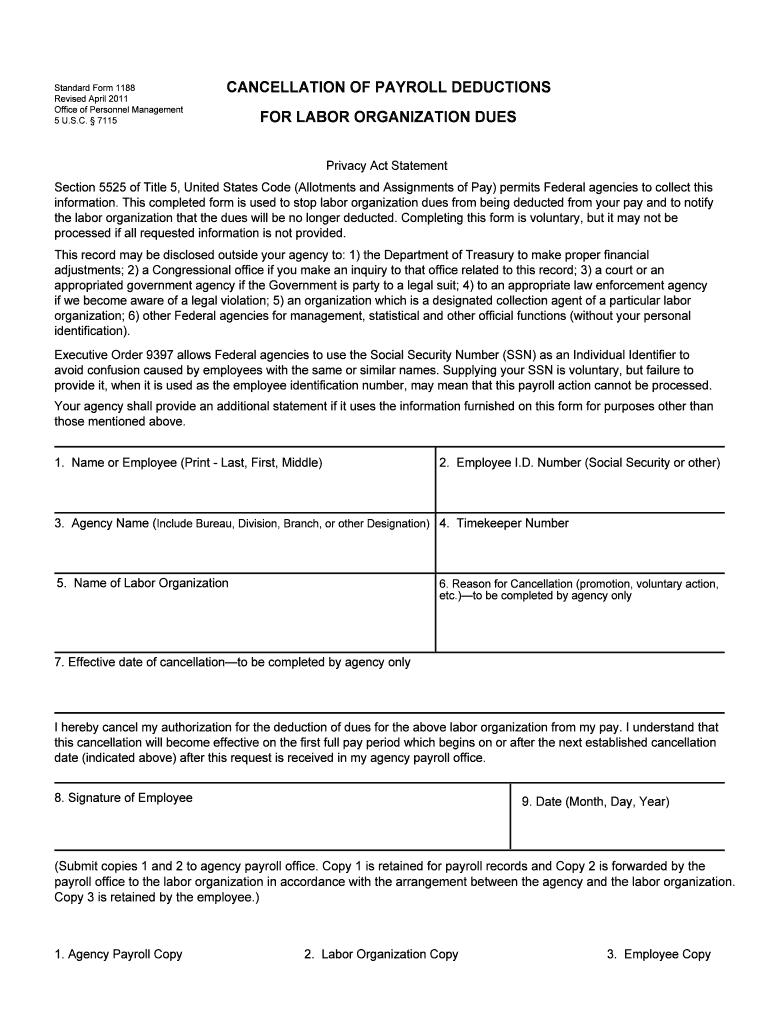
United States Code (Allotments and Assignments of Pay) permits Federal agencies to collect this information. This completed form is used to stop labor organization dues from being deducted from your pay and to notify the labor organization that the dues will be no longer deducted. Completing this form is voluntary, but it may not be processed if all requested information is not provided. This record may be disclosed outside your agency to: 1) the Department of Treasury to make proper financial.
Loading

Open form follow the instructions

Easily sign the form with your finger

Send filled & signed form or save
How to fill out the OPM SF 1188 online
The OPM SF 1188 is a standardized form used to cancel payroll deductions for labor organization dues. This guide will walk you through the steps to complete the form online, ensuring that you can cancel these deductions efficiently and effectively.
Follow the steps to complete the OPM SF 1188 online.
- Press the ‘Get Form’ button to access the OPM SF 1188 and open it for editing.
- Begin by entering your name in the first section as 'Last, First, Middle'.
- In the next field, provide your Employee I.D. Number, which can be your Social Security Number or another identification number.
- Fill in the 'Agency Name' field, including any relevant bureau, division, or branch information.
- Enter your Timekeeper Number, which may be provided by your agency.
- Specify the name of the labor organization from which you wish to cancel dues.
- The next two fields, 'Reason for Cancellation' and 'Effective Date of Cancellation,' are to be completed by your agency, so skip these for now.
- Sign the form in the section labeled 'Signature of Employee' to confirm your request.
- Finally, include the date of completion in the 'Date' section, formatted as Month, Day, Year.
- Once all fields are completed, save your changes, download a copy for your records, and print or share the form as required.
Complete your documents online today for a seamless experience.
Experience a faster way to fill out and sign forms on the web. Access the most extensive library of templates available.
Related content
Standard Form 1188. CANCELLATION OF PAYROLL DEDUCTIONS. Revised January 1979. Office of...
Use professional pre-built templates to fill in and sign documents online faster. Get access to thousands of forms.
If you believe that this page should be taken down, please follow our DMCA take down process here.