Loading
Get Au D9199 2020-2026
How it works
-

Open form follow the instructions
-

Easily sign the form with your finger
-

Send filled & signed form or save
How to fill out the AU D9199 online
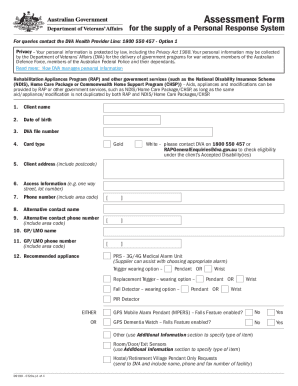
The AU D9199 form is used to assess the supply of a Personal Response System for eligible individuals. This guide will provide clear and detailed instructions to help users complete this form efficiently online.
Follow the steps to fill out the AU D9199 form online.
- Click ‘Get Form’ button to access the AU D9199 document and open it for editing.
- Begin by entering the client name in the designated field at the top of the form. Ensure the name matches the legal documents.
- Fill in the date of birth using the format specified in the form. It is crucial for identifying the client.
- Provide the DVA file number which is essential for processing the request.
- Indicate the card type by selecting either Gold or White. For White, ensure to confirm eligibility by contacting the DVA.
- Input the client address, making sure to include the postcode for accurate location verification.
- Detail any access information that may be necessary for the delivery and installation of the Personal Response System.
- Enter the client’s phone number, ensuring to include the area code for proper connectivity.
- If available, provide an alternative contact name and their phone number for additional communication.
- Document the name and phone number of the client’s general practitioner or local medical officer for reference.
- Select the recommended appliance from the list provided, paying attention to the wearing options available.
- Complete the recommendation section, indicating if it is for a new installation or any other relevant details.
- Specify the current residence type by selecting whether it is a house, unit, rental, or under the Department of Housing.
- Evaluate the criteria to determine eligibility for the Personal Response System based on the guidelines provided.
- Fill out questions related to mobile coverage, landline availability, and the required setup for the Personal Response System.
- Provide details regarding the provider type, name, registration number, and contact information, ensuring transparency in the prescription process.
- Document any emergency contact details, including names, addresses, relationships, and phone numbers to ensure a reliable support network.
- Utilize the additional information section to elaborate on any medical conditions, medications, or other pertinent details that may affect the assessment.
- Once all sections are completed, ensure to save changes, and you may also print or share the form as necessary.
Complete your AU D9199 form online today to ensure timely processing of your request.
Related links form
Get in contact with our team or call us on 1300 848 252.