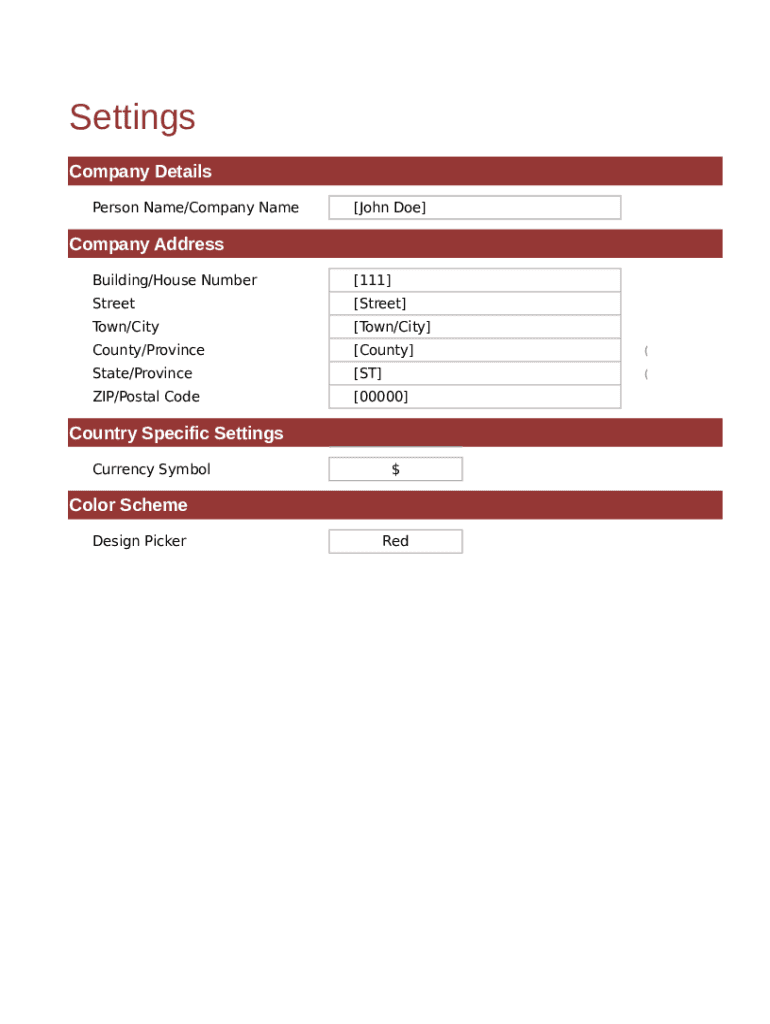
Settings Company Details Person Name/Company Name John Doe Company Address Building/House Number 111 Street Street Town/City Town/City County/Province County (Optional)State/Province ST (Optional)ZIP/Postal.
Loading

Open form follow the instructions

Easily sign the form with your finger

Send filled & signed form or save
How to fill out the Dual Type Rent Receipt online
Filling out the Dual Type Rent Receipt online is a straightforward process that allows landlords and property managers to document rental payments efficiently. This guide provides clear instructions to ensure you can complete the form accurately and easily.
Follow the steps to fill out the Dual Type Rent Receipt smoothly.
- Click the ‘Get Form’ button to access the form and open it in your desired editing application.
- Enter your Company Details. Provide your name or company name, followed by the company address. Fill in the building or house number, street, town or city, county or province (if needed), state or province (optional), and ZIP or postal code. Make sure to include the country where applicable.
- In the Currency Symbol field, select or input the appropriate symbol that represents the currency being used (e.g., '$' for US dollars).
- Set the Color Scheme by selecting your preferred design picker option. The default option is red.
- Fill in the Date field to document the transaction date. Make sure this date accurately reflects the date the payment was received.
- Input the Rent Receipt Number. This unique identifier will help you track the receipt among other transactions.
- Enter the Amount Received to indicate how much rent was paid. Make sure this matches the agreed rental amount for the period specified.
- Indicate the For Period by entering the start date and end date of the rental period being paid for.
- Specify the Tenant's Name who is making the payment.
- Indicate who the receipt is Received by, typically this would be your name or the person handling the rental transactions.
- After completing the form, save your changes. You may also choose to download, print, or share the form if necessary.
Start filling out your Dual Type Rent Receipt online today to manage your rental transactions efficiently.
Experience a faster way to fill out and sign forms on the web. Access the most extensive library of templates available.
Related content
Use Schedule E (Form 1040) to report income or loss from rental real estate, royalties...
What kind of notices does the landlord need to provide to the tenant? ... tenants...
Use two or more people to move and install appliance. Failure to ... having a grounding...
Get answers to your most pressing questions about US Legal Forms API.
How do I get proof of rent payments?
Use Your Existing Proof Gather together your cancelled checks or money order receipts. Written rent receipts are usually acceptable as long as they include the date, amount of rent you paid and the name and signature of the person receiving your rent.
Do landlords have to provide receipts for rent?
Yes. California Civil Code Section 1499 provides that if a tenant requests a rent receipt, the landlord is required to provide a signed and dated receipt.
How do I write a receipt for a rental property?
The date the payment was received. The tenant's full name. The full name of anyone else who made the payment on behalf of the tenant. The name of the landlord or property manager receiving the payment. The rental property address and unit number.
Can I make my own rent receipt?
But if you plan to make your own rent receipt template, make sure that it contains the following information: Your contact information. The name of the tenant who's giving the payment. The total amount the tenant paid.
Do you need a rent receipt for taxes in Ontario?
Receipts. You do not have to include property tax or rent receipts with the Ontario tax credits form. Keep all receipts in case the Canada Revenue Agency asks to see them. Receipts should state the year, the total amount of rent paid, and the name and address of the landlord.
Does a landlord have to give rent receipts?
Yes. California Civil Code Section 1499 provides that if a tenant requests a rent receipt, the landlord is required to provide a signed and dated receipt. Tenants should keep a file with all of their rental receipts and/or canceled checks in the event a dispute later arises.
How do I prove I paid rent in cash?
You need proof that you paid your rent in cash, in case questions arise later. So, if you pay cash, request a written receipt each time. Make sure the date, time, and amount are legible on the receipt, as well as the name and signature of the person who received the rent.
How do I make a receipt for rent?
Tenant name and telephone number. Landlord or property manager name. Rental property address and unit number if applicable. Rental period the payment applies to (e.g. April 1 - April 30) Amount of the rent payment and how it was made (personal check, cash, etc.)
How do I write a tax receipt for rent?
Rent Receipts for Tax Purposes If the landlord won't provide one, you can prepare a receipt online and present it to the landlord for signature. Include the date, the amount paid, the rental address, what month the payment represents, your name, and unit.
What qualifies as a rent receipt?
A rent receipt should include the date of payment, the tenant's name and address, and the amount of the payment, along with the payment method.
Use professional pre-built templates to fill in and sign documents online faster. Get access to thousands of forms.
If you believe that this page should be taken down, please follow our DMCA take down process here.