Loading
Form preview
  • US Legal Forms
  • Form Library
  • More Forms
  • More Multi-State Forms
  • Home Inventory Contents List

Get Home Inventory Contents List

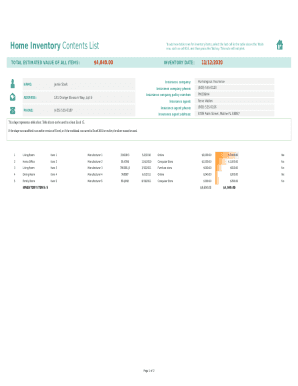
Home Inventory Contents List $4,040.00TOTAL ESTIMATED VALUE OF ALL ITEMS:NAME: ADDRESS: PHONE:To add new table rows for inventory items, select the last cell in the table above the Totals row,.

How it works

  1. Open form

    Open form follow the instructions

  2. Easily sign form

    Easily sign the form with your finger

  3. Share form

    Send filled & signed form or save

How to fill out the Home Inventory Contents List online

Completing the Home Inventory Contents List is essential for organizing and protecting your valuable belongings. This guide will provide you with clear, step-by-step instructions to assist you in filling out the form accurately and efficiently online.

Follow the steps to complete your Home Inventory Contents List online.

  1. Press the ‘Get Form’ button to access the Home Inventory Contents List and open it in your preferred editor.
  2. Begin by entering your name, address, and phone number in the designated fields at the top of the form. This information is crucial for identification and communication purposes.
  3. Input the inventory date to indicate when you are conducting this inventory. This will help keep your records organized.
  4. Provide the insurance company information, including the name and phone number of your insurance agent, along with their address. This section ensures that all necessary insurance details are readily available if needed.
  5. In the inventory table, start entering items by selecting the last cell in the table. Press the Tab key to create new rows for adding more inventory items.
  6. For each item, fill out the necessary details, including the room or area where the item is located, a description of the item, make and model, serial number or ID number, purchase date, where the item was purchased, purchase price, estimated current value, and any notes you might need.
  7. If applicable, indicate whether you have a photo of the item by selecting ‘Yes’ or ‘No’ in the corresponding column.
  8. After completing all entries, review your information for accuracy. Once satisfied, you can save your changes, download, print, or share the completed Home Inventory Contents List.

Start filling out your Home Inventory Contents List online to secure and manage your valuable belongings.

Get form

Experience a faster way to fill out and sign forms on the web. Access the most extensive library of templates available.
Get form

Related content

Home Property Inventory Form - City of Cleveland
Description: Keep a listing of your home contents for insurance purposes. This template...
Learn more
Household Inventory - NMSU ACES - New Mexico State...
discuss the household inventory, the reasons to have one, ... List the contents of each...
Learn more
Set up a shareable home inventory - Simple Storage...
If you registered to create an account for a Free Shareable Home Inventory, you may ... 6...
Learn more

Related links form

Application For Admission To High School - Vivien T. Thomas Medical ... - Pcab Baltimorecityschools Fin 412 Order Form For The Good Food Box - Stonegatechc RESIDENCY FORM - SUNY Adirondack - Sunyacc

Questions & Answers

Get answers to your most pressing questions about US Legal Forms API.

Contact support

A home inventory can speed up a homeowners insurance claim process. It can help ensure that you make a claim for all of your belongings if there's a fire, tornado or other damage. If you forget what you own, you won't get reimbursed for what you lost.

Contents insurance covers your household items and personal belongings if they're damaged, lost or stolen. This can include your furniture, clothes, computer, fridge, television, tools and jewellery.

Write it down: To do a written home inventory, you'll need to walk through your home and make a long, detailed list of your property. For each item, be sure to record the date it was purchased, the serial or model number if applicable, and the item's value.

Make Your Inventory. Choose your checklist. ... Work through your home, room by room. ... Supplement with photos or video. ... Add a storage map. ... Keep paperwork in one place. ... RELATED: New Filing Cabinets to Organize Paperwork.

Document where the item is in your home, and what it is. Include serial numbers and model numbers if applicable. You can then give a copy of the sheet to your insurance agent. It is probably a good idea to document your possessions in conjunction with the video or photo documentation.

Contents insurance typically covers your personal belongings while they're in your home or in transit to a new home, according to the III. However, this coverage usually doesn't pay for damage to your belongings when it was caused by movers whether when they were packing the items or physically moving them.

Home contents insurance covers you against loss, theft or damage to your personal and home possessions. It can also cover you if you take items out of the home, on holiday, for example. The insurance covers your own possessions and those of close family members living with you.

A good home inventory includes a detailed list of your possessions, including receipts, descriptions, and photos of your home contents. o Start with new purchases and add older items later. o Group your possessions into logical categories, e.g., by hobby, by room in your home, etc. Be specific.

Get This Form Now!

Use professional pre-built templates to fill in and sign documents online faster. Get access to thousands of forms.
Get form
If you believe that this page should be taken down, please follow our DMCA take down processhere.
Get Home Inventory Contents List
Get form
  • Adoption
  • Bankruptcy
  • Contractors
  • Divorce
  • Home Sales
  • Employment
  • Identity Theft
  • Incorporation
  • Landlord Tenant
  • Living Trust
  • Name Change
  • Personal Planning
  • Small Business
  • Wills & Estates
  • Packages A-Z
  • Affidavits
  • Bankruptcy
  • Bill of Sale
  • Corporate - LLC
  • Divorce
  • Employment
  • Identity Theft
  • Internet Technology
  • Landlord Tenant
  • Living Wills
  • Name Change
  • Power of Attorney
  • Real Estate
  • Small Estates
  • Wills
  • All Forms
  • Forms A-Z
  • Form Library
  • Legal Hub
  • About Us
  • Help Portal
  • Legal Resources
  • Blog
  • Affiliates
  • Contact Us
  • Delete My Account
  • Site Map
  • Industries
  • Forms in Spanish
  • Localized Forms
  • State-specific Forms
  • Forms Kit
  • Real Estate Handbook
  • All Guides
  • Notarize
  • Incorporation services
  • For Consumers
  • For Small Business
  • For Attorneys
  • USLegal
  • FormsPass
  • pdfFiller
  • signNow
  • altaFlow
  • DocHub
  • Instapage
Form Packages
  • Adoption
  • Bankruptcy
  • Contractors
  • Divorce
  • Home Sales
  • Employment
  • Identity Theft
  • Incorporation
  • Landlord Tenant
  • Living Trust
  • Name Change
  • Personal Planning
  • Small Business
  • Wills & Estates
  • Packages A-Z
Form Categories
  • Affidavits
  • Bankruptcy
  • Bill of Sale
  • Corporate - LLC
  • Divorce
  • Employment
  • Identity Theft
  • Internet Technology
  • Landlord Tenant
  • Living Wills
  • Name Change
  • Power of Attorney
  • Real Estate
  • Small Estates
  • Wills
  • All Forms
  • Forms A-Z
  • Form Library
Customer Service
  • Legal Hub
  • About Us
  • Help Portal
  • Legal Resources
  • Blog
  • Affiliates
  • Contact Us
  • Delete My Account
  • Site Map
  • Industries
  • Forms in Spanish
  • Localized Forms
  • State-specific Forms
  • Forms Kit
Legal Guides
  • Real Estate Handbook
  • All Guides
Prepared for you
  • Notarize
  • Incorporation services
Our Customers
  • For Consumers
  • For Small Business
  • For Attorneys
Our Sites
  • USLegal
  • FormsPass
  • pdfFiller
  • signNow
  • altaFlow
  • DocHub
  • Instapage
Social Media
Call us now toll free:
+1 833 426 79 33
As seen in:
© Copyright 1999-2026 airSlate Legal Forms, Inc. 3720 Flowood Dr, Flowood, Mississippi 39232
  • Your Privacy Choices
  • Terms of Service
  • Privacy Notice
  • Content Takedown Policy
  • Bug Bounty Program