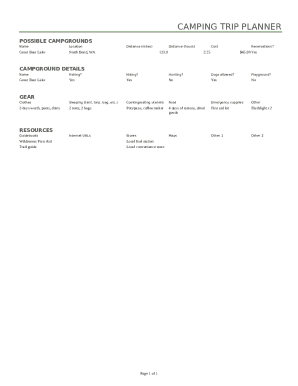
CAMPING TRIP PLANNER POSSIBLE CAMPGROUNDS NameLocationGreat Bear LakeNorth Bend, WADistance (miles)Distance (hours)123.0Cost2:25Reservations?$45.00 YesCAMPGROUND DETAILS NameFishing?Hiking?Hunting?Dogs.

How it works
  • Open form

    Open form follow the instructions

  • Easily sign form

    Easily sign the form with your finger

  • Share form

    Send filled & signed form or save

How to fill out the Outdoor Trip Planner online

Completing the Outdoor Trip Planner is essential for organizing your outdoor adventures effectively. This guide outlines each section of the form, providing you with step-by-step instructions to ensure all necessary details are filled out accurately and efficiently.

Follow the steps to complete your Outdoor Trip Planner form.

  1. Click ‘Get Form’ button to access the form and open it in the editor.
  2. Begin by detailing the possible campgrounds you are considering. Fill in the names, locations, distance in miles, driving time in hours, cost per night, and whether reservations are required.
  3. Next, provide comprehensive campground details, including whether fishing, hiking, or dogs are allowed. Specify any additional facilities available, such as playgrounds.
  4. Outline the necessary gear and supplies for your trip. List your clothing essentials, sleeping equipment (tents, tarps, sleeping bags), cooking and eating utensils, food supplies, emergency items, and any other necessities.
  5. Document useful resources you may need during your trip, such as guidebooks, local fuel stations, convenience stores, and maps to help you navigate the area.
  6. Once you have filled out all the required sections, review the form for completeness and accuracy. You can then proceed to save your changes, download, print, or share the completed form as needed.

Start planning your outdoor adventure by completing the Outdoor Trip Planner online today.

Get form

Experience a faster way to fill out and sign forms on the web. Access the most extensive library of templates available.

Related content

Trip Planner | Recreation.gov

Plan a Trip. A good starting point is picking a time and place. From there, you can add on...

Learn more
4-H Outdoor Adventure Challenge Trip Plan Samples...

Mar 31, 2015 — Each trip plan is unique based on the location and the group. Use these...

Learn more
Summer camp - Wikipedia

Attendees of summer camps often enjoy outdoor activities. This photo of a YMCA camp shows...

Learn more
Questions & Answers

Get answers to your most pressing questions about US Legal Forms API.

Contact support

How do you map a road trip with multiple stops?

Start typing in your first destination or tap a location on the map below to start your journey. Next, open the menu (the three dots at the top right), and then tap the Add Stop command. Enter the location of your next stop, or tap anywhere on the map to add the next destination.

Research your destination. ... Know when to go and when to book. ... Choose a reputable outfitter. ... Choose the trip that's the best value for your money. ... Know your limitations. ... Consider travel insurance. ... Pack light, but don't forget the essentials. ... Don't forget your documents and money.

Choose a Destination. We like to say that the destinations dictates the adventure. ... Pick an Activity. Now, let's delve into the "destination dictates the adventure" phrase. ... Research. Always, always, always research your destination. ... Remember Why. Planning an adventure can take so much out of you.

Out of the many different trip planning tools, the Google Maps Trip Planner may be the best. When you don't have the right tools, trip planning can be so difficult and chaotic. But the Google Maps Trip Planner allows you to put everything you need all in the same place.

You can use the Google Apps mobile app (free for iOS or Android) to create a map with multiple destinations in much the same way. Fire up the Google Maps app on your mobile device, and then tap the blue Go button on the bottom right of your screen. By default, Maps uses your device's location for the starting point.

Define Your Trip's Parameters. General questions are a good starting point for trip planning. ... Research Conditions. ... Select Gear. ... Plan Your Food. ... Create or Collect Navigational Resources. ... Gain Fitness and Skills. ... Conduct a Final Check.

#1: Pick a date for your backpacking trip. ... #2: Pick a trail for your backpacking trip. ... #3: Check permit requirements & get a permit if you need one. ... #4: Invite your friends (or commit to going solo) ... #5: Make your transportation plan. ... #6: Get the Gear for your first backpacking trip. ... #7: Test your gear. ... #8: Shop for Food.

Make a New Google Map. ... Categorize Your Map. ... Add Your Ideas to the Google Map. ... Customize Your Map. ... Decide Which Activities to Group Together. ... Plan Your Day-by-Day Itinerary. ... Download Google Maps on Your Phone & Log In. ... Share Your Map with Friends and Travel Buddies.

9-10 days, no resupply, no break in period required if you train adequately. Mileage dependent on conditions, as I typically hike a fair amount off trail. Exploring and hanging out in remote places as opposed to longer mileage thru hikes. A long day for me is 18-20 miles.

Make sure you have either the driving or walking option selected, as Maps only lets you make multiple destinations with these two travel modes. To add another destination, all you have to do is click either the + or the space below your first destination, and then start typing a new location.

Get This Form Now!

Use professional pre-built templates to fill in and sign documents online faster. Get access to thousands of forms.

If you believe that this page should be taken down, please follow our DMCA take down process here.

Get Outdoor Trip Planner