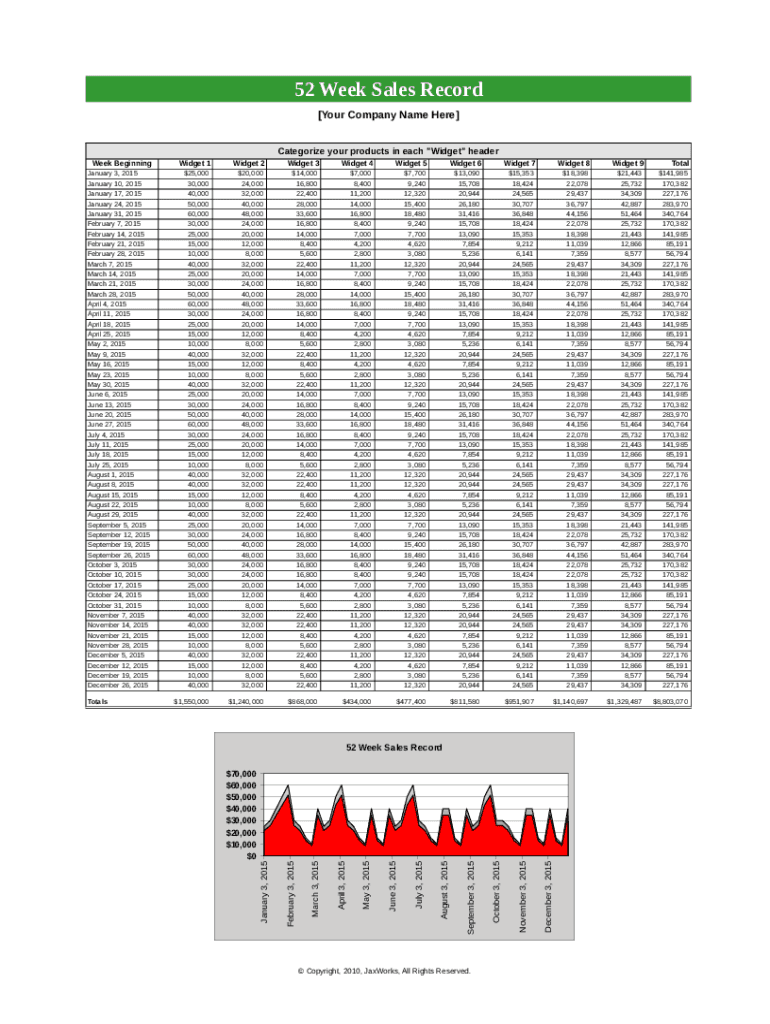
52 Week Sales Record Your Company Name Here Categorize your products in each "Widget " header Week BeginningWidget 1Widget 2Widget 3Widget 4Widget 5Widget 6Widget 7Widget 8Widget 9TotalJanuary.

Open form follow the instructions

Easily sign the form with your finger

Send filled & signed form or save
How to fill out the Week Sales Log online
Filling out the Week Sales Log online is an essential step for tracking your sales data effectively. This guide will provide you with clear instructions for each section and field of the form, ensuring you can complete it accurately and efficiently.
Follow the steps to easily complete your Week Sales Log
- Press the ‘Get Form’ button to access the Week Sales Log and open it in your preferred editor.
- Begin by entering your company name at the top of the form, as it identifies the source of the data.
- In the section labeled 'Week Beginning', input the starting date for each week of sales you wish to document. Ensure you enter the dates sequentially.
- Under each 'Widget' header, categorize and input your sales figures for each product. Record the total sales for each corresponding week.
- Continue filling in the sales data for all weeks until you reach the end of the form, ensuring that no weeks are omitted.
- Review the totals at the end of the form to verify that all data has been entered correctly and that totals reflect the weekly inputs.
- Once all information is complete, save your changes in the document, and consider downloading, printing, or sharing the form as necessary.
Complete your Week Sales Log online today to keep your sales data organized.
Experience a faster way to fill out and sign forms on the web. Access the most extensive library of templates available.
Related content
1.507 Questions regarding the report may be discussed with the Export Sales ... Reporting...
Entities producing and selling one million pounds or more of these products per year are...
A record chart, also called a music chart, is a ranking of recorded music according to...
Get answers to your most pressing questions about US Legal Forms API.
What does a weekly report look like?
Reports should be clear and concise. They should not ramble on about standard, weekly tasks, and contain everything you have done during the week. Your weekly activities report should be no longer than a page if you're writing them out physically, and no more than 3-10 items if you are using software.
How do you write a weekly report?
Brief Summary. The top management can't remember everything all the time so it's best to always give a summary of your project's objectives. Date. The aim here is record keeping. ... Daily Deliverables. ... Headline. ... Tasks. ... Results. ... Challenges and Roadblocks. ... Action Items For Next Week.
What should be included in a weekly status report?
The work that's been completed. The plan for what will follow. The summary of the project budget and schedule. A list of action items. Any issues and risks, and what's being done about them.
What should I write in my weekly report?
Brief Summary. The top management can't remember everything all the time so it's best to always give a summary of your project's objectives. Date. The aim here is record keeping. ... Daily Deliverables. ... Headline. ... Tasks. ... Results. ... Challenges and Roadblocks. ... Action Items For Next Week.
How do I write a weekly sales report?
Identify the purpose of your report. ... Know your audience. ... Gather your data. ... Make use of visuals. ... Put the numbers into context. ... Provide a summary. ... Use a sales report template. ... Automate sales reporting with a CRM.
How do I do a sales report in Excel?
Highlight the forecasted revenue line and click on the box icon with a plus sign inside called CHART ELEMENTS. Select DATA LABELS. Click on the black directional arrow and select ABOVE.
What is sales log?
A sales log is used to maintain records of daily, weekly or monthly sales. It is an important aspect of a business as it gives an insight into the finances and sales of a company. With the help of numerous sales log templates, you can customize your sales log and redefine your business strategies.
How do you keep track of sales leads?
Determine & Define Your Lead Sources. ... Evaluate & Select Lead Tracking Options. ... Set Up Your System & Test It. ... Roll Out Your Lead Tracking System. ... Input & Assign Leads. ... Nurture Your Leads & Track Activities. ... Prioritize Your Leads.
What is a weekly progress report?
A weekly progress report provides a week by week breakdown of what has been accomplished and what tasks remain to be completed. Just like a daily progress report, a weekly progress report may include challenges and lessons learned.
How do you track sales leads in Excel?
Add new leads and enter notes for every sales touch. Check the latest progress of leads and view leads by priority. See how every region is performing as well as opportunities in the upcoming months. Automate email follow-ups to leads.
Use professional pre-built templates to fill in and sign documents online faster. Get access to thousands of forms.
If you believe that this page should be taken down, please follow our DMCA take down process here.