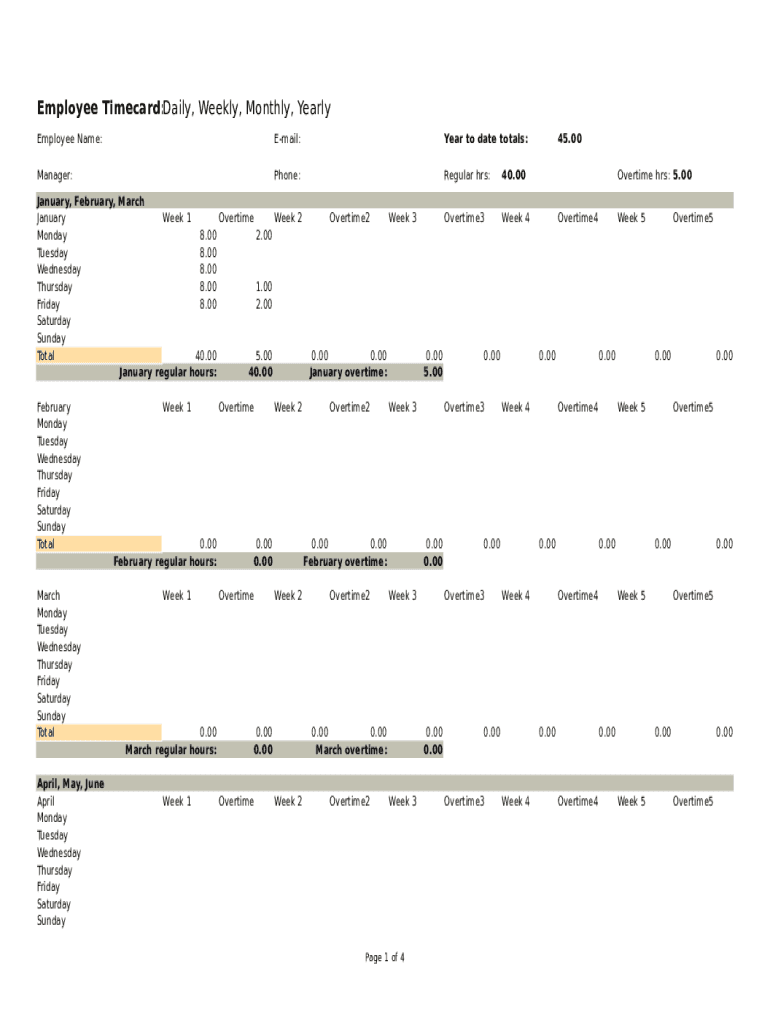
Employee Timecard:Daily, Weekly, Monthly, Yearly Employee Name:Email:Year to date totals:Manager:Phone:Regular hrs:40.00January, February, March January Week 1 Overtime Week 2 Overtime2 Week 3 Overtime3 Week.
Loading

Open form follow the instructions

Easily sign the form with your finger

Send filled & signed form or save
How to fill out the Yearly Employee Timecard online
Completing the Yearly Employee Timecard online is a straightforward process that ensures accurate tracking of hours worked. This guide provides clear, step-by-step instructions to assist users in navigating each section of the form effectively.
Follow the steps to successfully complete your Yearly Employee Timecard.
- Click ‘Get Form’ button to access the Yearly Employee Timecard and open it in your preferred editing tool.
- Input your employee name in the designated field. Ensure that your name is spelled correctly to avoid any discrepancies.
- Enter your email address in the provided section. This is important for communication regarding your submitted timecard.
- Fill in your manager's name who oversees your work. This helps in streamlining the approval process.
- Provide your phone number in the designated field. This may be required for follow-up communication.
- Record your total regular hours worked to date. This figure should accurately reflect your hours accumulated throughout the year.
- For each month, fill in the regular hours worked for each day of the week, ensuring to differentiate between weekdays and weekends.
- Document any overtime hours worked in the appropriate fields for each month, clearly indicating when overtime was accrued.
- After completing the necessary sections, review all entries for accuracy and completeness before proceeding.
- Once satisfied with your entries, save your changes. You may also download, print, or share the form as needed.
Start completing your Yearly Employee Timecard online today to ensure timely and accurate reporting of your hours.
Experience a faster way to fill out and sign forms on the web. Access the most extensive library of templates available.
Related content
The law requires this information to be accurate. The following is a listing of the basic...
6, January, February, March Employee Timecard: Daily, Weekly, Monthly, Yearly. 7, January...
Pay Plan/Grade/Step. An employee's current pay plan, grade and step. Annual Salary...
Get answers to your most pressing questions about US Legal Forms API.
What is daily time?
There are 24 hours in a day. ... Daytime is from sunrise (this varies, but we can say approximately 6am) to sunset (we can say approximately 6pm). Night-time is from sunset to sunrise. Every day starts precisely at midnight.
How do you calculate hours and minutes?
divide the minutes by 60. if the result is a number with a decimal part, then. the hours is the integer part. the minutes is the decimal part multiplied by 60.
How do you calculate hours on a calculator?
0:18 1:16 Suggested clip Converting Hours to Hours/Minutes on a Calculator - YouTubeYouTubeStart of suggested clipEnd of suggested clip Converting Hours to Hours/Minutes on a Calculator - YouTube
How do you create a timesheet for employees?
Step 1: Format your spreadsheet. To create a spreadsheet that's easy to read, first you need to format. ... Step 2: Title your timesheet. ... Step 3: Add labels to your timesheet. ... Step 4: Add timesheet labels. ... Step 5: Print the timesheet.
How do you calculate work hours and pay?
Convert all times to 24 hour clock (military time): Convert 8:45 am to 08:45 hours. ... Next, Subtract the start time from the end time. Now you have the actual hours and minutes worked for the day. Finally to determined total wage, you will need to convert this to a decimal format.
What is daily time sheet?
Defining timesheets A timesheet is a data table which an employer can use to track the time a particular employee has worked during a certain period. Businesses use timesheets to record time spent on tasks, projects, or clients. ... Paper-based timesheets have now given way to the digital formats.
What is the purpose of timesheets?
A timesheet is a data table which an employer can use to track the time a particular employee has worked during a certain period. Businesses use timesheets to record time spent on tasks, projects, or clients.
What is a 7.6 hour day?
Most of us in full time employment are used to working a 5-day week, Monday to Friday. Dividing 38 hours by 5 days gives us 7.6 hours each day. 7.6 hours equates to 7 hours 36 minutes.
How do I calculate payroll hours in Excel?
Click on cell "A1" and enter the first of your payroll times. Enter the time as "xx:yy" where "xx" is the number of hours worked, and "yy" is the number of minutes worked. Press Enter and Excel will automatically select cell A2. Enter your next payroll time in A2.
How do you calculate hours worked?
Convert all times to 24 hour clock (military time): Convert 8:45 am to 08:45 hours. ... Next, Subtract the start time from the end time. Now you have the actual hours and minutes worked for the day. Finally to determined total wage, you will need to convert this to a decimal format.
Use professional pre-built templates to fill in and sign documents online faster. Get access to thousands of forms.
If you believe that this page should be taken down, please follow our DMCA take down process here.