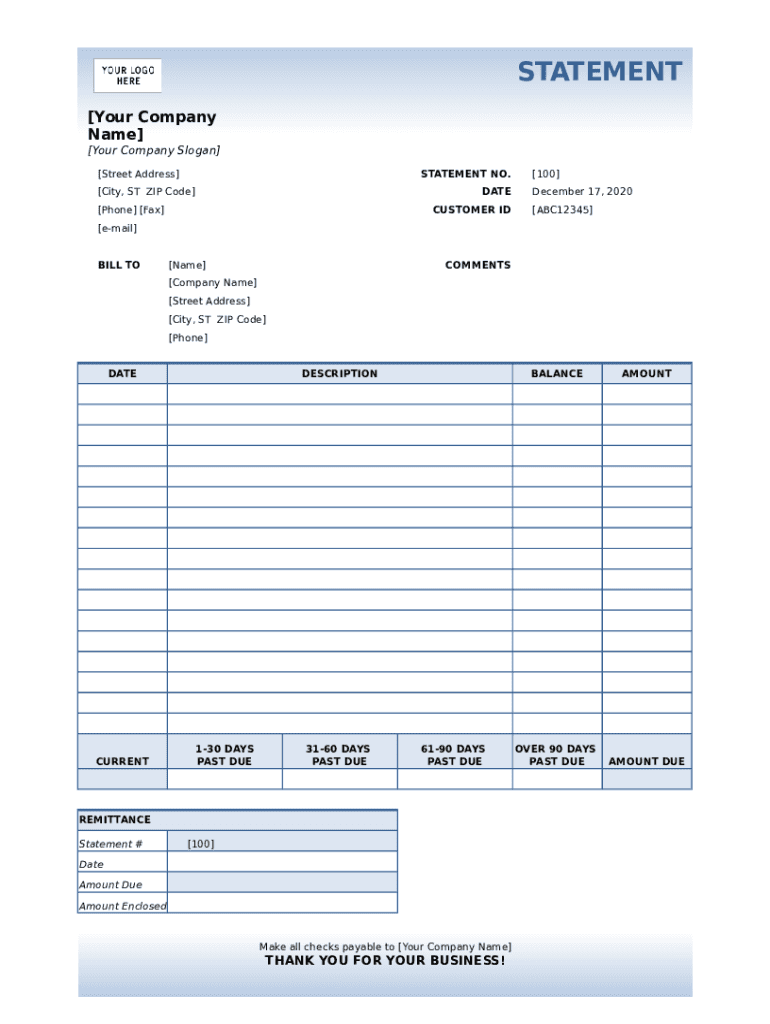
STATEMENT Your Company Name Your Company Slogan Street Address STATEMENT NO. City, ST ZIP Code DATE Phone Fax CUSTOMER ID 100 December 17, 2020 ABC12345 email BILL TO Name COMMENTS Company.

Open form follow the instructions

Easily sign the form with your finger

Send filled & signed form or save
How to fill out the Billing Statement Spreadsheet online
Filling out a billing statement spreadsheet online can streamline your financial tracking and ensure accurate record-keeping. This guide will walk you through each component of the form, providing clear instructions to help you complete your document efficiently.
Follow the steps to accurately fill out your billing statement spreadsheet
- Click ‘Get Form’ button to obtain the Billing Statement Spreadsheet and open it in the editor.
- Begin by entering your company name and slogan at the top of the form, followed by your street address and city, state, and ZIP code.
- Locate the 'Statement No.' field and input the unique identifier for this billing statement, which will help in tracking and referencing the document.
- Input the date of the statement in the designated field. Ensure the date is current to reflect accurate billing periods.
- Enter your company’s phone and fax numbers. This information is essential for clients to contact you regarding any billing inquiries.
- Provide the customer ID associated with the billing statement. This ID helps in maintaining accurate records for each client.
- Fill in the 'Bill To' section with the name and address of the customer receiving the statement. Include complete details for clarity.
- In the 'Comments' section, add any notes or additional information you wish to communicate to the payer regarding this bill.
- Proceed to fill out the sections for current amounts due and any past due amounts by entering the relevant figures in the appropriate columns labeled as '1-30 days', '31-60 days', '61-90 days', and 'over 90 days'.
- For the 'Remittance' section, input the statement number, date, and amount due. This section will inform the payer of the total to remit.
- Clearly state how checks should be made payable in the provided space, reinforcing the necessity for accuracy in payment.
- Finally, review all entered information for accuracy. Once satisfied, you can save the changes, download, print, or share the completed billing statement.
Start filling out your billing statement spreadsheet online today for streamlined financial management!
Experience a faster way to fill out and sign forms on the web. Access the most extensive library of templates available.
Related content
Sheet1. A, B, C, D, E, F, G, H, I, J, K, L. 1, FAA Airports - Central Region. 2, This is a...
Monthly Computer Store Statements will be attached to the monthly billing edoc ... click...
When you add a pull request template to your repository, project contributors will...
Get answers to your most pressing questions about US Legal Forms API.
How do I create a billing statement in Word?
Open a New Blank Document. ... Create an Invoice Header. ... Add the Invoice Date. ... Include a Unique Invoice Number. ... Include Your Client's Contact Details. ... Create an Itemized List of Services. ... Display the Total Amount Due. ... Add the Deadline for Payment.
How do I write a billing statement?
Create a Professional Layout. Your invoice should look professional. ... Include Company and Client Information. ... Add an Invoice Number, Invoice Date, and Due Date. ... Write Each Line Item with a Description of Services. ... Add-up Line Items for Total Money Owed. ... Include Simple Payment Terms and Payment Options. ... Add a Personal Note.
How do I make a billing statement?
the date of the original invoice. the type of invoice. the invoice number. a brief description of the products or services provided. the amount of the original invoice. the amount that has been paid for the original invoice.
How do I set up billing in Excel?
Open Microsoft Excel. ... Search for an Invoice Template. ... Choose Your Template. ... Open the Invoice Template. ... Customize the Invoice. ... Save the Invoice. ... Send the Invoice. ... Open Microsoft Excel.
Where can I get a billing statement?
Billing statements are issued monthly at the end of each billing cycle. For example, credit card holders can receive their billing statements by mail or online.
How do I create a billing statement in Excel?
Open a Blank Excel Workbook. ... Create an Invoice Header. ... Add the Client's Information. ... List the Payment Due Date. ... Add an Itemized List of Services. ... Add the Total Amount Owing. ... Include Your Payment Terms.
How do I create a billing statement?
Use an invoice template. ... Customize the template. ... Keep it for future use. ... Purchase Order & Work Order List. ... The Formula in the template.
What is a billing sheet?
Definitions of billing sheet a form used to keep track of time worked for which the client will be charged.
How do you make a statement on Excel?
0:00 3:40 Suggested clip Billing Statement Installed Template in Excel 2007/2010 (Video 1 of ...YouTubeStart of suggested clipEnd of suggested clip Billing Statement Installed Template in Excel 2007/2010 (Video 1 of ...
Use professional pre-built templates to fill in and sign documents online faster. Get access to thousands of forms.
If you believe that this page should be taken down, please follow our DMCA take down process here.