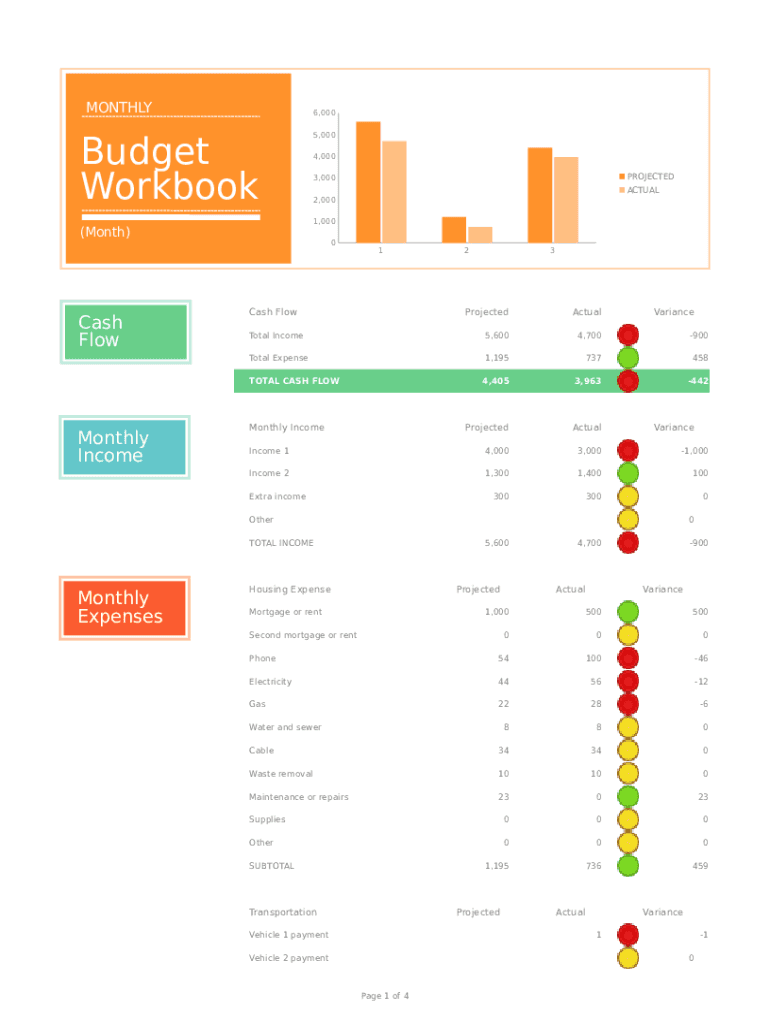
MONTHLY6,000Budget WorkbookMonthly Income4,000PROJECTED3,000ACTUAL 2,000 1,000(Month)Cash Flow5,00001Cash Flow23ProjectedActualTotal Income5,6004,700900Total Expense1,195737458TOTAL CASH FLOW4,4053,963442ProjectedActualIncome.
Loading

Open form follow the instructions

Easily sign the form with your finger

Send filled & signed form or save
How to fill out the Monthly Budget Sheet online
Managing your finances can be simplified with the Monthly Budget Sheet. This guide will provide you with clear and instructive steps to effectively fill out the form online, ensuring you can track your income and expenses with ease.
Follow the steps to complete the Monthly Budget Sheet online.
- Click ‘Get Form’ button to obtain the form and open it in the editor.
- Begin by entering your projected monthly income. This is the amount you anticipate receiving, including all sources of income. You will find fields labeled for different income streams such as Income 1 and Income 2. Complete these sections accurately based on your expectations.
- Next, input the actual income you received in the corresponding fields. This section allows you to compare your projections with the actual amounts, helping you assess your financial performance.
- Proceed to the Monthly Expenses section. Here, identify and enter all your projected expenses, categorized by types such as Housing, Transportation, and Food. This breakdown helps you understand where your money is likely to go each month.
- Afterward, record the actual expenses in the same categories. This step plays a crucial role in tracking your spending against your plans.
- For each category of income and expense, you will also find fields for variance. This allows you to calculate the difference between projected and actual amounts, giving you insights into your budget management.
- Once you have filled in all required fields in the form, review the totals for income and expenses. Check the Total Cash Flow to understand your overall financial position.
- Finally, save your changes. You may choose to download, print, or share the Monthly Budget Sheet as needed to keep track of your budgeting progress.
Complete your Monthly Budget Sheet online today and take charge of your financial wellbeing.
Experience a faster way to fill out and sign forms on the web. Access the most extensive library of templates available.
Related content
Use this worksheet to see how much money you spend this month. Also, use the worksheet to...
Monthly Budgeting. Google Sheets Budget Template. Taking time to make a budget will help...
Jan 4, 2019 — ... search the scheduler as well as run reports such as your daily...
Get answers to your most pressing questions about US Legal Forms API.
How do you write a monthly budget?
How to make a monthly budget: 5 steps Calculate your monthly income. The first step when building a monthly budget is to determine how much money you make each month. ... Spend a month or two tracking your spending. ... Think about your financial priorities. ... Design your budget. ... Track your spending and refine your budget as needed.
What is a 50 30 20 spreadsheet budget?
The first step is to track your spending and see where money is going. This is a great google sheet that follows the 50/30/20 rule to help you manage your money effectively and simply. The basic rule of thumb is 50% for needs, 30% for wants, and 20% for savings or paying off debt.
How do I make a monthly budget spreadsheet?
How to create a budget spreadsheet Choose a spreadsheet program or template. Create categories for income and expense items. Set your budget period (weekly, monthly, etc.). Enter your numbers and use simple formulas to streamline calculations. Consider visual aids and other features.
How do you write a simple budget?
How do I make a budget? Write down your expenses. Expenses are what you spend money on. ... Bills: Other expenses, like: Write down how much money you make. This includes your paychecks and any other money you get, like child support. Subtract your expenses from how much money you make. This number should be more than zero.
What is a typical monthly budget?
September 13, 2022. The average American household spends $5,111 each month. Housing, transportation and healthcare costs are some of the top expenses.
What is the 50 20 30 budget rule?
By Melissa Green | Citizens Bank Staff One of the most common percentage-based budgets is the 50/30/20 rule. The idea is to divide your income into three categories, spending 50% on needs, 30% on wants, and 20% on savings.
How to budget $2,000 a month?
10 Tips to Comfortably Live on $2000 a Month Create a Budget and Stick To It. ... Extinguish Your Fuel Costs. ... Save Money on Groceries. ... Choose an Affordable Cell Phone Plan. ... Save on Electricity. ... Choose Affordable Health Care. ... Spend Less on Rent. ... Find Free Things to Do Around Town.
Use professional pre-built templates to fill in and sign documents online faster. Get access to thousands of forms.
If you believe that this page should be taken down, please follow our DMCA take down process here.