Loading
Form preview
  • US Legal Forms
  • Form Library
  • More Forms
  • More Multi-State Forms
  • Bi-weekly Budget Sheet

Get Bi-weekly Budget Sheet

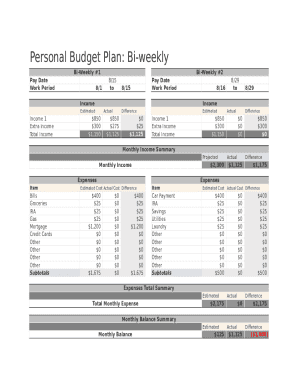
Personal Budget Plan: Biweekly BiWeekly #1 Pay Date Work Period8/1BiWeekly #2 8/15 toPay Date Work Period8/15Income8/29 to8/29IncomeEstimatedIncome 1 Extra Income Total Income8/16Actual$850 $300 $1,150Difference$850 $275 $1,125$0 $25 $1,125EstimatedIncome.

How it works

  1. Open form

    Open form follow the instructions

  2. Easily sign form

    Easily sign the form with your finger

  3. Share form

    Send filled & signed form or save

How to fill out the Bi-Weekly Budget Sheet online

Managing your finances effectively is crucial for achieving your financial goals. This guide will walk you through the process of filling out the Bi-Weekly Budget Sheet online, ensuring you understand each component and how to track your income and expenses efficiently.

Follow the steps to complete your budget sheet with ease.

  1. Click the ‘Get Form’ button to access the Bi-Weekly Budget Sheet and open it in your preferred editor.
  2. Begin with the top section labeled 'Bi-Weekly #1'. Enter the pay date and the corresponding work period for the first two weeks.
  3. In the 'Income' section, provide your estimated income figures. Include 'Income 1' and any extra income you anticipate earning during this period.
  4. Next, fill in the 'Actual' income section with the amounts you actually received during the pay period. This allows you to compare against your estimates.
  5. Calculate the 'Difference' by subtracting the actual income from the estimated income for each category.
  6. Move to the 'Expenses' section. List out all of your anticipated expenses including bills, groceries, and other categories specified.
  7. Record the actual costs that you incurred in the 'Actual Cost' column for each expense item during this pay period.
  8. Calculate the 'Difference' for each expense by subtracting actual costs from estimated costs.
  9. At the bottom of the form, find the 'Expenses Total Summary' and input your total estimated expenses, actual expenses, and their differences.
  10. Finally, review the 'Monthly Balance Summary' and enter your estimated monthly balance and actual monthly balance. Calculate any differences to assess your overall financial health.
  11. Once you have completed all sections, ensure to save your changes, download, print, or share the completed form as needed.

Start filling out your Bi-Weekly Budget Sheet online today to stay on top of your finances!

Get form

Experience a faster way to fill out and sign forms on the web. Access the most extensive library of templates available.
Get form

Related content

CalWORKs BUDGET WORKSHEET - California Department...
CalWORKs BUDGET WORKSHEET. Use the worksheet on the back of the CW 30 to calculate income...
Learn more
BUDGET SHEET - West Chester University
BUDGET SHEET. MONTHLY EXPENSES ... +If you are using a bi-weekly paycheck: multiply that...
Learn more
Staffing Reports - sbv.wiki
Aug 16, 2017 — This is an Excel based report that shows you the date, budget group and...
Learn more

Related links form

MI Electronic Certificate Of Veterinary Inspection User Agreement Bina Mulya Samajik Suraksha Yojana Designing Design By Kenya Hara Pdf Dog Registration Form - Brighton Council

Questions & Answers

Get answers to your most pressing questions about US Legal Forms API.

Contact support

To create a biweekly budget, list all your expenses and add them to a bill calendar. Then add up variable spending and set savings goals. Create a budget for each pay period of the month, and then track your progress.

To create a biweekly budget, list all your expenses and add them to a bill calendar. Then add up variable spending and set savings goals. Create a budget for each pay period of the month, and then track your progress.

Here's what a budget that adheres to the 50/30/20 rule looks like: Spend 50% of your money on needs. Spend 30% of your money on wants. Stash 20% of your money for savings. Calculate your after-tax income. Categorize your spending for the past month. Evaluate and adjust your spending to match the 50/30/20 rule.

How much of my biweekly paycheck should I save? As a general rule, you should aim to save at least 20% of your take-home income each paycheck. For example, if you're following the 50/30/20 budget rule, this means you'll want to set aside: 50% of your paycheck to put towards your needs (living essentials)

I created EveryTwo because I couldn't find a low-cost and easy-to-use budget app that would let me do biweekly budgeting. This budget planner will let you fully customize your budget schedule whether it's a weekly budget, biweekly budget, bimonthly budget, monthly budget, or any other time frame you need.

The basic rule of thumb is 50% for needs, 30% for wants, and 20% for savings or paying off debt. From here you can adjust your spending habits to be smarter and put money in the right places!

By Melissa Green | Citizens Bank Staff One of the most common percentage-based budgets is the 50/30/20 rule. The idea is to divide your income into three categories, spending 50% on needs, 30% on wants, and 20% on savings.

We recommend the 50/30/20 system, which splits your income across three major categories: 50% goes to necessities, 30% to wants and 20% to savings and debt repayment.

Get This Form Now!

Use professional pre-built templates to fill in and sign documents online faster. Get access to thousands of forms.
Get form
If you believe that this page should be taken down, please follow our DMCA take down processhere.

Industry-leading security and compliance

US Legal Forms protects your data by complying with industry-specific security standards.
  • In businnes since 1997
    25+ years providing professional legal documents.
  • Accredited business
    Guarantees that a business meets BBB accreditation standards in the US and Canada.
  • Secured by Braintree
    Validated Level 1 PCI DSS compliant payment gateway that accepts most major credit and debit card brands from across the globe.
Get Bi-Weekly Budget Sheet
Get form
Form Packages
Adoption
Bankruptcy
Contractors
Divorce
Home Sales
Employment
Identity Theft
Incorporation
Landlord Tenant
Living Trust
Name Change
Personal Planning
Small Business
Wills & Estates
Packages A-Z
Form Categories
Affidavits
Bankruptcy
Bill of Sale
Corporate - LLC
Divorce
Employment
Identity Theft
Internet Technology
Landlord Tenant
Living Wills
Name Change
Power of Attorney
Real Estate
Small Estates
Wills
All Forms
Forms A-Z
Form Library
Customer Service
Your Privacy Choices
Terms of Service
Privacy Notice
Legal Hub
Content Takedown Policy
Bug Bounty Program
About Us
Help Portal
Legal Resources
Blog
Affiliates
Contact Us
Delete My Account
Site Map
Industries
Forms in Spanish
Localized Forms
State-specific Forms
Forms Kit
Legal Guides
Real Estate Handbook
All Guides
Prepared for You
Notarize
Incorporation services
Our Customers
For Consumers
For Small Business
For Attorneys
Our Sites
US Legal Forms
USLegal
FormsPass
pdfFiller
signNow
altaFlow
DocHub
Instapage
Social Media
Call us now toll free:
+1 833 426 79 33
As seen in:
  • USA Today logo picture
  • CBC News logo picture
  • LA Times logo picture
  • The Washington Post logo picture
  • AP logo picture
  • Forbes logo picture
© Copyright 1997-2025
airSlate Legal Forms, Inc.
3720 Flowood Dr, Flowood, Mississippi 39232
Form Packages
Adoption
Bankruptcy
Contractors
Divorce
Home Sales
Employment
Identity Theft
Incorporation
Landlord Tenant
Living Trust
Name Change
Personal Planning
Small Business
Wills & Estates
Packages A-Z
Form Categories
Affidavits
Bankruptcy
Bill of Sale
Corporate - LLC
Divorce
Employment
Identity Theft
Internet Technology
Landlord Tenant
Living Wills
Name Change
Power of Attorney
Real Estate
Small Estates
Wills
All Forms
Forms A-Z
Form Library
Customer Service
Your Privacy Choices
Terms of Service
Privacy Notice
Legal Hub
Content Takedown Policy
Bug Bounty Program
About Us
Help Portal
Legal Resources
Blog
Affiliates
Contact Us
Delete My Account
Site Map
Industries
Forms in Spanish
Localized Forms
State-specific Forms
Forms Kit
Legal Guides
Real Estate Handbook
All Guides
Prepared for You
Notarize
Incorporation services
Our Customers
For Consumers
For Small Business
For Attorneys
Our Sites
US Legal Forms
USLegal
FormsPass
pdfFiller
signNow
altaFlow
DocHub
Instapage
Social Media
Call us now toll free:
+1 833 426 79 33
As seen in:
  • USA Today logo picture
  • CBC News logo picture
  • LA Times logo picture
  • The Washington Post logo picture
  • AP logo picture
  • Forbes logo picture
© Copyright 1997-2025
airSlate Legal Forms, Inc.
3720 Flowood Dr, Flowood, Mississippi 39232