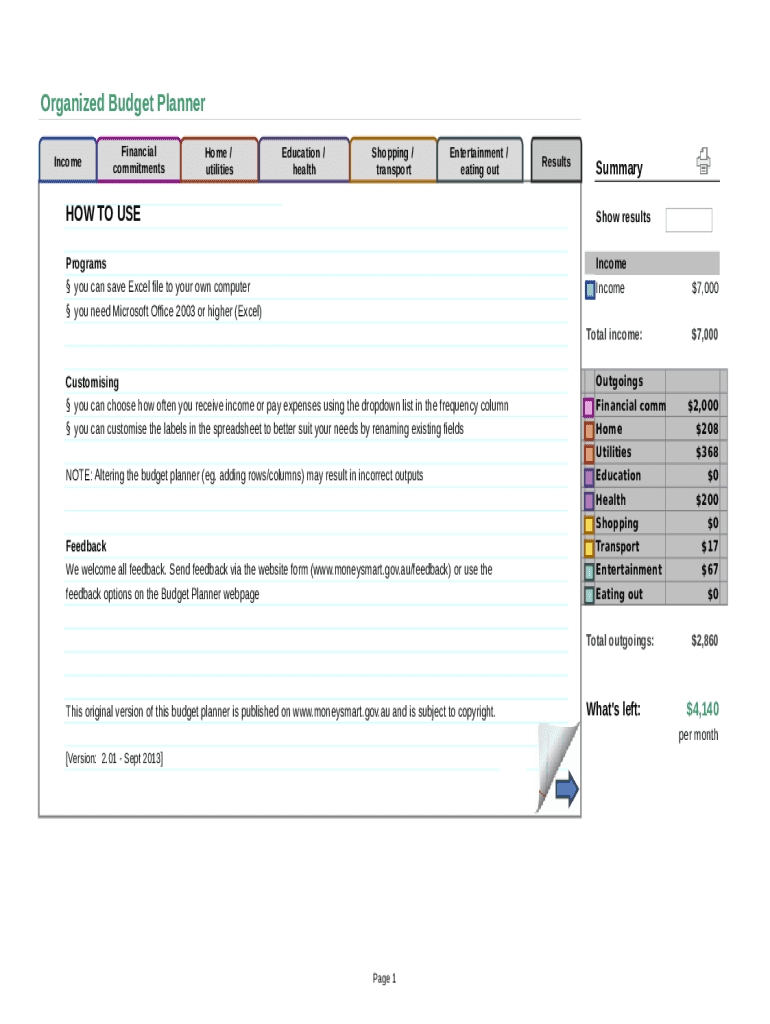
Organized Budget Planner IncomeFinancial commitmentsHome / utilitiesEducation / healthShopping / transportEntertainment / eating outResultsSummaryHOW TO USEShow resultsPrograms you can save Excel.

Open form follow the instructions

Easily sign the form with your finger

Send filled & signed form or save
How to fill out the Organized Budget Planner online
The Organized Budget Planner is an essential tool designed to help users gain control of their finances. This guide provides clear, step-by-step instructions for filling out the form online, ensuring you manage your income and expenses effectively.
Follow the steps to complete your Organized Budget Planner.
- Click ‘Get Form’ button to access the Organized Budget Planner and open it in your preferred online editor.
- Begin by entering your total income into the designated field. You can include all sources of earnings, such as salary, bonuses, and any benefits.
- Next, input your financial commitments. This section includes regular expenses like rent or mortgage, loan repayments, and any other recurring bills. Ensure that you select the appropriate frequency from the dropdown menu provided.
- Proceed to enter your home and utility expenses. This section covers costs for electricity, water, internet, and any other necessary services. Make sure to categorize these expenses correctly to maintain an accurate budget.
- Fill in the education and health expenses. This includes school fees, medical costs, or any ongoing health-related payments.
- Provide details on shopping and transport expenses. Include all costs related to groceries, clothing, and commuting.
- Input your entertainment and eating out expenses. This section captures costs for leisure activities, dining out, and other discretionary spending.
- Once all fields are completed, review the results and the summary section to assess your budget position. You will be able to see how much money is left after all expenses have been accounted for.
- Finally, save your changes, download a copy of your Organized Budget Planner, print it, or share it as needed to manage your finances effectively.
Start managing your finances today by completing the Organized Budget Planner online.
Experience a faster way to fill out and sign forms on the web. Access the most extensive library of templates available.
Related content
Create a personal budget for college, understand how college cost of attendance works with...
In many organizations, the Board of Directors needs to approve a budget before the...
Emblem-money.svg Business and economics portal · v · t · e. In the field of management...
Get answers to your most pressing questions about US Legal Forms API.
How do you do the 50 20 30 budget rule?
The 50/30/20 rule budget is a simple way to budget that doesn't involve detailed budgeting categories. Instead, you spend 50% of your after-tax pay on needs, 30% on wants, and 20% on savings or paying off debt.
What are the 4 steps to preparing a budget?
Step 1: Identify Your Goals. ... Step 2: Review What You Have. ... Step 3: Define the Costs. ... Step 4: Create the Budget.
How do you calculate a monthly budget?
Calculate your monthly income, pick a budgeting method and monitor your progress. Try the 50/30/20 rule as a simple budgeting framework. Allow up to 50% of your income for needs. Leave 30% of your income for wants. Commit 20% of your income to savings and debt repayment.
How should a beginner budget?
Step 1: List monthly income. Step 2: List fixed expenses. Step 3: List variable expenses. Step 4: Consider the model budget. Step 5: Budget for wants. Step 6: Trim your expenses. Step 7: Budget for credit card debt. Step 8: Budget for student loans.
What should be included in a budget planner?
Groceries. Housing. Basic utilities. Transportation. Insurance. Minimum loan payments. Anything beyond the minimum goes into the savings and debt repayment category. Child care or other expenses you need so you can work.
What is the 70 20 10 Rule money?
70% of your monthly budget should go to monthly expenses. 20% should go to savings.
How do you organize a budget planner?
Step 1: Note your net income. The first step in creating a budget is to identify the amount of money you have coming in. ... Step 2: Track your spending. ... Step 3: Set your goals. ... Step 4: Make a plan. ... Step 5: Adjust your habits if necessary. ... Step 6: Keep checking in.
What is the 50 30 20 budget strategy?
The 50/30/20 rule budget is a simple way to budget that doesn't involve detailed budgeting categories. Instead, you spend 50% of your after-tax pay on needs, 30% on wants, and 20% on savings or paying off debt.
What are the five steps in planning a budget?
Find out how much money you're managing. Track your spending. Set your financial goals. Decrease your spending or increase your income. Stick to your plan.
Use professional pre-built templates to fill in and sign documents online faster. Get access to thousands of forms.
If you believe that this page should be taken down, please follow our DMCA take down process here.