Loading
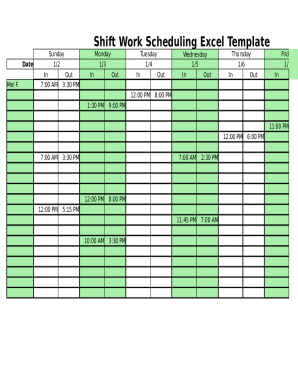
Get Shift Work Scheduling Excel
How it works
-

Open form follow the instructions
-

Easily sign the form with your finger
-

Send filled & signed form or save
How to fill out the Shift Work Scheduling Excel online
This guide provides a comprehensive approach to completing the Shift Work Scheduling Excel document online. Designed to accommodate users of all backgrounds, it will help you navigate each section and field of the form effectively.
Follow the steps to complete your shift work schedule accurately.
- Click ‘Get Form’ button to access the Shift Work Scheduling Excel template and open it in your preferred online document editor.
- Begin by entering your name or the name of the individual for whom you are scheduling shifts at the top of the document. This identification will help in organizing the schedule effectively.
- In the section labeled 'Date,' input the specific dates for the shifts. Each date corresponds to a day of the week, making it easy to visualize the scheduled shifts.
- For each date, you will find fields labeled 'In' and 'Out.' Enter the start and end times of shifts in these fields. Ensure to follow the 12-hour or 24-hour clock format consistently.
- If there are any days when shifts do not occur, leave the 'In' and 'Out' fields blank for that specific date to indicate that no work is scheduled.
- Review the weekly hours section, typically located at the bottom of the form, to track total hours worked each day. This will help ensure accurate recording and management of work hours.
- After entering all shift details, review the document for any discrepancies and make necessary adjustments to ensure everything is accurate and clear.
- Finally, you can save your changes, download a copy for your records, or print the completed form directly from the online document editor.
Start filling out your Shift Work Scheduling Excel online today for efficient scheduling!
Start Microsoft Excel, click on the File tab. Select New. Double-click the Schedules button on the Available Templates screen. Double-click the Business schedules file folder icon.