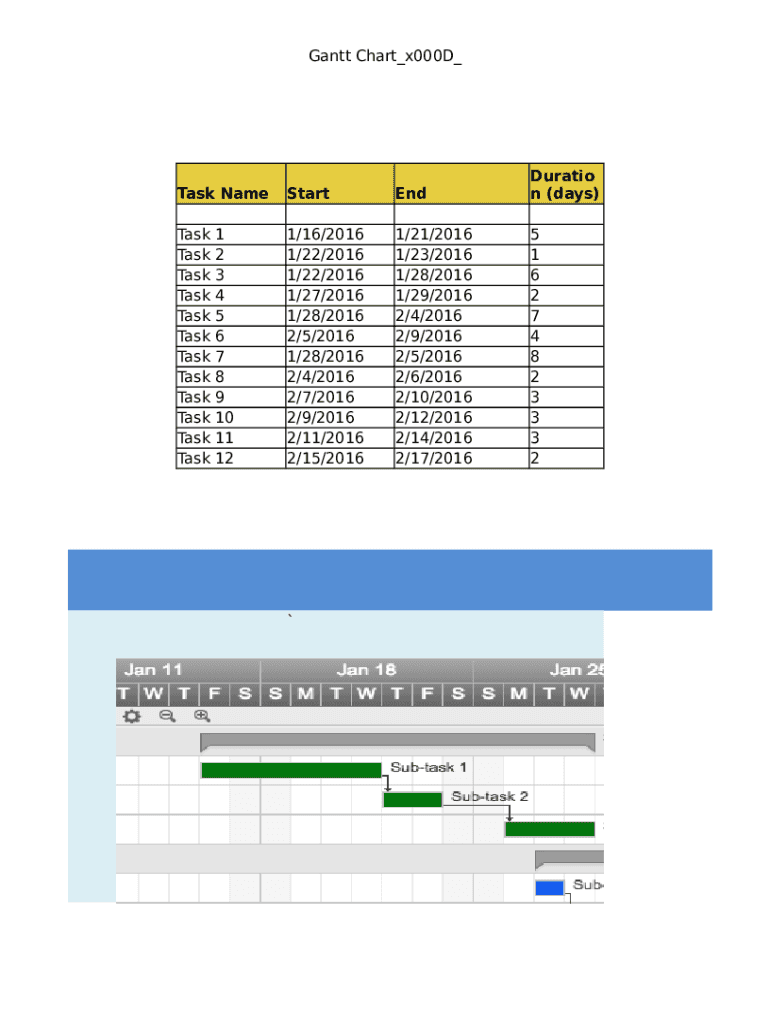
Gantt Chart x000D Task NameStartEndDuratio n (days)Task Task Task Task Task Task Task Task Task Task Task Task1/16/2016 1/22/2016 1/22/2016 1/27/2016 1/28/2016 2/5/2016 1/28/2016 2/4/2016 2/7/2016 2/9/2016 2/11/2016 2/15/20161/21/2016 1/23/2016 1/28/2016 1/29/2016 2/4/2016 2/9/2016 2/5/2016 2/6/2016 2/10/2016 2/12/2016 2/14/2016 2/17/20165 1 6 2 7 4 8 2 3 3 3 21 2 3 4 5 6 7 8 9 10 11 12 Gantt.
Loading

Open form follow the instructions

Easily sign the form with your finger

Send filled & signed form or save
How to fill out the Timeline Template Sheet online
Filling out the Timeline Template Sheet can streamline your project planning and scheduling. This guide provides clear steps to help you navigate the online form efficiently.
Follow the steps to successfully complete your Timeline Template Sheet.
- Use the 'Get Form' button to access the Timeline Template Sheet and open it in your preferred online editor.
- Begin by entering a task name in the designated field. This should clearly describe the task you plan to undertake, allowing for better organization.
- Input the start date for your task. Make sure to select the correct format, typically MM/DD/YYYY, to ensure compatibility.
- Next, enter the end date of the task in the appropriate section. This helps in defining the timeline and duration of each task.
- In the duration section, indicate the number of days the task is expected to take. This should reflect the time frame between the start and end dates.
- Continue adding details for each task following the same pattern until all tasks are entered.
- Review all entered information for accuracy to ensure a comprehensive timeline.
- Finally, save your changes, and choose to download, print, or share the completed form as needed.
Start filling out your Timeline Template Sheet online today for effective project management.
Experience a faster way to fill out and sign forms on the web. Access the most extensive library of templates available.
Related content
64 items — It is a worksheet for program managers to map out relevant resources for...
Your timeline template is a Google Sheet with a few columns and rows that have already...
Jun 18, 2007 — Document control sheet. Contact for ... Standard PM WBS Template for Non...
Get answers to your most pressing questions about US Legal Forms API.
How do I create a history timeline?
What does your timeline depict? Every timeline should have a title identifying the project or historic events it illustrates. ... Make the timeline. Decide what segment of time you want to illustrate. ... Determine the scale of the timeline. ... Missing time. ... Add events. ... Add visuals.
How do I make a timeline chart in Google Sheets?
First column: Enter the dates or dates and times you want to show in the chart. Second column: Enter numeric data. ... Third and fourth column (Optional): Enter a note about the title. Fourth column (Optional): Enter notes about each event. Rows: Each row represents a point on the chart.
What is the best program to create a timeline?
Toggl Plan. The Toggl Plan website describes its product as Project planning and task management made easy. That sums it up perfectly. ... Lucidchart. ... Smart Draw. ... Office Timeline. ... RWT Timeline. ... Timeglider. ... Tiki-Toki. ... Preceden.
How do I create a sequence in Google Sheets?
On your computer, open a spreadsheet in Google Sheets. In a column or row, enter text, numbers, or dates in at least two cells next to each other. Highlight the cells. You'll see a small blue box in the lower right corner. Drag the blue box any number of cells down or across.
Is there a timeline template in Google Docs?
From your Google Doc, select Add-ons > Lucidchart Diagrams > Insert Diagram to open the sidebar. Click + in the bottom-right corner. Select a blank document or a timeline template to customize. ... Modify the template or drag and drop shapes to create a timeline of events.
How do I build a timeline in Excel?
On the Insert tab, in the Illustrations group, click SmartArt. In the Choose a SmartArt Graphic gallery, click Process, and then double-click a timeline layout (such as Basic Timeline). To enter your text, do one of the following: Click [Text] in the Text pane, and then type your text.
How do I make a timeline on sheets?
Step 1 Select a Timeline Template. Step 2 Open the Timeline Template. Step 3 Edit Text on the Timeline. Step 4 Customize the Timeline. Step 1: Select a Timeline Template. Step 2: Make Your Own Timeline. Step 3: Format Your Timeline.
Does Word have a timeline template?
In the Home tab, click the Create New button and click Browse Templates. Search for timeline and select the Project with Gantt Timeline template. Rename the template and choose where to save it.
Does Google have a timeline template?
If you want to create your own Google timeline template, you have a couple of options: First, you can create a visual timeline using Google Drawings. ... You can also add your timeline data to a Google spreadsheet and use that sheet to populate a visual timeline.
How do you create a timeline on word?
On the Insert tab, click SmartArt > Process. Click Basic Timeline or one of the other process-related graphics. Click the [Text] placeholders and enter the details of your events. Tip: You can also open the Text Pane and enter your text there. On the SmartArt Design tab, click Text Pane.
Use professional pre-built templates to fill in and sign documents online faster. Get access to thousands of forms.
If you believe that this page should be taken down, please follow our DMCA take down process here.