Loading
Form preview
  • US Legal Forms
  • Other Templates
  • More Forms
  • More Multi-State Forms
  • Petty Cashpetty Cash Receipt

Get Petty Cashpetty Cash Receipt

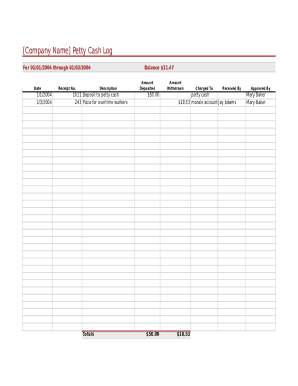
Company Name Petty Cash Log For 01/01/2004 through 01/03/2004Date1/1/2004 1/3/2004Receipt No.Balance $31.47Description1011 Deposit to petty cash 243 Pizza for overtime workersTotalsAmount Deposited$50.00$50.00Amount WithdrawnCharged.

How it works

  1. Open form

    Open form follow the instructions

  2. Easily sign form

    Easily sign the form with your finger

  3. Share form

    Send filled & signed form or save

How to fill out the Petty Cashpetty Cash Receipt online

Filling out the Petty Cashpetty Cash Receipt accurately is essential for maintaining financial transparency within your organization. This guide provides a step-by-step approach to ensure you complete the form correctly and efficiently.

Follow the steps to accurately complete your Petty Cashpetty Cash Receipt online.

  1. Click 'Get Form' button to obtain the form and open it in the editor.
  2. Begin by filling in the 'Date' section. Enter the date of the transaction. For example, you might use '01/01/2004' for a transaction made on that date.
  3. Next, proceed to the 'Receipt No.' field. This field typically requires a unique identifier for each receipt issued. Input the corresponding receipt number.
  4. In the 'Description' section, briefly describe the purpose of the transaction. For instance, you could state 'Deposit to petty cash' or specify any purchases made, like 'Pizza for overtime workers.'
  5. Move to the 'Amount Deposited' section. Enter the total amount deposited into the petty cash. Ensure the figure reflects actual deposits made, for example, '$50.00.'
  6. Next, fill in the 'Amount Withdrawn' field. Enter the amount taken from the petty cash for the transaction, ensuring it matches what was spent or withdrawn.
  7. In the 'Charged To' field, indicate the account to which the amount withdrawn will be charged. This could be a specific budget category, such as 'morale account.'
  8. The 'Received By' section should include the name of the individual who received the cash. For instance, you may write 'Jay Adams.'
  9. Finally, the 'Approved By' field must be filled with the name of the authorized person approving the transaction. For example, you would enter 'Mary Baker.'
  10. After completing all fields, review the information for accuracy. Once confirmed, you can save your changes, download, print, or share the completed form as necessary.

Complete your Petty Cashpetty Cash Receipt online for efficient financial management.

Get form

Experience a faster way to fill out and sign forms on the web. Access the most extensive library of templates available.
Get form

Related content

Petty Cash Receipts - CT State Comptroller...
Petty Cash Receipts · 1 General Information 3.1. · 2 Workers' Compensation "First"...
Learn more
How to Complete a Petty Cash Receipt | Financial...
2. Date – Enter the date that the petty cash receipt is prepared. 3. Pay To – Enter...
Learn more
Pulaski County Special School District - Amazon...
Aug 23, 2018 — Petty Cash Funds. 01:03. Accumulation of Funds. 01:04. Field Trips...
Learn more

Related links form

Tesserino Funghi Capanne Di Marcarolo Non Small Cell Lung Cancer Radiation Therapy Treatment Plan Checklist Egst Realtors Association Of New Mexico Termination Agreement And ...

Questions & Answers

Get answers to your most pressing questions about US Legal Forms API.

Contact support

The petty cash journal entry is a debit to the petty cash account and a credit to the cash account. The petty cash custodian refills the petty cash drawer or box, which should now contain the original amount of cash that was designated for the fund. The cashier creates a journal entry to record the petty cash receipts.

Require that employees maintain a running petty cash log for every transaction, including receipts. Each entry in the petty cash book should include the date, the amount, and what was purchased with the petty cash. Review your petty cash register before you replenish the petty cash fund.

The custodian of petty cash should sign the receipt to indicate that he authorized the funds. However, you should also have the recipient sign the receipt. This makes it easier to follow the paper trail if there is a dispute about the amount dispensed from petty cash or the purpose for which it was used.

Usually a simple form used by the petty cash custodian in order to document small payments from a petty cash box.

Journal entry for putting money into the petty cash fund To show this, debit your Petty Cash account and credit your Cash account. When the petty cash fund gets too low, you must refill it to its set amount. Then, create another journal entry debiting the Petty Cash account and crediting the Cash account.

The custodian of petty cash should sign the receipt to indicate that he authorized the funds. However, you should also have the recipient sign the receipt.

To show this, debit your Petty Cash account and credit your Cash account. When the petty cash fund gets too low, you must refill it to its set amount. Then, create another journal entry debiting the Petty Cash account and crediting the Cash account.

A petty cash slip is a small form to document a disbursement from the fund.

Get This Form Now!

Use professional pre-built templates to fill in and sign documents online faster. Get access to thousands of forms.
Get form
If you believe that this page should be taken down, please follow our DMCA take down processhere.
Get Petty Cashpetty Cash Receipt
Get form
  • Adoption
  • Bankruptcy
  • Contractors
  • Divorce
  • Home Sales
  • Employment
  • Identity Theft
  • Incorporation
  • Landlord Tenant
  • Living Trust
  • Name Change
  • Personal Planning
  • Small Business
  • Wills & Estates
  • Packages A-Z
  • Affidavits
  • Bankruptcy
  • Bill of Sale
  • Corporate - LLC
  • Divorce
  • Employment
  • Identity Theft
  • Internet Technology
  • Landlord Tenant
  • Living Wills
  • Name Change
  • Power of Attorney
  • Real Estate
  • Small Estates
  • Wills
  • All Forms
  • Forms A-Z
  • Other Templates
  • Legal Hub
  • About Us
  • Help Portal
  • Legal Resources
  • Blog
  • Affiliates
  • Contact Us
  • Delete My Account
  • Site Map
  • Industries
  • Forms in Spanish
  • Localized Forms
  • State-specific Forms
  • Forms Kit
  • Real Estate Handbook
  • All Guides
  • Notarize
  • Incorporation services
  • For Consumers
  • For Small Business
  • For Attorneys
  • USLegal
  • FormsPass
  • pdfFiller
  • signNow
  • altaFlow
  • DocHub
  • Instapage
Form Packages
  • Adoption
  • Bankruptcy
  • Contractors
  • Divorce
  • Home Sales
  • Employment
  • Identity Theft
  • Incorporation
  • Landlord Tenant
  • Living Trust
  • Name Change
  • Personal Planning
  • Small Business
  • Wills & Estates
  • Packages A-Z
Form Categories
  • Affidavits
  • Bankruptcy
  • Bill of Sale
  • Corporate - LLC
  • Divorce
  • Employment
  • Identity Theft
  • Internet Technology
  • Landlord Tenant
  • Living Wills
  • Name Change
  • Power of Attorney
  • Real Estate
  • Small Estates
  • Wills
  • All Forms
  • Forms A-Z
  • Other Templates
Customer Service
  • Legal Hub
  • About Us
  • Help Portal
  • Legal Resources
  • Blog
  • Affiliates
  • Contact Us
  • Delete My Account
  • Site Map
  • Industries
  • Forms in Spanish
  • Localized Forms
  • State-specific Forms
  • Forms Kit
Legal Guides
  • Real Estate Handbook
  • All Guides
Prepared for you
  • Notarize
  • Incorporation services
Our Customers
  • For Consumers
  • For Small Business
  • For Attorneys
Our Sites
  • USLegal
  • FormsPass
  • pdfFiller
  • signNow
  • altaFlow
  • DocHub
  • Instapage
Social Media
Call us now toll free:
+1 833 426 79 33
As seen in:
© Copyright 1999-2026 airSlate Legal Forms, Inc. 17 Station Street, Ste. 203, Brookline, MA 02445
  • Your Privacy Choices
  • Terms of Service
  • Privacy Notice
  • Content Takedown Policy
  • Bug Bounty Program