Loading
Get Budget Comparison Template
How it works
-

Open form follow the instructions
-

Easily sign the form with your finger
-

Send filled & signed form or save
How to fill out the Budget Comparison Template online
The Budget Comparison Template is a crucial tool for managing financial expectations against actual expenditures. This guide will provide you with clear, step-by-step instructions to assist you in completing the template effectively and accurately online.
Follow the steps to fill out the Budget Comparison Template online.
- Click ‘Get Form’ button to obtain the form and open it in the editor.
- Review the header section of the template, which includes the title 'Budget Comparison Template.' Ensure that you have the correct year specified at the top of the document.
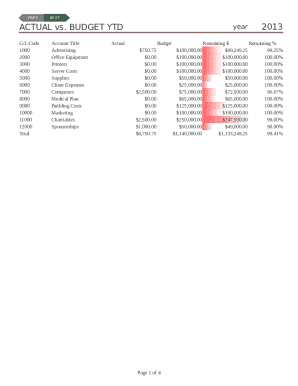
- Locate the section labeled 'Actual vs. Budget YTD.' Here, enter the actual spendings in the 'Actual' column corresponding to the relevant G/L codes and account titles. Make sure to verify the accuracy of your figures.
- Under the 'Budget' column, input the budgeted amounts for each respective account title. This helps in comparing planned expenditures with the actual amounts spent.
- If applicable, fill in the 'Remaining $' and 'Remaining %' columns, which will automatically calculate the remaining budget and percentage remaining based on the figures you have entered.
- Proceed to the 'Monthly Expenses Summary' section. Here, input the monthly expenses for each category under the months provided. Ensure all figures are correctly aligned with their respective months.
- In each expense category, from January through December, enter your monthly expenditure figures accurately.
- After completing the monthly summary, navigate to the 'Itemized Expenses' section. In this area, detail each expense, including invoice dates, amounts, payees, and descriptions of the purpose of each expense.
- Fill in the 'Charitables & Sponsorships' segment to record contributions and sponsorship expenditures. Indicate amounts and related details for each entry.
- Once you have entered all required information throughout the template, review the document for any errors or omissions. Make corrections as needed.
- Finally, save your changes. You can also choose to download, print, or share the completed form as per your requirements.
Start filling out your Budget Comparison Template online today for effective financial management.
Step 1: Pick Your Program. First, select an application that can create and edit spreadsheet files. ... Step 2: Select a Template. ... Step 3: Enter Your Own Numbers. ... Step 4: Check Your Results. ... Step 5: Keep Going or Move Up to a Specialized App.
Industry-leading security and compliance
US Legal Forms protects your data by complying with industry-specific security standards.
-
In businnes since 199725+ years providing professional legal documents.
-
Accredited businessGuarantees that a business meets BBB accreditation standards in the US and Canada.
-
Secured by BraintreeValidated Level 1 PCI DSS compliant payment gateway that accepts most major credit and debit card brands from across the globe.