We use cookies to improve security, personalize the user experience, enhance our marketing activities (including cooperating with our marketing partners) and for other business use.
Click "here" to read our Cookie Policy. By clicking "Accept" you agree to the use of cookies. Read less
Read more
Accept
Loading
Form preview
  • US Legal Forms
  • Form Library
  • More Forms
  • More Multi-State Forms
  • Home Renovation Budget Excel

Get Home Renovation Budget Excel

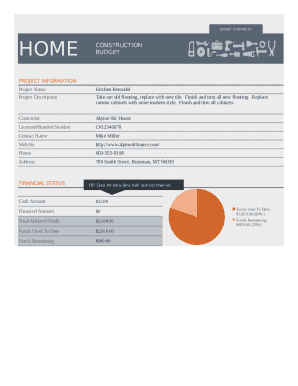
ENTER EXPENSESHOMECONSTRUCTION BUDGETPROJECT INFORMATION Project NameKitchen RemodelProject DescriptionTake out old flooring, replace with new tile. Finish and trim all new flooring. Replace current.

How it works

  1. Open form

    Open form follow the instructions

  2. Easily sign form

    Easily sign the form with your finger

  3. Share form

    Send filled & signed form or save

How to fill out the Home Renovation Budget Excel online

Filling out the Home Renovation Budget Excel is a crucial step in managing your renovation finances effectively. This guide will provide you with clear instructions on how to complete each section of the form online, ensuring that you keep track of your expenses and stay within budget.

Follow the steps to complete your renovation budget effortlessly.

  1. Click the ‘Get Form’ button to access the Home Renovation Budget Excel. Open the form in your preferred online editor.
  2. Locate the 'Project Information' section. Here, you should fill out the 'Project Name' with a brief title for your renovation (e.g., Kitchen Remodel) and provide a 'Project Description' detailing the scope of work involved.
  3. Enter the contractor's details in the provided fields, including the contractor's name, their licensed/bonded number, contact name, website, phone number, and address to ensure proper communication.
  4. In the 'Financial Status' section, input your 'Cash Amount' available for the project, followed by any 'Financed Amount' if applicable. The total of 'Allotted Funds' should automatically calculate based on your inputs.
  5. Enter the 'Funds Used To Date' to reflect how much money has been spent so far. This will help track your remaining budget and help you manage your finances effectively.
  6. Navigate to the 'Budget Summary' section. List all expenses by specifying each 'Item', its 'Category', and the corresponding 'Amount'. This section helps you maintain an itemized overview of your budget.
  7. Review the totals at the bottom of the expense list. Make sure that 'Funds Used To Date' aligns with the total of your listed expenses. This ensures that you have accurately tracked your expenditures.
  8. Once all fields are completely filled, you can save your changes, download a copy of the form for your records, or print it out for easy reference.

Complete your Home Renovation Budget Excel online today and manage your renovation costs effectively!

Get form

Experience a faster way to fill out and sign forms on the web. Access the most extensive library of templates available.
Get form

Related content

Budget forms | Office of Financial Management
To save these Excel or Word files, right-click on the document link and choose ... Office...
Learn more
Capital Plan Templates | Capital Planning & Budget
Description: Worksheet to record capital project budget estimates for capital ... Purpose:...
Learn more
Housing Development Financing Application...
Aug 9, 2019 — Application Form, Self-Scoring Worksheet, & Development Schedule. ◇...
Learn more

Related links form

Apple For Albania Visa Form Duties Form 4a Statement Of Defence Sample Vat 201 Form Pdf Download

Questions & Answers

Get answers to your most pressing questions about US Legal Forms API.

Contact support

Step 1: Create some row headings. ... Step 2: Create some categories. ... Step 3: Create column headings for months. ... Step 4: Enter the figures for one month. ... Step 5: Add up the total outgoings. ... Step 6: Work out income minus outgoings. ... Step 7: Copy one month's figures.

With $50,000, a homeowner can afford a dream renovation, such as a high-end kitchen remodel that includes top-of-the-line appliances and cabinetry. Another option would be to add to the house's usable space by turning a screened porch or garage into a fully finished interior room.

DIY with the Personal budget template This Excel template can help you track your monthly budget by income and expenses. Input your costs and income, and any difference is calculated automatically so you can avoid shortfalls or make plans for any projected surpluses.

Always use the market value of your property as a starting point for calculating home renovation costs. As a general rule of thumb, the amount you spend on your renovations should not be more than 10% of the current market value of your home.

Maintaining a budget isn't always easy, but it's a key tool to improve your financial health. Still, not everyone's cut out for managing their money without a little help. That's where Microsoft Excel comes in. The legendary spreadsheet program can help you work that budget.

Step 1: Open a Blank Workbook. ... Step 2: Set Up Your Income Tab. ... Step 3: Add Formulas to Automate. ... Step 4: Add Your Expenses. ... Step 5: Add More Sections. ... Step 6.0: The Final Balance.

Check your account statements. Pinpoint your money habits by taking inventory of all of your accounts, including your checking account and all credit cards you have. ... Categorize your expenses. Start grouping your expenses. ... Use a budgeting or expense-tracking app. ... Explore other expense trackers. ... Identify room for change.

Step One: Follow The 5 To 15% Rule. The five to 15 percent rule is a widely accepted guideline within the remodeling and building industries. ... Step Two: Determine The Scope Of Your Project. ... Step Three: Add Cost Of Living Expenses. ... Step Four: Factor In The Variables. ... Step Five: Get A Pro's Opinion. ... Step Six: Stick To It.

You don't want to spend more than 10 to 15 percent of your home's value on a single room. If you spend more, the value of the renovation will not proportionally add to the value of your home. For example, if your home is worth $100,000, the maximum you should spend on a kitchen or bathroom renovation is $15,000.

Typically, you can expect to spend at least $100 to $200 per square foot on any renovation. When you're deciding on your home renovation budget, it can be easier, and more affordable, to prioritize projects by room and build a budget around the cost of each individual project.

Get This Form Now!

Use professional pre-built templates to fill in and sign documents online faster. Get access to thousands of forms.
Get form
If you believe that this page should be taken down, please follow our DMCA take down processhere.

Industry-leading security and compliance

US Legal Forms protects your data by complying with industry-specific security standards.
  • In businnes since 1997
    25+ years providing professional legal documents.
  • Accredited business
    Guarantees that a business meets BBB accreditation standards in the US and Canada.
  • Secured by Braintree
    Validated Level 1 PCI DSS compliant payment gateway that accepts most major credit and debit card brands from across the globe.
Get Home Renovation Budget Excel
Get form
Form Packages
Adoption
Bankruptcy
Contractors
Divorce
Home Sales
Employment
Identity Theft
Incorporation
Landlord Tenant
Living Trust
Name Change
Personal Planning
Small Business
Wills & Estates
Packages A-Z
Form Categories
Affidavits
Bankruptcy
Bill of Sale
Corporate - LLC
Divorce
Employment
Identity Theft
Internet Technology
Landlord Tenant
Living Wills
Name Change
Power of Attorney
Real Estate
Small Estates
Wills
All Forms
Forms A-Z
Form Library
Customer Service
Terms of Service
Privacy Notice
Legal Hub
Content Takedown Policy
Bug Bounty Program
About Us
Help Portal
Legal Resources
Blog
Affiliates
Contact Us
Delete My Account
Site Map
Industries
Forms in Spanish
Localized Forms
State-specific Forms
Forms Kit
Legal Guides
Real Estate Handbook
All Guides
Prepared for You
Notarize
Incorporation services
Our Customers
For Consumers
For Small Business
For Attorneys
Our Sites
US Legal Forms
USLegal
FormsPass
pdfFiller
signNow
airSlate WorkFlow
DocHub
Instapage
Social Media
Call us now toll free:
+1 833 426 79 33
As seen in:
  • USA Today logo picture
  • CBC News logo picture
  • LA Times logo picture
  • The Washington Post logo picture
  • AP logo picture
  • Forbes logo picture
© Copyright 1997-2025
airSlate Legal Forms, Inc.
3720 Flowood Dr, Flowood, Mississippi 39232
Form Packages
Adoption
Bankruptcy
Contractors
Divorce
Home Sales
Employment
Identity Theft
Incorporation
Landlord Tenant
Living Trust
Name Change
Personal Planning
Small Business
Wills & Estates
Packages A-Z
Form Categories
Affidavits
Bankruptcy
Bill of Sale
Corporate - LLC
Divorce
Employment
Identity Theft
Internet Technology
Landlord Tenant
Living Wills
Name Change
Power of Attorney
Real Estate
Small Estates
Wills
All Forms
Forms A-Z
Form Library
Customer Service
Terms of Service
Privacy Notice
Legal Hub
Content Takedown Policy
Bug Bounty Program
About Us
Help Portal
Legal Resources
Blog
Affiliates
Contact Us
Delete My Account
Site Map
Industries
Forms in Spanish
Localized Forms
State-specific Forms
Forms Kit
Legal Guides
Real Estate Handbook
All Guides
Prepared for You
Notarize
Incorporation services
Our Customers
For Consumers
For Small Business
For Attorneys
Our Sites
US Legal Forms
USLegal
FormsPass
pdfFiller
signNow
airSlate WorkFlow
DocHub
Instapage
Social Media
Call us now toll free:
+1 833 426 79 33
As seen in:
  • USA Today logo picture
  • CBC News logo picture
  • LA Times logo picture
  • The Washington Post logo picture
  • AP logo picture
  • Forbes logo picture
© Copyright 1997-2025
airSlate Legal Forms, Inc.
3720 Flowood Dr, Flowood, Mississippi 39232