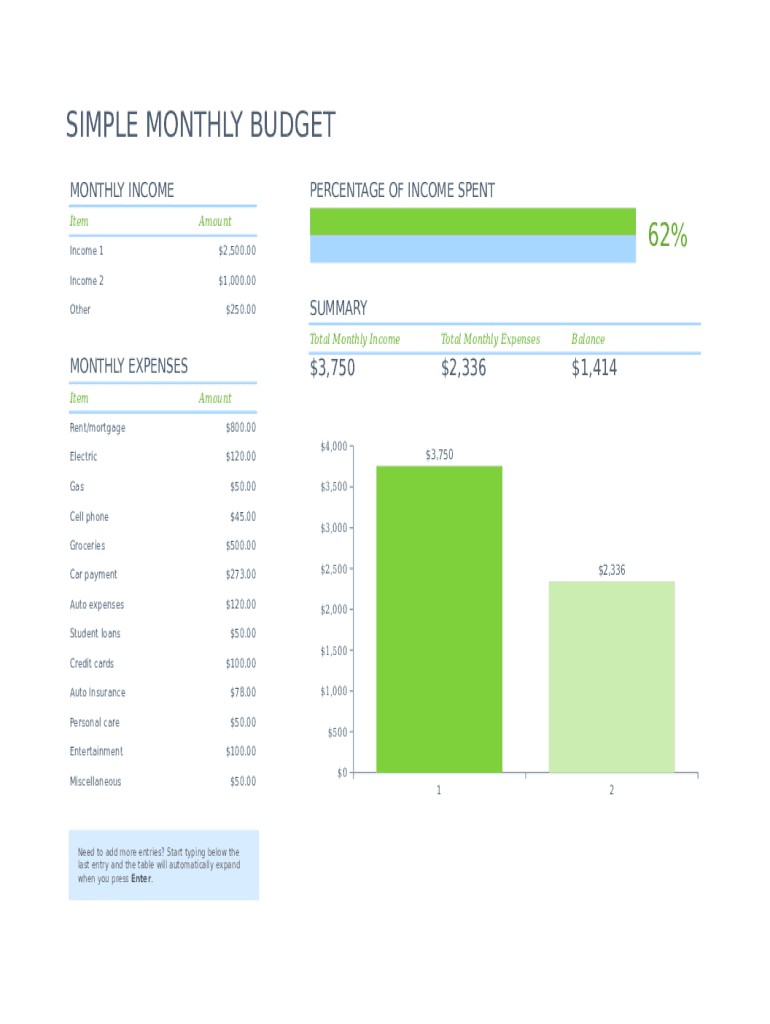
SIMPLE MONTHLY BUDGET MONTHLY INCOME ItemPERCENTAGE OF INCOME SPENT AmountIncome 1$2,500.00Income 2$1,000.00Other$250.00MONTHLY EXPENSES Item62% SUMMARY Total Monthly IncomeTotal Monthly ExpensesBalance$3,750$2,336$1,414AmountRent/mortgage$800.00Electric$120.00Gas$50.00Cell.
Loading

Open form follow the instructions

Easily sign the form with your finger

Send filled & signed form or save
How to fill out the Simple Monthly Budget Template online
Creating a monthly budget is an important step towards achieving financial stability and understanding your monetary habits. This guide will walk you through the process of filling out the Simple Monthly Budget Template online, ensuring that you capture all necessary income and expenses accurately.
Follow the steps to complete your budget effectively.
- Click ‘Get Form’ button to access the template and open it in your chosen online editor.
- Locate the 'Monthly Income' section at the top of the form. Here, you'll enter all sources of income you receive. For example, you can input ‘Income 1’ as your primary job earnings, ‘Income 2’ for any part-time work, and ‘Other’ for additional income streams.
- For each income source, fill in the corresponding amount next to its label. Make sure to include the correct figures, such as $2,500.00 for Income 1, $1,000.00 for Income 2, and $250.00 for Other.
- Next, move to the ‘Monthly Expenses’ section. Here, you will list all your regular expenses such as rent or mortgage, utilities, and insurance. Input the respective amounts for each line item.
- Ensure that you also include variable expenses like groceries, entertainment, and any personal care costs. Keep track of every expense to get an accurate picture of your financial situation.
- Upon entering all your income and expenses, review the totals reflected in the ‘Summary’ section. This will display your total monthly income, total monthly expenses, and your balance.
- If you find the need to add more entries for either income or expenses, simply start typing below the last entry. The form will automatically expand to accommodate your additional inputs.
- Once you have filled out all sections, you can save your changes, download the completed template, print it out for your records, or share it with relevant parties as needed.
Start managing your finances by completing your Simple Monthly Budget Template online today!
Experience a faster way to fill out and sign forms on the web. Access the most extensive library of templates available.
Related content
Use this worksheet to see how much money you spend this month. Also, use the worksheet to...
Enter your estimated monthly income and expenses to better understand what changes you...
Net metering is an electricity billing mechanism that allows consumers who generate some...
Get answers to your most pressing questions about US Legal Forms API.
How do you create a simple budget spreadsheet?
Step 1: Pick Your Program. First, select an application that can create and edit spreadsheet files. ... Step 2: Select a Template. ... Step 3: Enter Your Own Numbers. ... Step 4: Check Your Results. ... Step 5: Keep Going or Move Up to a Specialized App.
What should I include in my monthly budget?
Rent. Groceries. Daily Incidentals. Irregular Expenses and Emergency Fund. Household Maintenance. Work Wardrobe and Upkeep. Subscriptions. Guests.
What are the simple steps to do a budget?
Step 1: Set Realistic Goals. Goals for your money will help you make smart spending choices. ... Step 2: Identify your Income and Expenses. ... Step 3: Separate Needs and Wants. ... Step 4: Design Your Budget. ... Step 5: Put Your Plan into Action. ... Step 6: Seasonal Expenses. ... Step 7: Look Ahead.
How do I make a budget spreadsheet on Excel?
Step 1: Open a Blank Workbook. ... Step 2: Set Up Your Income Tab. ... Step 3: Add Formulas to Automate. ... Step 4: Add Your Expenses. ... Step 5: Add More Sections. ... Step 6.0: The Final Balance.
What are the 5 steps to creating a budget?
Find out how much money you're managing. Track your spending. Set your financial goals. Decrease your spending or increase your income. Stick to your plan.
How do you start a budget with no money?
Avoid Immediate Disasters. Don't be afraid to request bill extensions or payment plans. ... Review Credit Card Payments and Due Dates. ... Prioritizing Bills. ... Ignore the 10% Savings Rule, For Now. ... Review Your Past Month's Spending. ... Negotiate Credit Card Interest Rates. ... Eliminate Unnecessary Expenses. ... Journal New Budget for One Month.
How do you write a monthly budget?
Determine your income. Start with how much money you make after tax each month. ... Calculate Expenses. Let's break up your monthly spend into specific buckets. ... Calculate the difference. If your expenses are already greater than your savings, you have 2 options. ... Determine what to do with your savings. ... Make it a habit.
How do you fill out a monthly budget sheet?
Open a New Spreadsheet. ... Decide Your Budget Planner Organization. ... Track Your Income Sources. ... Enter Your Expenses. ... Compare Your Income and Expenses.
How do you create a simple monthly budget?
Gather Your Financial Paperwork. Before you begin, gather up all your financial statements, including: ... Calculate Your Income. ... Create a List of Monthly Expenses. ... Determine Fixed and Variable Expenses. ... Total Your Monthly Income and Expenses. ... Make Adjustments to Expenses.
Your needs \u2014 about 50% of your after-tax income \u2014 should include:
Groceries.Housing.Basic utilities.Transportation.Insurance.Minimum loan payments. Anything beyond the minimum goes into the savings and debt repayment category.Child care or other expenses you need so you can work.
Use professional pre-built templates to fill in and sign documents online faster. Get access to thousands of forms.
If you believe that this page should be taken down, please follow our DMCA take down process here.