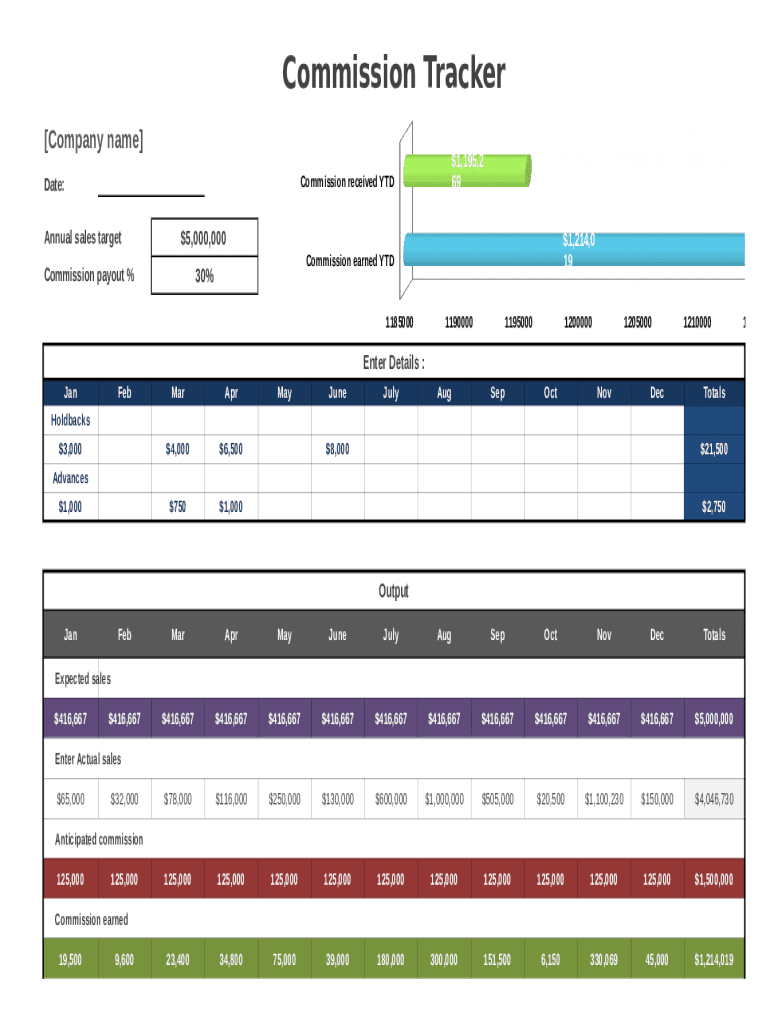
Commission Tracker Company name Commission received YTDDate: Annual sales target$1,195,2 69$5,000,000 30%Commission payout %$1,214,0 19Commission earned YTD118500011900001195000120000012050001210000Enter.
Loading

Open form follow the instructions

Easily sign the form with your finger

Send filled & signed form or save
How to fill out the Commission Tracker online
The Commission Tracker is an essential tool for managing and monitoring your commission earnings throughout the year. This guide offers clear, step-by-step instructions to help you effectively complete the form online, ensuring accurate tracking of your sales and commissions.
Follow the steps to successfully fill out the Commission Tracker online.
- To begin, click the ‘Get Form’ button to access the Commission Tracker and open it for editing.
- In the first section, enter your company name at the designated location. This identifies the report and associates it with your sales.
- Next, input the date in the appropriate field to document when the information is being recorded.
- Fill in the annual sales target, which sets the benchmark for evaluating your commission performance. Ensure this is accurate as it directly affects calculations.
- Enter your expected commission percentage based on your agreed-upon rates. This is crucial for calculating potential earnings.
- In the 'Enter Details' section, populate the monthly commission amounts that you have earned or anticipate for each month, such as January through December.
- Record any holdbacks and advances received during the year in the respective fields to reflect adjustments in your earnings.
- Review the 'Output' section where totals will be computed automatically, based on your inputted commission data.
- Once all fields are completed, review your inputs for accuracy, then select options to save your changes. You may also choose to download, print, or share the document as needed.
Begin managing your commission earnings by completing the Commission Tracker online today!
Experience a faster way to fill out and sign forms on the web. Access the most extensive library of templates available.
Related content
Here are answers to some commonly asked questions about online tracking – how it works...
The commission staff shall review each application for water tracker submitted to the...
The grantee code is assigned by the Commission permanently to a company for authorization...
Get answers to your most pressing questions about US Legal Forms API.
What is commission dashboard?
A good commission tracking dashboard features commissions earned for each payee. It should indicate how much the team as a whole has earned as well as what each individual is owed. More than likely, the dashboard will provide up-to-date information for the current cycle.
Does HubSpot track commissions?
Integration features Keep track of commissions for every deal directly within HubSpot. No need to toggle between platforms. QuotaPath is built to handle the variables you need in a sales compensation plan. Build your comp plan, or use our Compensation Hub to find and customize a validated plan.
What is commission tracking software?
Commission tracking software automates the process of calculating and tracking sales and performance-based compensation. Primarily used in industries like sales, insurance, real estate, and finance, these platforms usually include commission tracking, sales forecasting, and payment processing.
How do you create a commission schedule?
How to Choose the Right Sales Commission Structure For Your Sales Team Step 1: Determine company goals and priorities. ... Step 2: Benchmark against industry commission rates. ... Step 3: Consider roles and responsibilities. ... Step 4: Factor in turnover rates. ... Step 5: Look at productivity levels.
How do you keep track of commissions?
The most common method of tracking your sales commissions is through a sales commission tracking spreadsheet like Excel or Google Sheets. This works great when compensation plans get more complex and you can't do the mental math as quickly. We find it best for slightly complex plans with many deals.
How do you manage commissions?
For most companies, manually managing commissions involve: Exporting data from a sales tracking source. Inputting it into an Excel spreadsheet and sorting it based on sales rep. Calculating the percentages for each sales rep, ensuring they are assigned the correct accounts and current commission structure.
How do I keep track of commissions in QuickBooks?
Select the Gear icon at the top then Account and Settings (or Company Settings.) Select Advanced from the left navigation menu. Choose the pencil icon next to Categories. Put a check mark on the Track Classes or Track Locations checkmark boxes.
How do you record sales commission?
How to Report Sales Commissions as Revenue. In cases where a company earns a sales commission, it is reported as revenue in the income statement. It is normally classified as operating revenue if the commission earned is part of the core operations of the business. Otherwise, it is classified as other income.
Use professional pre-built templates to fill in and sign documents online faster. Get access to thousands of forms.
If you believe that this page should be taken down, please follow our DMCA take down process here.