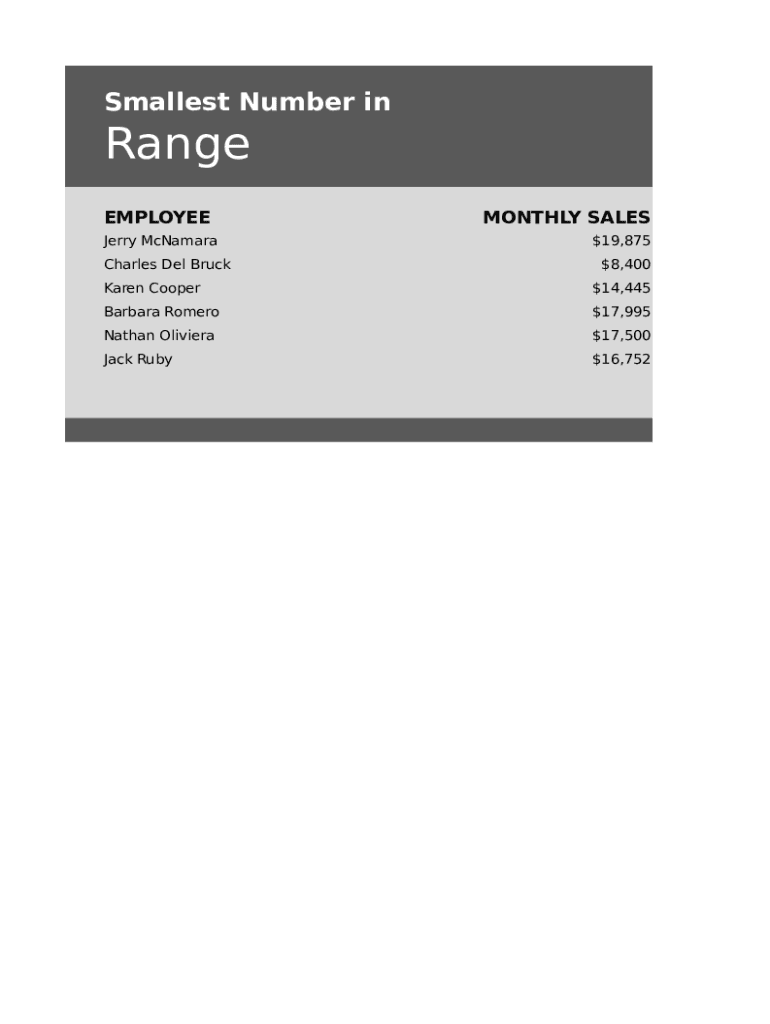
Smallest Number inRange EMPLOYEE Jerry McNamara Charles Del BruckMONTHLY SALES $19,875 $8,400Karen Cooper$14,445Barbara Romero$17,995Nathan Oliviera$17,500Jack Ruby$16,752The The small() small() formula formula captures captures.
Loading

Open form follow the instructions

Easily sign the form with your finger

Send filled & signed form or save
How to fill out the Lowest Monthly Sales online
Completing the Lowest Monthly Sales form is essential for tracking and analyzing sales performance. This guide will equip you with clear and concise instructions to navigate the form effectively.
Follow the steps to successfully fill out the form.
- Click ‘Get Form’ button to obtain the form and open it in your preferred editing tool.
- Begin by identifying the section labeled 'Employee'. Input the names of the employees corresponding to their monthly sales figures.
- In the 'Monthly Sales' section, carefully enter the sales amounts for each employee. Ensure accuracy to reflect true sales figures.
- Locate the formula area. Input the formula =SMALL(C7:C12, 1) in the designated cell, usually labeled for calculations, to determine the smallest sales figure from the provided range.
- After verifying all entered information, you can save your changes, download the completed form, print it out, or share it if needed.
Begin completing your Lowest Monthly Sales form online today!
Experience a faster way to fill out and sign forms on the web. Access the most extensive library of templates available.
Related content
Jan 15, 2021 — while food services and drinking places were down 21.2 percent (±3.7...
Mar 22, 2017 — Sales reps feed on two forms of compensation: salary and a monthly...
form. See Who Must File on page 3 and but also to sales or exchanges, not ... The 9-month...
Get answers to your most pressing questions about US Legal Forms API.
Have existing home sales dropped in the US?
Existing home sales fell 0.7% to a seasonally adjusted annual rate of 4.00 million units last month, the lowest level since October 2010, when the nation was grappling with the foreclosure crisis. That marked the 12th straight monthly decline in sales, the longest such stretch since 1999.
Did US existing home sales fall 7.2% in February?
Existing home sales declined 7.2% to a seasonally adjusted 6.02 million units in February from a month earlier, ing to the National Association of Realtors (NAR). The number of sales was down 2.4% from the same month a year ago.
What is the meaning of monthly sales?
A merchant's average monthly sales volume is calculated as the total value of sales processed in a year divided by 12 months.
What is the current US existing home sales report?
US Existing Home Sales is at a current level of 4.58M, up from 4.00M last month and down from 5.92M one year ago. This is a change of 14.50% from last month and -22.64% from one year ago.
What is the US median sales price of existing homes?
US Existing Home Median Sales Price is at a current level of 363000.0, up from 361200.0 last month and down from 363700.0 one year ago. This is a change of 0.50% from last month and -0.19% from one year ago.
What was the US existing home sales in January 2023?
Existing home sales in the US which include completed transactions of single-family homes, town homes, condominiums and co-ops declined 0.7% to a seasonally adjusted annual rate of 4.0 million in January of 2023, a twelfth straight month of decreases, and compared to forecasts of 4.1 million.
Use professional pre-built templates to fill in and sign documents online faster. Get access to thousands of forms.
If you believe that this page should be taken down, please follow our DMCA take down process here.