Loading
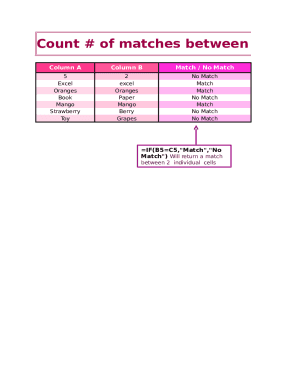
Get Count Matches Template
How it works
-

Open form follow the instructions
-

Easily sign the form with your finger
-

Send filled & signed form or save
How to fill out the Count Matches Template online
This guide provides step-by-step instructions on how to complete the Count Matches Template online, helping users accurately document and analyze matches between two columns of data. Whether you are new to digital document management or familiar with online forms, this guide will support you in navigating the process with ease.
Follow the steps to complete the Count Matches Template effectively.
- Use the ‘Get Form’ button to access the Count Matches Template and open it in the designated interface.
- Identify Column A and Column B in the template. Enter the respective items that you want to compare between these two columns in the available fields.
- In the ‘Match / No Match’ section, input the relevant formula. For instance, use ‘=IF(B5=C5,
- Once completed, you may save changes, download the form, print it for your records, or share it as necessary.
Start filling out the Count Matches Template online today for efficient data analysis.
Template matching is the process of moving the template over the entire image and calculating the similarity between the template and the covered window on the image. Template matching is implemented through twodimensional convolution.