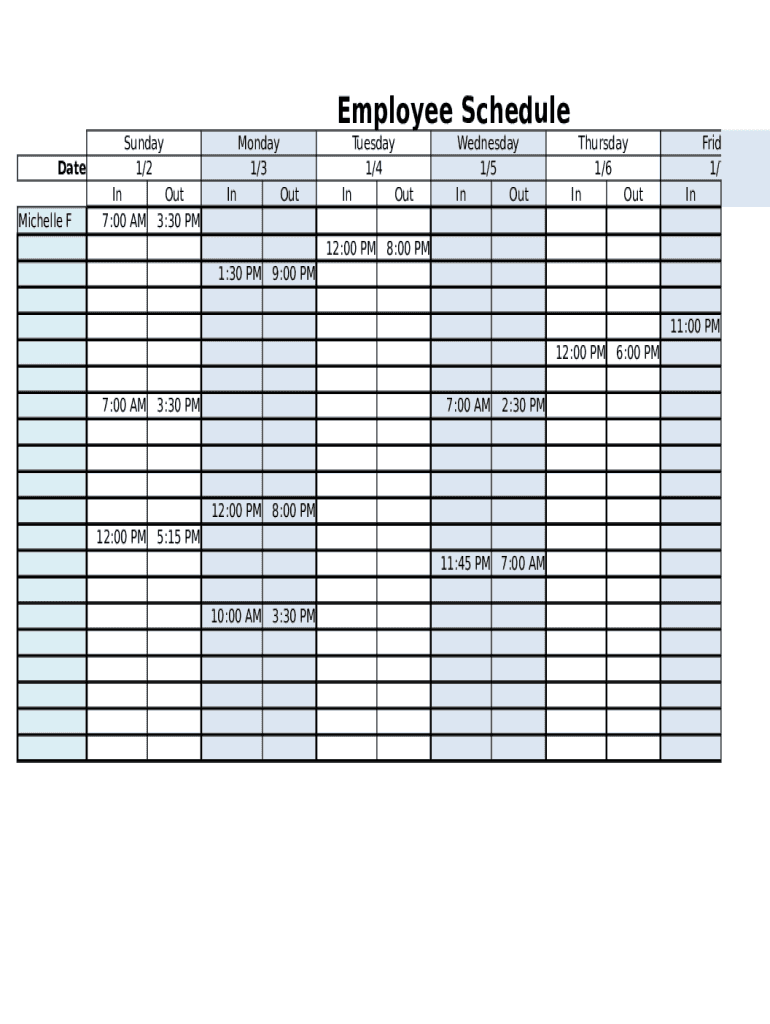
Employee Schedule Date Michelle FSunday 1/2 In 7:00 AMOut 3:30 PMMonday 1/3 In OutTuesday 1/4 In Out 12:00 PM1:30 PMWednesday 1/5 In OutThursday 1/6 In OutFriday 1/7 In8:00 PM9:00 PM 11:00 PM 12:00.

Open form follow the instructions

Easily sign the form with your finger

Send filled & signed form or save
How to fill out the Free Printable Work Schedule online
Filling out the Free Printable Work Schedule can help you effectively manage your work hours and responsibilities. This guide will walk you through the steps for completing the form online, ensuring that you capture all necessary information accurately.
Follow the steps to complete your work schedule efficiently.
- Click the ‘Get Form’ button to obtain the work schedule template and open it in your editor.
- Begin by entering your name in the designated field at the top of the form. This will help to personalize your schedule.
- In the date section, fill in the relevant dates for your work week, starting from Sunday to Saturday.
- For each day of the week, you will find fields labeled 'In' and 'Out'. Record your start and end times for each day you are scheduled to work.
- If you have breaks during your shifts, ensure that you note those times in the respective 'In' and 'Out' fields for any relevant dates.
- At the end of the week, you can review your total hours worked, which may be summarized in a section dedicated to weekly totals.
- Once all fields are completed, you will have the option to save your changes, download, print, or share the work schedule with your team or management.
Start managing your time effectively by completing your Free Printable Work Schedule online today.
Experience a faster way to fill out and sign forms on the web. Access the most extensive library of templates available.
Related content
State agency employees can access work-related information here. Resources for ... FREE...
Our friendly staff is ready to help – drop by or make an appointment! Creative Commons...
A weekly work schedule indicates which employees of a business are going to work at which...
Get answers to your most pressing questions about US Legal Forms API.
How do I make an employee work schedule free?
Open a new blank spreadsheet in Excel. ... In the first row of the spreadsheet, create column headings. ... List each employee name/ID number. ... Enter work times under days of the week/dates. ... Share the schedule with your employees.
How do I create a work schedule in Google Docs?
To use the Google Docs employee schedule template, go to your Google Drive, click the New button, and then go to Google Sheets > From a template. Scroll through the General Template Gallery, find the Personal section and select the Schedule template.
How do I create a work schedule in Excel?
Step 1: Enter the Employee Names and Dates. The vertical X-axis is for your employees. ... Step 2: Create the Work Shifts. Enter the hours of work and relevant employee positions under each day of work. ... Step 3: Customize the Excel Work Schedule.
How do I create a staff schedule?
Set out your budget for payroll. ... Ask all employees to submit their availability and working preferences. ... Set up employees in your work scheduling platform. ... Assess the kinds of shifts you need coverage for. ... Formalise a shift-swapping policy. ... Use a template to save time.
How do I create a work schedule for my employees?
Know Your Team. ... Build Shifts Around Your Best Employees. ... Establish A Team-Wide Communication Method. ... Get The Schedule Out Quickly. ... Honor Work Preferences And Time-Off Requests As Much As Possible. ... Get Employees To Do Some Of The Work Scheduling. ... Let Employees Find Their Own Substitutes.
How do I make an employee schedule free?
Open a new blank spreadsheet in Excel. ... In the first row of the spreadsheet, create column headings. ... List each employee name/ID number. ... Enter work times under days of the week/dates. ... Share the schedule with your employees.
How do I make a work schedule in Word?
Open Microsoft Word and click the "File" tab in the menu bar at the top of the screen. Select "New" from the menu and choose "Schedule" from the list of templates that appears.
How do I create an employee schedule in Google Sheets?
Go to File > New From Template. In the search box on the upper right in the Template Gallery, search for schedule Scroll down a bit and you'll see a template called Weekly employee shift schedule
How do I make an editable calendar in Google Docs?
Open a new document. To get started, open a brand new Google Doc. ... Add a table. Next, add a table to make your calendar squares. ... Include your dates. Complete your calendar by adding in your dates: ... Make it your own.
How do I create a shift schedule?
Know Your Team. ... Build Shifts Around Your Best Employees. ... Establish A Team-Wide Communication Method. ... Get The Schedule Out Quickly. ... Honor Work Preferences And Time-Off Requests As Much As Possible. ... Get Employees To Do Some Of The Work Scheduling. ... Let Employees Find Their Own Substitutes.
Use professional pre-built templates to fill in and sign documents online faster. Get access to thousands of forms.
If you believe that this page should be taken down, please follow our DMCA take down process here.