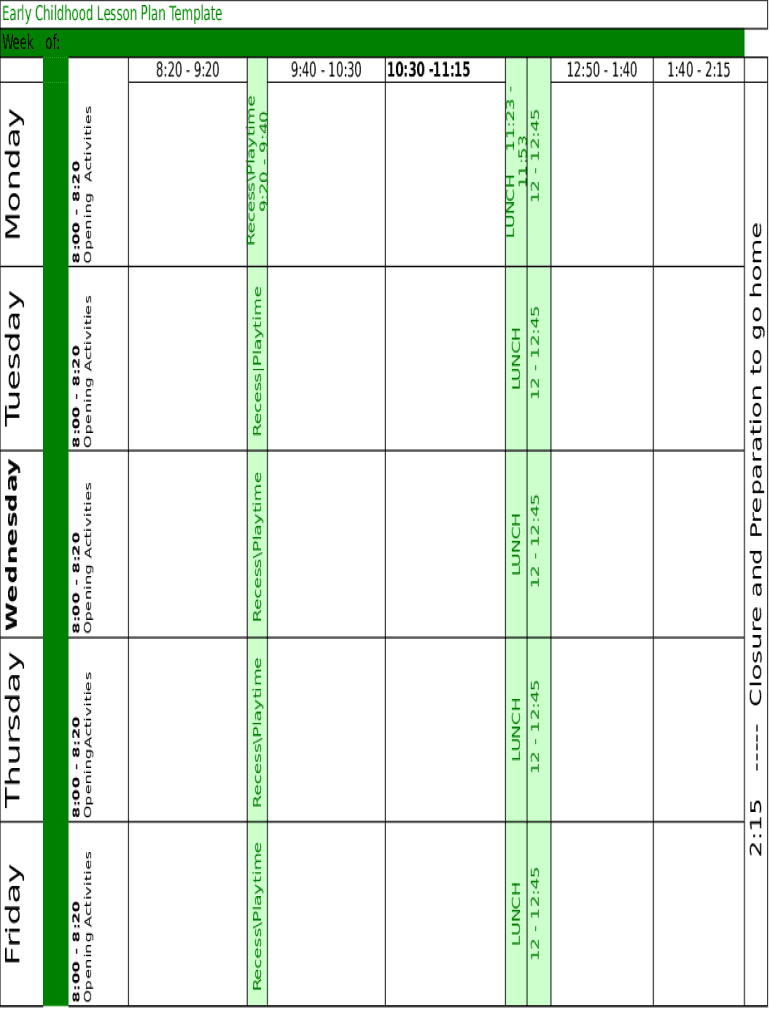
LUNCH 12 12:45LUNCH 12 12:4512 12:45LUNCHRecessPlaytime8:00 8:20 Opening ActivitiesWednesday12 12:45LUNCHRecess Playtime8:00 8:20 Opening ActivitiesTuesdayLUNCH 11:23 11:53 12 12:45RecessPlaytime 9:20.
Loading

Open form follow the instructions

Easily sign the form with your finger

Send filled & signed form or save
How to fill out the Early Childhood Lesson Plan online
Filling out the Early Childhood Lesson Plan is a key step in planning engaging and educational experiences for young learners. This guide provides a clear and supportive approach to completing the online form, ensuring that all necessary components are addressed effectively.
Follow the steps to successfully complete your Early Childhood Lesson Plan online.
- Click ‘Get Form’ button to access the Early Childhood Lesson Plan template and open it in the editor.
- Begin by entering the date for the week of the lesson plan in the designated field. This sets the timeframe for your planning.
- Fill in the daily schedule, starting with opening activities. Specify the time and activities planned for each day; ensure consistency throughout the week.
- In the recess and playtime sections, note the specific times allocated for these activities, providing balance within the daily schedule.
- For each day of the week, ensure you detail the lunch period, its start, and end times, reflecting the same for each instance.
- Conclude the lesson plan by filling in the closure and preparation times, ensuring all transitions are smooth for the children at the end of the day.
- Review all entries for accuracy and completeness, ensuring that every section aligns with your educational goals.
- Once satisfied with the information provided, save your changes. Users can also download, print, or share the completed form as needed.
Start creating your Early Childhood Lesson Plan online today!
Experience a faster way to fill out and sign forms on the web. Access the most extensive library of templates available.
Related content
For more ideas for lesson plans, visit PEACH (Planning Educational Activities for...
Jan 4, 2019 — ... that young children get the engagement and nurturing they need to...
The right to education has been recognized as a human right in a number of international...
Get answers to your most pressing questions about US Legal Forms API.
What are the 4 key components of a lesson plan?
Four key components of a lesson plan are setting objectives, determining performance standards, anticipating ways to grab the students' attention and finding ways to present the lesson. Teachers should also focus on closing the lesson and encouraging students to engage in independent learning.
What is the 5 minute lesson plan?
The 5 Minute Lesson Plan supports cognitive thinking and structures your thought process. Put short, it breaks down your super-complex teacher-thoughts into bitesize, digestible chunks.
What are the 5 steps in a lesson plan lesson cycle?
The five steps involved are the Anticipatory Set, Introduction of New Material, Guided Practice, Independent Practice and Closure.
What are 4as?
One way to develop a lesson plan is observing the 4A's strategy on teaching Mathematics: Activity, Analysis, Abstraction, and Application. ... The activity in the 4A's strategy aims to give understanding to what the learner's prior knowledge and give idea what will be learning through the activity that will be presented.
What are the steps to making a lesson plan?
Identify the objectives. ... Determine the needs of your students. ... Plan your resources and materials. ... Engage your students. ... Instruct and present information. ... Allow time for student practice. ... Ending the lesson. ... Evaluate the lesson.
What are the 5 E's in education?
Teaching and learning progresses through five phases: Engage, Explore, Explain, Elaborate and Evaluate. The phases of the Primary Connections 5E teaching and learning model are based on the 5Es instructional model (Bybee, 1997).
What are the 4 themes in early childhood education?
Four themes emerge from the history of early childhood education: the ethic of social reform, the importance of childhood, transmitting values, and a sense of professionalism.
What is 4A's strategy in teaching?
The Four A Technique is a strategy to connect the content you are teaching to the life experiences of learners. The strategy is broken into four parts: Anchor, Add, Apply and Away, which describe four possible parts of learning tasks.
What are the 7 E's of lesson plan?
The 7 Es stand for the following. Elicit, Engage, Explore,Explain, Elaborate, Extend and Evaluate.
What are the 4 A's in lesson plan?
Choose a topic that you want the children in your class to learn and apply the 4-A's of activating prior knowledge, acquiring new knowledge, applying the knowledge, and assessing the knowledge.
Use professional pre-built templates to fill in and sign documents online faster. Get access to thousands of forms.
If you believe that this page should be taken down, please follow our DMCA take down process here.