Loading
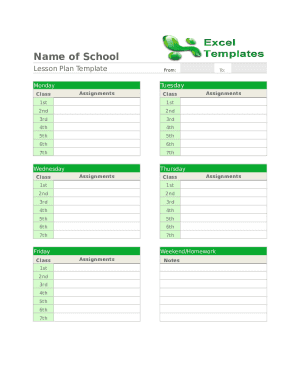
Get Blank Lesson Plan Spreadsheet
How it works
-

Open form follow the instructions
-

Easily sign the form with your finger
-

Send filled & signed form or save
How to fill out the Blank Lesson Plan Spreadsheet online
Filling out the Blank Lesson Plan Spreadsheet online can streamline your lesson planning process. This guide will walk you through each section of the spreadsheet, ensuring that you include all necessary details for effective teaching.
Follow the steps to complete your lesson plan effectively.
- Click ‘Get Form’ button to obtain the form and open it in your online editor.
- In the first section, fill in your class details. You will find fields labeled '1st', '2nd', '3rd', etc., representing different class periods. Enter the relevant class for each time slot.
- Next, in the 'Assignments' row for each class period, input the assignments or learning objectives you plan to cover during that period.
- Move on to the sections for 'Wednesday' and 'Friday'. Follow the same format as before; input class details and corresponding assignments for each day.
- For the 'Monday', 'Tuesday', and 'Thursday' sections, repeat the process, ensuring that all class details and assignments are completed for these days as well.
- In the 'Weekend/Homework' section, record any assignments that students are expected to complete outside of class.
- Lastly, use the 'Notes' section to add any additional comments, reminders, or important information relevant to your lesson planning.
- Once you have filled out all sections, ensure to save your changes. You can choose to download, print, or share the form as needed.
Start filling out your lesson plans online today for more effective teaching!
Know your students. Understand who you are going to educate. ... Set learning objectives. A learning objective is a statement that provides a detailed description of what students will be able to do upon completing a course. ... Write the objective for the lesson. ... Plan your timeline.