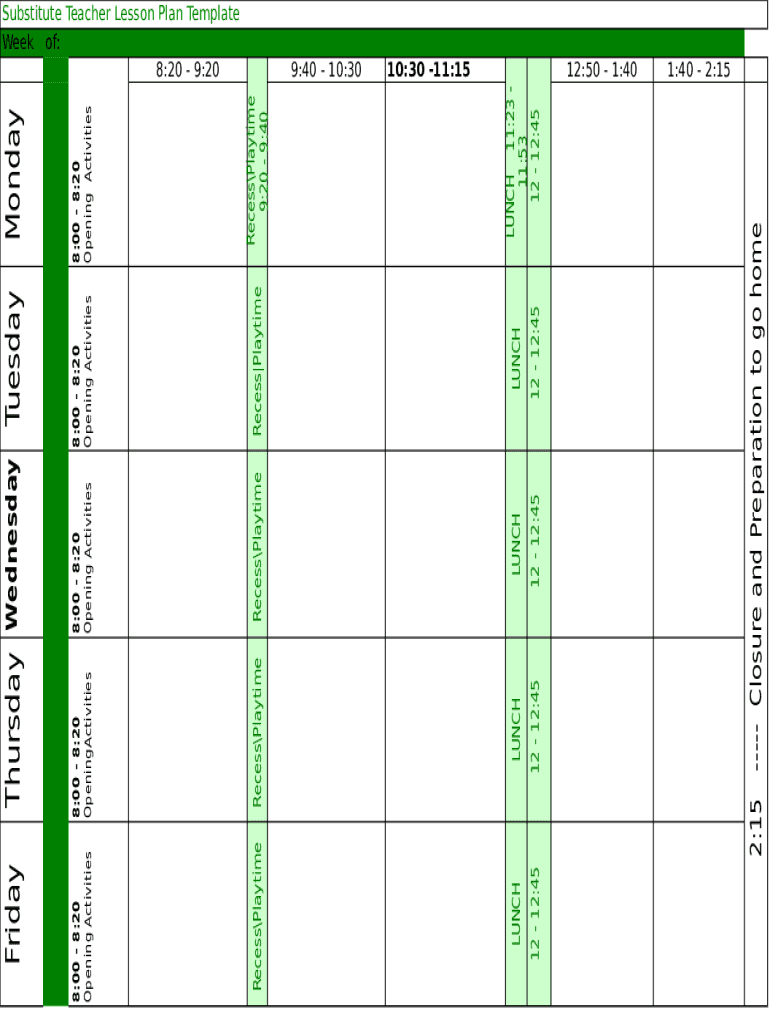
LUNCH 12 12:45LUNCH 12 12:4512 12:45LUNCHRecessPlaytime8:00 8:20 Opening ActivitiesWednesday12 12:45LUNCHRecess Playtime8:00 8:20 Opening ActivitiesTuesdayLUNCH 11:23 11:53 12 12:45RecessPlaytime 9:20.
Loading

Open form follow the instructions

Easily sign the form with your finger

Send filled & signed form or save
How to fill out the Substitute Teacher Lesson Plan online
Creating an effective Substitute Teacher Lesson Plan is essential for a seamless classroom experience. This guide provides step-by-step instructions for filling out the form online, ensuring clarity and organization for users.
Follow the steps to complete the Substitute Teacher Lesson Plan
- Click ‘Get Form’ button to obtain the document and open it in your chosen editor.
- Begin by entering the date range in the designated 'Week of' section, ensuring it reflects the correct week for the lesson plan.
- Fill in the schedule for each day of the week, starting with 'Opening Activities'. This section should include time slots alongside the specific activities planned.
- Indicate recess or playtime durations accurately for each day to help maintain a structured environment.
- Designate lunch periods for each day, confirming they are consistent throughout the week.
- Include any closure activities at the end of the day to ensure students are prepared to go home. This section should state the time and the activities planned.
- Review all entered information for accuracy and completeness before finalizing.
- Once completed, users can save changes, download, print, or share the form as needed.
Complete your Substitute Teacher Lesson Plan online today to streamline classroom management.
Experience a faster way to fill out and sign forms on the web. Access the most extensive library of templates available.
Related content
by AG Glatfelter · 2006 · Cited by 34 · Related articleswhen the teacher is...
Sep 10, 2012 — Here is an example of my Art Studio Update form: You can also include...
The Old Teachers' College is a heritage-listed former tertiary college at 122–132...
Get answers to your most pressing questions about US Legal Forms API.
What should a substitute teacher do if there are no lesson plans?
As a substitute teacher, it is a good idea to have worksheets or other activities you can have the class do if the teacher did not leave behind lesson plans. Include worksheets or activities that appeal to a variety of ages and subjects in your sub bag. Coloring pages can keep younger children occupied for a while.
How do you deal with a bad substitute teacher?
Go to the main office where you can find the principal, the vice-principal, or the secretary. If you can't find someone there, go into the nearest classroom to tell the teacher there. Explain to them what is going on, and ask them to come help with the situation because you are worried something bad may happen.
Can a teacher teach without a lesson plan?
It is a waste of time to teach without a lesson plan. A lesson plan, while subject to modification, is a guide to producing possible positive student outcomes. Any teacher who thinks they can wing it without plans is looking for failure.
How do I prepare for my first day of substitute teaching?
Set the tone early Have an introduction for yourself ready. Explain to them that you are their teacher for the day. Create order in the classroom early with some general rules like don't talk when I'm speaking and be respectful to help proactively prevent behavior problems before they start.
How do you write a lesson plan for beginners?
Identify the objectives. ... Determine the needs of your students. ... Plan your resources and materials. ... Engage your students. ... Instruct and present information. ... Allow time for student practice. ... Ending the lesson. ... Evaluate the lesson.
Are teachers required to write a lesson plan?
Every teacher is required to prepare a lesson plan because this is considered as guide for the day's lessons. Lesson planning is important because it gives the teacher a concrete direction of what she/he wants to take up for the day. Research has shown that student learning is correlated to teacher planning.
How do you write a substitute lesson plan?
1) Have sub plans ready to go in advance. Sort your ready-to-go sub plans by subject, in the order in which they will be taught. ... 2) Include a classroom schedule. ... 3) Include basic classroom management procedures. ... 4) Keep lessons simple for the substitute, yet engaging for your students.
How would you prepare for a substitute teaching assignment?
Arrive early. Be understanding. Use other teachers as a resource. Maintain control of the classroom. Bring your own supplies. Consider any special needs students. Have a backup plan. Reward good behavior.
Do substitute teachers have any rights?
In some jurisdictions and school districts substitute teachers have procedural rights -- either by virtue of union representation, civil service-type rules, or a procedure voluntarily adopted.
Use professional pre-built templates to fill in and sign documents online faster. Get access to thousands of forms.
If you believe that this page should be taken down, please follow our DMCA take down process here.