Loading
Form preview
  • US Legal Forms
  • Form Library
  • More Forms
  • More Multi-State Forms
  • English Lesson Plan

Get English Lesson Plan

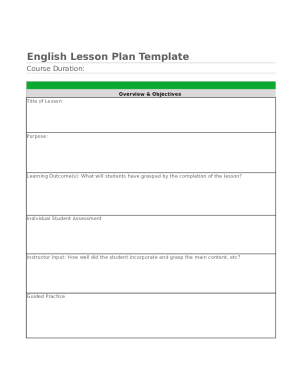
English Lesson Plan Template Course Duration:Overview & Objectives Title of Lesson:Purpose:Learning Outcome(s): What will students have grasped by the completion of the lesson?Individual Student AssessmentInstructor.

How it works

  1. Open form

    Open form follow the instructions

  2. Easily sign form

    Easily sign the form with your finger

  3. Share form

    Send filled & signed form or save

How to fill out the English Lesson Plan online

Filling out the English Lesson Plan online is a straightforward process that enables educators to effectively plan their lessons. This guide provides clear and concise instructions to help users navigate each section of the form.

Follow the steps to complete your English Lesson Plan online.

  1. Click ‘Get Form’ button to obtain the English Lesson Plan and open it in the editing interface.
  2. Begin by entering the course duration in the designated field. This section outlines the time allocated for the lesson.
  3. In the 'Overview & Objectives' section, fill in the title of the lesson, clearly stating what the lesson covers.
  4. Next, specify the purpose of the lesson. This section provides context about why the lesson is important.
  5. Define the learning outcome(s). Clearly articulate what students will have achieved by the end of the lesson.
  6. Proceed to the 'Individual Student Assessment' section. Here, provide feedback on how well each student incorporated and understood the main concepts.
  7. Fill in the 'Guided Practice' section, detailing activities or exercises that will support student learning.
  8. In the 'Summary and Closure' section, indicate whether students demonstrated their understanding through discussion and completed assignments.
  9. Complete the 'Testing Periods' section by specifying details for Assessment #1 through Assessment #6 as necessary.
  10. Finalize the form by reviewing all sections for accuracy. Once complete, users can save changes, download, print, or share the English Lesson Plan.

Begin creating your English Lesson Plan online today!

Get form

Experience a faster way to fill out and sign forms on the web. Access the most extensive library of templates available.
Get form

Related content

English Language Arts Lessons - NYS Dept. of...
This collection of lesson plans facilitates integration of river studies with instruction...
Learn more
How to Create Your Own ESL Lesson Plans and Top...
Oct 9, 2019 — ESL lesson plans keep you on track when teaching and help you fill class...
Learn more
Instructional design - Wikipedia
Instructional design (ID), also known as instructional systems design (ISD), is the...
Learn more

Related links form

RecoveryRecycling Unit Input Form Department - Www-ehs Ucsd OFFER OF PROOF IN ADVANCE OF AUGUST 10 DISCOVERY HEARING LOTS AND VACANT LAND DATA INPUT FORM Name Ad Number Lease Core Skills Workout: Text Structures NONFICTION: Attack At Sea, Pages 410 December 2015/January

Questions & Answers

Get answers to your most pressing questions about US Legal Forms API.

Contact support

A lesson plan is a document that outlines the content of your lesson step-by-step. It's a list of tasks that your students will undertake, to help guide your teaching. A lesson plan is usually prepared in advance and can either cover a one-off activity, an entire lesson, a unit or course, a day, or a week.

One way to develop a lesson plan is observing the 4A's strategy on teaching Mathematics: Activity, Analysis, Abstraction, and Application. ... The activity in the 4A's strategy aims to give understanding to what the learner's prior knowledge and give idea what will be learning through the activity that will be presented.

The 7 Es stand for the following. Elicit, Engage, Explore,Explain, Elaborate, Extend and Evaluate.

Identify the objectives. ... Determine the needs of your students. ... Plan your resources and materials. ... Engage your students. ... Instruct and present information. ... Allow time for student practice. ... Ending the lesson. ... Evaluate the lesson.

The Four A Technique is a strategy to connect the content you are teaching to the life experiences of learners. The strategy is broken into four parts: Anchor, Add, Apply and Away, which describe four possible parts of learning tasks.

Four key components of a lesson plan are setting objectives, determining performance standards, anticipating ways to grab the students' attention and finding ways to present the lesson. Teachers should also focus on closing the lesson and encouraging students to engage in independent learning.

Identify the learning objectives. ... Plan the specific learning activities. ... Plan to assess student understanding. ... Plan to sequence the lesson in an engaging and meaningful manner. ... Create a realistic timeline. ... Plan for a lesson closure.

Choose a topic that you want the children in your class to learn and apply the 4-A's of activating prior knowledge, acquiring new knowledge, applying the knowledge, and assessing the knowledge.

Identify the learning objectives. ... Plan the specific learning activities. ... Plan to assess student understanding. ... Plan to sequence the lesson in an engaging and meaningful manner. ... Create a realistic timeline. ... Plan for a lesson closure.

7E learning model consists of elicit, engage, explore, explain, elaborate, evaluate and extend steps. Elicit is the stage in which the prior knowledge of the learner is elicited by questions and scenarios.

Get This Form Now!

Use professional pre-built templates to fill in and sign documents online faster. Get access to thousands of forms.
Get form
If you believe that this page should be taken down, please follow our DMCA take down processhere.
Get English Lesson Plan
Get form
  • Adoption
  • Bankruptcy
  • Contractors
  • Divorce
  • Home Sales
  • Employment
  • Identity Theft
  • Incorporation
  • Landlord Tenant
  • Living Trust
  • Name Change
  • Personal Planning
  • Small Business
  • Wills & Estates
  • Packages A-Z
  • Affidavits
  • Bankruptcy
  • Bill of Sale
  • Corporate - LLC
  • Divorce
  • Employment
  • Identity Theft
  • Internet Technology
  • Landlord Tenant
  • Living Wills
  • Name Change
  • Power of Attorney
  • Real Estate
  • Small Estates
  • Wills
  • All Forms
  • Forms A-Z
  • Form Library
  • Legal Hub
  • About Us
  • Help Portal
  • Legal Resources
  • Blog
  • Affiliates
  • Contact Us
  • Delete My Account
  • Site Map
  • Industries
  • Forms in Spanish
  • Localized Forms
  • State-specific Forms
  • Forms Kit
  • Real Estate Handbook
  • All Guides
  • Notarize
  • Incorporation services
  • For Consumers
  • For Small Business
  • For Attorneys
  • USLegal
  • FormsPass
  • pdfFiller
  • signNow
  • altaFlow
  • DocHub
  • Instapage
Form Packages
  • Adoption
  • Bankruptcy
  • Contractors
  • Divorce
  • Home Sales
  • Employment
  • Identity Theft
  • Incorporation
  • Landlord Tenant
  • Living Trust
  • Name Change
  • Personal Planning
  • Small Business
  • Wills & Estates
  • Packages A-Z
Form Categories
  • Affidavits
  • Bankruptcy
  • Bill of Sale
  • Corporate - LLC
  • Divorce
  • Employment
  • Identity Theft
  • Internet Technology
  • Landlord Tenant
  • Living Wills
  • Name Change
  • Power of Attorney
  • Real Estate
  • Small Estates
  • Wills
  • All Forms
  • Forms A-Z
  • Form Library
Customer Service
  • Legal Hub
  • About Us
  • Help Portal
  • Legal Resources
  • Blog
  • Affiliates
  • Contact Us
  • Delete My Account
  • Site Map
  • Industries
  • Forms in Spanish
  • Localized Forms
  • State-specific Forms
  • Forms Kit
Legal Guides
  • Real Estate Handbook
  • All Guides
Prepared for you
  • Notarize
  • Incorporation services
Our Customers
  • For Consumers
  • For Small Business
  • For Attorneys
Our Sites
  • USLegal
  • FormsPass
  • pdfFiller
  • signNow
  • altaFlow
  • DocHub
  • Instapage
Social Media
Call us now toll free:
+1 833 426 79 33
As seen in:
© Copyright 1999-2026 airSlate Legal Forms, Inc. 17 Station Street, Suite 303, Brookline, MA 02445
  • Your Privacy Choices
  • Terms of Service
  • Privacy Notice
  • Content Takedown Policy
  • Bug Bounty Program