Loading
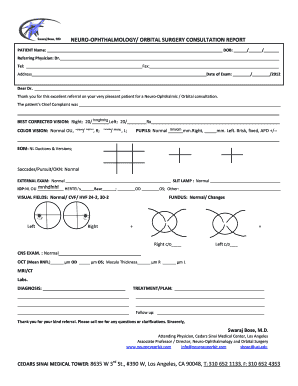
Get Uci Neuro-ophthalmology / Orbital Surgery Consultation Report
How it works
-

Open form follow the instructions
-

Easily sign the form with your finger
-

Send filled & signed form or save
How to fill out the UCI Neuro-Ophthalmology / Orbital Surgery Consultation Report online
Completing the UCI Neuro-Ophthalmology / Orbital Surgery Consultation Report online is an essential step to ensure effective communication between healthcare providers. This guide offers a clear, step-by-step approach to help you accurately fill out the necessary fields of the report.
Follow the steps to successfully complete the consultation report.
- Click ‘Get Form’ button to access the UCI Neuro-Ophthalmology / Orbital Surgery Consultation Report and open it in your preferred digital editor.
- Begin by entering the patient’s name in the designated field, followed by their date of birth in the format DD/MM/YYYY. This information is crucial for identifying the patient.
- In the referring physician section, input the name of the doctor who is referring the patient. Include their phone number and fax number in the respective fields along with their address.
- Fill in the date of the examination accurately, ensuring it reflects the correct format.
- Specify the patient’s chief complaint clearly, providing details relevant to their condition.
- Indicate the best corrected vision for each eye—specifically for the right and left. You may enter the visual acuity followed by the prescription in the appropriate fields.
- For color vision, note any relevant observations. Fill in details about normal or abnormal findings for each eye.
- In the pupils section, provide measurements for each eye and any abnormalities that might be noted.
- Record the findings from the external examination and any specific observations from the slit lamp examination.
- Document the intraocular pressure (IOP) measurements for each eye in the designated areas.
- Specify the results of visual fields assessments, including any abnormalities or normal findings.
- If applicable, note any findings from the fundus examination, documenting normal changes or specific details observed.
- Complete the CNS exam section with any pertinent remarks regarding patient neurological status.
- Record diagnostic imaging results such as OCT measurements, including mean RNFL thickness and macular thickness.
- Finally, fill in the diagnosis and treatment plan based on your observations. Provide a follow-up plan and any additional remarks as necessary.
- Once all fields are completed, you can save your changes, download, print, or share the completed form as required.
Encourage others to complete their documents online for efficiency and accuracy.
Industry-leading security and compliance
US Legal Forms protects your data by complying with industry-specific security standards.
-
In businnes since 199725+ years providing professional legal documents.
-
Accredited businessGuarantees that a business meets BBB accreditation standards in the US and Canada.
-
Secured by BraintreeValidated Level 1 PCI DSS compliant payment gateway that accepts most major credit and debit card brands from across the globe.