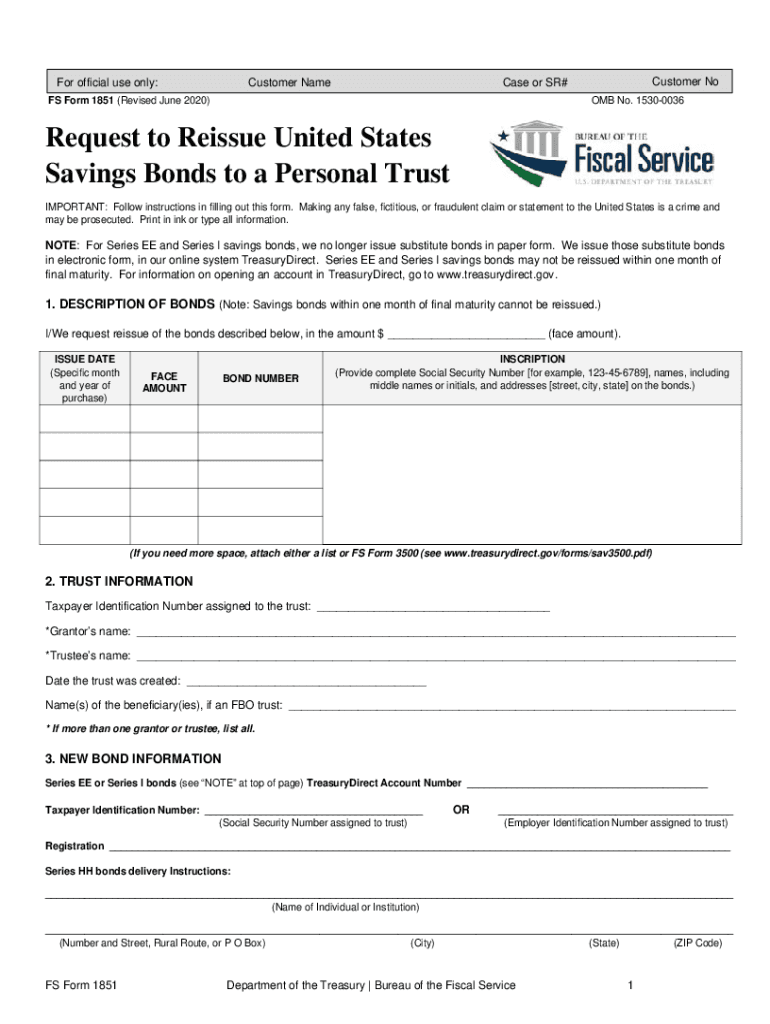
RESETFor official use only:Customer NoCase or SR#Customer NameFS Form 1851 (Revised June 2020)OMB No. 15300036Request to Reissue United States Savings Bonds to a Personal Trust IMPORTANT: Follow instructions.
Loading

Open form follow the instructions

Easily sign the form with your finger

Send filled & signed form or save
How to fill out the TreasuryDirect FS 1851 online
The TreasuryDirect FS 1851 form is used to request the reissue of United States Savings Bonds to a personal trust. This guide provides clear, step-by-step instructions to assist users in accurately completing the form online.
Follow the steps to complete the TreasuryDirect FS 1851 online.
- Press the ‘Get Form’ button to acquire the form and access it in the online editor.
- Begin with section 1, 'Description of Bonds.' Enter the face amount of the bonds you wish to reissue, along with their issue dates and bond numbers. Ensure that you provide the full names and Social Security Numbers of individuals listed on the bonds.
- Proceed to section 2, 'Trust Information.' Fill in the Taxpayer Identification Number for the trust, along with the grantor's and trustee's names, and the date the trust was created. If there are multiple grantors or trustees, include all names.
- In section 3, 'New Bond Information,' enter the TreasuryDirect account number for the trust. If you do not have one, make sure to create an account. Additionally, provide the Taxpayer Identification Number assigned to the trust, along with registration details as specified.
- Refer to section 4, 'Tax Liability Notice,' for important information regarding tax implications on the reissued bonds.
- Complete section 5, 'Tax Liability Statement.' Choose either option 'a' or 'b' regarding the ownership of the portion of the trust represented by the tax-deferred accumulated interest on the bonds.
- In section 6, 'Signatures,' ensure that the form is signed by the owner or both coowners, along with the trustee. All signatures must be provided in the presence of a certifying officer.
- Finally, save your changes. Depending on your needs, you can download, print, or share the completed form.
Complete your TreasuryDirect FS 1851 form online today to ensure a smooth reissue process.
Experience a faster way to fill out and sign forms on the web. Access the most extensive library of templates available.
Related content
Apr 19, 2019 - FS Form 1851 (download or order) must be signed by everyone named in the...
... 985 topic 986 fs 987 primary 988 oh 989 fy 990 fine 991 limited 992 amendment...
... dj 1850 serving 1851 bee 1852 discounts 1853 featured 1854 residential 1855 ... into...
Get answers to your most pressing questions about US Legal Forms API.
How do I add a beneficiary in TreasuryDirect?
Click the Establish My Payroll Savings Plan link on the ManageDirect page. On the Establish My Payroll Savings Plan page, your preferred TreasuryDirect registration is displayed. To use a different registration for your savings bond, choose one from the drop-down box, or add another by clicking "Add New Registration".
Can you add a beneficiary to a savings bond?
Savings bonds can be transferred to new owners without probate if they were jointly owned or if the owner named a payable-on-death (POD) beneficiary to inherit them. These bonds can be jointly owned, or they can be registered in POD form, but not both; only sole owners can designate a POD beneficiary.
What is a co owner on a savings bond?
Co-owners on savings bonds have equal rights to hold or redeem the bonds. ... The U.S. Treasury allows a savings bond to have either co-owners or an owner and a beneficiary.
How do you add a co owner to a savings bond?
If you own a bond solely in your name and want to add a co-owner or beneficiary or change the beneficiary to a co-owner, you must have the bond reissued. To do this, fill out FS Form 4000, available online from TreasuryDirect.
Can you gift US Savings Bonds?
When you buy savings bonds as gifts, you must hold them in your TreasuryDirect account for at least five business days before you can deliver them to the gift recipient. The five-day hold protects Treasury against loss by ensuring the ACH debit has been successfully completed before the funds can be moved.
Can I change the beneficiary on a savings bond?
Because things have a way of changing, savings bonds offer the owner of the bond the flexibility to be able to change beneficiaries. The process for making these changes is very simple. Visit the US savings bonds website, and click Enter under the section for individuals.
Can you cash a savings bond that's not in your name?
Remember that savings bonds can't be sold, traded or given away. The person whose name is on the bond is the only person who can cash it in (with some exception, which we'll get to shortly). ... You cash it in via the Treasury Web site, and the funds are deposited into your bank account).
Can savings bonds be transferred to another person?
Savings Bonds are still popular--and are usually easy to transfer to the beneficiary after the original owner dies. Savings bonds can be transferred to new owners without probate if they were jointly owned or if the owner named a payable-on-death (POD) beneficiary to inherit them.
Can you transfer ownership of US Savings Bonds?
Transferring Securities. Yes. The owner can transfer EE and I Bonds to another person with a TreasuryDirect account; however, you must wait five business days after the purchase date to transfer the bonds.
What do I do if I lost my US Savings Bonds?
If your paper U.S. Savings Bonds are ever lost, stolen or destroyed, you can obtain replacement bonds from the U.S. Treasury. The Treasury keeps records of the paper savings bonds it has issued, and it can search those records to replace your lost bonds.
Use professional pre-built templates to fill in and sign documents online faster. Get access to thousands of forms.
If you believe that this page should be taken down, please follow our DMCA take down process here.
This form is available in several versions. Select the version you need from the drop-down list below.