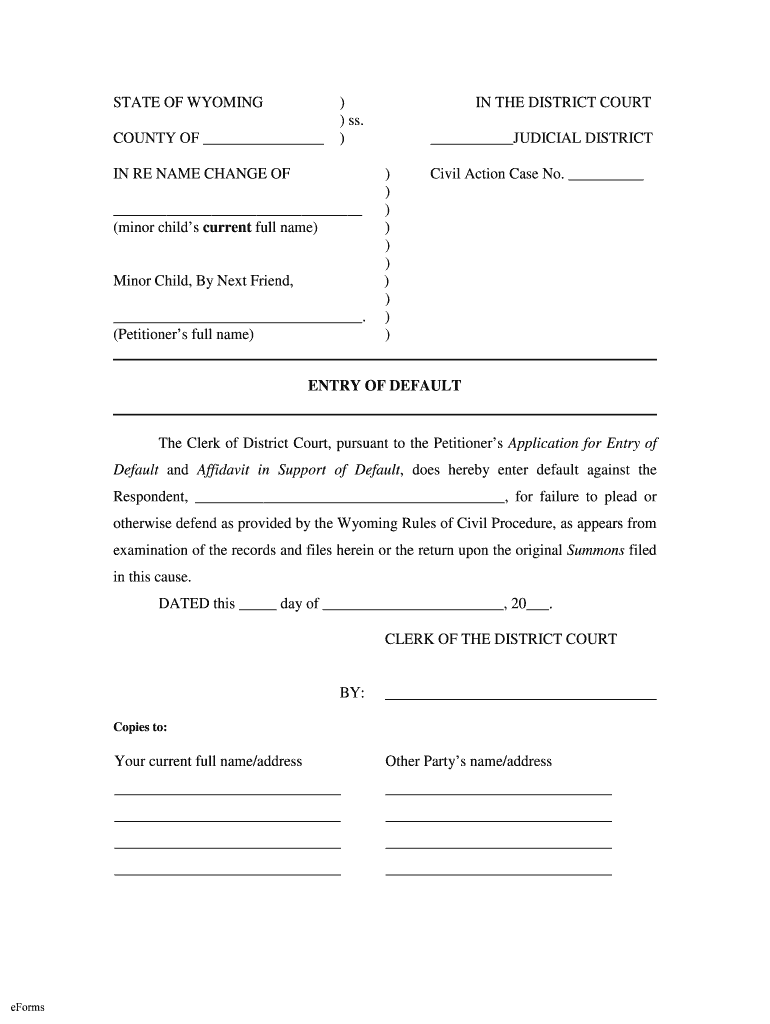
STATE OF WYOMING COUNTY OF ) ) ss. )IN RE NAME CHANGE OF (minor childs current full name)Minor Child, By Next Friend, . (Petitioners full name)IN THE DISTRICT COURT JUDICIAL DISTRICT ) ) ) ) ) ) ).
Loading

Open form follow the instructions

Easily sign the form with your finger

Send filled & signed form or save
How to fill out the WY Entry Of Default online
The WY Entry Of Default is a legal document used to formally indicate a respondent's failure to respond to a legal action. This guide provides a comprehensive step-by-step approach to assist users in completing the form accurately online.
Follow the steps to complete the WY Entry Of Default form effectively.
- Press the ‘Get Form’ button to obtain the WY Entry Of Default form and open it in the form editor.
- Fill in the county name in the header section where indicated.
- In the section labeled 'IN RE NAME CHANGE OF', write the minor child's current full name.
- In the same section, under 'Minor Child, By Next Friend', enter the full name of the petitioner.
- Under 'IN THE DISTRICT COURT', specify the judicial district.
- Insert the civil action case number in the designated area.
- In the body of the form, identify the respondent by writing their full name.
- Leave the date and signature sections blank for the Clerk of the District Court to complete.
- Specify who will receive copies by adding the current full name and address of the petitioner, and the other party’s name and address in the 'Copies to' section.
- Once all required fields are completed, review the form for accuracy, then save changes, download, print, or share the completed form as needed.
Complete your documents online to ensure a smooth filing process.
Experience a faster way to fill out and sign forms on the web. Access the most extensive library of templates available.
Related content
The Clerk of District Court, pursuant to the Petitioner's Application for Entry of...
of court, or by any applicable statute, the day of the act, event, or default. * * * from...
837 Electronic Claim Entry – Interactively enter dental, institutional and medical...
Get answers to your most pressing questions about US Legal Forms API.
What is default entry?
Entry of default refers to the process where the person making a claim in a case makes a request before a court of law stating that the party against whom they have made a claim have failed to furnish any meaningful response to the claimant's pleadings within the time allowed for that.
Can you go to jail for default Judgement?
Today, you cannot go to prison for failing to pay for a civil debt like a credit card, loan, or hospital bill.
What is a default claim?
Most often, it is a judgment in favor of a plaintiff when the defendant has not responded to a summons or has failed to appear before a court of law. ... The failure to take action is the default. The default judgment is the relief requested in the party's original petition.
What happens when a default is entered?
Default judgments happen when you don't respond to a lawsuit often from a debt collector and a judge resolves the case without hearing your side. In effect, you're found guilty because you never entered a defense. Default judgments are sometimes called automatic judgments because of how fast they can happen.
How long does a default Judgement take?
Generally, if a defendant fails to respond to a complaint you can get a default judgment after 45 days. However, the court system is very slow these days and it can take several months to get the court to issue the default judgment.
What happens when you get a default judgment?
Default judgments happen when you don't respond to a lawsuit often from a debt collector and a judge resolves the case without hearing your side. In effect, you're found guilty because you never entered a defense. ... If you get notice of a default judgment or garnishment, here's what to do.
What happens after a default is entered?
In almost every case after a default is entered, the plaintiff will submit affidavits and a proposed judgment to the court and the court will then enter the judgment without the requirement that any hearings be held. Some times this is NOT the procedure that should have been followed.
What does entry default mean?
Entry of default refers to the process where the person making a claim in a case makes a request before a court of law stating that the party against whom they have made a claim have failed to furnish any meaningful response to the claimant's pleadings within the time allowed for that.
Use professional pre-built templates to fill in and sign documents online faster. Get access to thousands of forms.
If you believe that this page should be taken down, please follow our DMCA take down process here.