Loading
Get Sucg Cg-5484i 2020-2026
How it works
-

Open form follow the instructions
-

Easily sign the form with your finger
-

Send filled & signed form or save
How to fill out the SUCG CG-5484I online
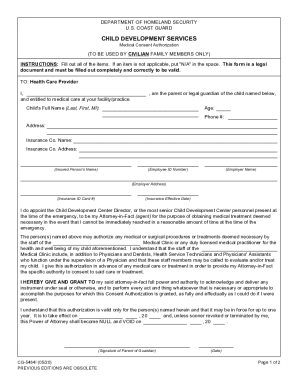
The SUCG CG-5484I is a critical medical consent authorization form used by civilian family members to grant medical care permissions. Completing this form accurately ensures that your child receives timely medical attention when necessary.
Follow the steps to fill out the SUCG CG-5484I form accurately.
- Press the ‘Get Form’ button to access the SUCG CG-5484I and open it in an online editor.
- Begin by entering your full name in the designated field as the parent or legal guardian.
- Provide the age of the child. This information is crucial for health care providers.
- Fill in the child's full name in the format Last, First, MI in the respective field.
- Enter your contact phone number to ensure that you can be reached in case of an emergency.
- Complete your current address in the provided space to give health care providers your location.
- Specify the name of the insurance company and their address in the appropriate fields.
- Input the insured person's name and the employee ID number according to your insurance documentation.
- Mention the employer's name and address related to the insurance plan.
- Fill in the insurance ID card number and the effective date of the insurance.
- In the designated area, appoint the Child Development Center Director or the present staff member as your Attorney-in-Fact for emergencies.
- Review the consent authorization statement, ensuring you understand the extent of authority you grant to your Attorney-in-Fact regarding medical decisions.
- Sign and date the form in the specified section to validate your consent and parental authority.
- Locate the section for notarization, fill in the necessary details, and arrange for a Notary Public to certify your signature.
- Final steps involve saving your changes, downloading the completed form, printing it if needed, or sharing it securely.
Complete your SUCG CG-5484I form online today to ensure your child has the necessary medical permissions in place.