Loading
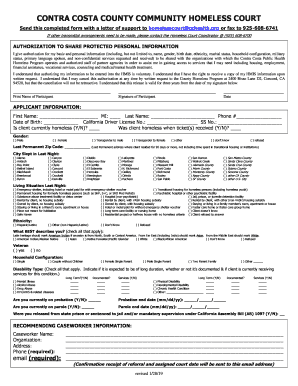
Get Ca Authorization To Share Protected Personal Information - Contra Costa 2019
How it works
-

Open form follow the instructions
-

Easily sign the form with your finger
-

Send filled & signed form or save
How to fill out the CA Authorization To Share Protected Personal Information - Contra Costa online
Filling out the CA Authorization To Share Protected Personal Information form is an essential step for individuals seeking assistance through Contra Costa's Homeless Program. This guide provides clear instructions to help you complete this form accurately and efficiently online.
Follow the steps to fill out the form correctly
- Click 'Get Form' button to obtain the form and open it in your preferred online editor.
- Begin by filling out your authorization statement, acknowledging your permission for basic personal information to be shared with relevant organizations. Ensure that you include your printed name, signature, and the date.
- Next, complete the applicant information section. Provide your first name, middle initial, last name, phone number, date of birth, California driver license number, and social security number.
- Indicate your current homeless status by selecting 'yes' or 'no'. Additionally, specify if you were homeless when receiving any tickets, followed by your gender identification.
- In the Last Permanent Zip Code field, enter the postal code of your last known address, skipping transitional housing or institutional stays.
- Select the city where you slept last night from the provided list. If unsure, choose 'refused'.
- Describe your living situation from the previous night by marking the appropriate option that best reflects your circumstances.
- In the ethnicity section, choose your ethnicity, if known. Utilize the checkboxes to indicate if you do not know or if you refuse to answer.
- Indicate your disability type by checking all applicable options and indicating if the condition is long-term, documented, or if you currently receive services.
- If applicable, fill in information regarding probation or parole, including dates and documented status.
- Finally, provide your recommending caseworker's information, including name, organization, address, phone number, and email. Ensure your email is accurate for confirmation purposes.
- Once completed, review your entire form for accuracy. You can then save changes, download, print, or share the form as needed.
Complete your CA Authorization To Share Protected Personal Information form online today and take a step towards accessing critical services.
Get form
Experience a faster way to fill out and sign forms on the web. Access the most extensive library of templates available.
Get This Form Now!
Use professional pre-built templates to fill in and sign documents online faster. Get access to thousands of forms.