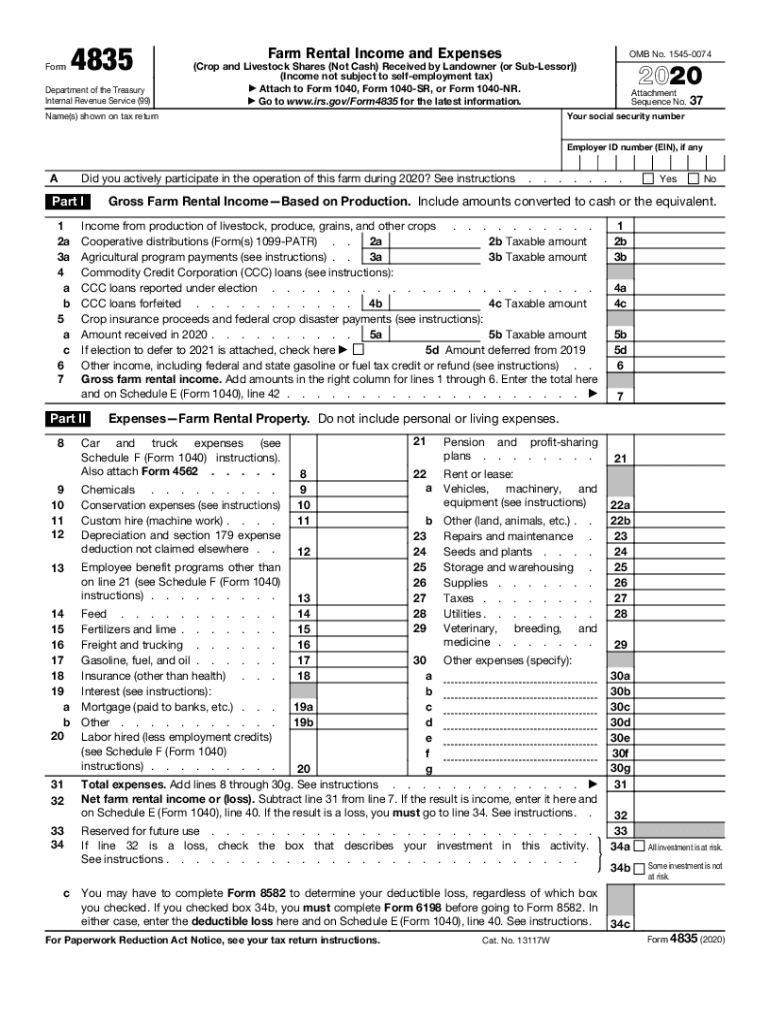
Ssor)) (Income not subject to self-employment tax) Attach to Form 1040, Form 1040-SR, or Form 1040-NR. Go to www.irs.gov/Form4835 for the latest information. Attachment Sequence No. 37 Your social security number Name(s) shown on tax return Employer ID number (EIN), if any A Did you actively participate in the operation of this farm during 2020? See instructions Part I 1 2a 3a 4 a b 5 a c 6 7 . . . . Chemicals . . . . . . . . . Conservation expenses (see instructions) Custom.
Loading

Open form follow the instructions

Easily sign the form with your finger

Send filled & signed form or save
How to fill out the IRS 4835 online
Filling out the IRS Form 4835 is essential for reporting farm rental income and expenses when you are a landowner who did not materially participate in the farm's operation. This guide provides clear, step-by-step instructions to ensure accurate and efficient completion of the form online.
Follow the steps to complete IRS Form 4835 online.
- Use the 'Get Form' button to access the IRS Form 4835 and open it in your preferred editor.
- Begin by entering your social security number and the name(s) as shown on your tax return. If applicable, include your employer ID number (EIN).
- Indicate if you actively participated in the operation of the farm during the year by selecting 'Yes' or 'No' as applicable.
- In Part I, report your gross farm rental income, including livestock and crops. Complete lines 1 through 6 based on the income received during the year.
- In Part II, record your expenses associated with the farm rental property. Complete lines 8 through 30g by entering the relevant expenses incurred.
- Calculate your total expenses on line 31 and find the net farm rental income or loss by subtracting total expenses from gross income on line 32.
- If applicable, complete additional questions regarding your investment risk on lines 34a through 34c.
- Review all entered information for accuracy and completeness. Ensure you follow all instructions before finalizing.
- Finally, save your changes, download a copy of the form, and print or share it as needed.
Complete your documents online and ensure compliance with IRS requirements.
Experience a faster way to fill out and sign forms on the web. Access the most extensive library of templates available.
Related content
Information about Form 4835, Farm Rental Income and Expenses, including recent updates...
Form 4835, farm rental income and expenses (crop and livestock shares (not ... Address of...
(Income not subject to self-employment tax). ▷ Attach to Form 1040 or Form 1040NR. ▷...
Get answers to your most pressing questions about US Legal Forms API.
Is farm rental income considered earned income?
Farm Rental is for when the landlord receives share crop income, (a percentage of the crop raised, not a cash payment). Earned Income from a farm goes on schedule F which is subject to Se tax.
What is Form 1040 Schedule F?
Use Schedule F (Form 1040) to report farm income and expenses. File it with Form 1040, 1040-SR, 1040-NR, 1041, or 1065. Your farming activity may subject you to state and local taxes and other require- ments such as business licenses and fees.
Is Form 4835 the same as Schedule F?
Qualification for Form 4835 If you're a traditional farmer who raises crops or livestock, you're considered a self-employed business person and you would file using Schedule F, Profit or Loss From Farming. ... Form 4835 is the way for non-participating farmland owners to report their farm income and expenses.
What constitutes a farm for tax purposes?
The definition of a farm describes farming activities. These activities produce farm income which is recorded on a Form 1040 Schedule F: Profit or Loss From Farming. Someone may have a farm and produce farm income, but not qualify as a farmer under some tax provisions.
What is the tax rate for farm income?
In 2016, family farm households faced an estimated income tax rate of 17.2 percent on average.
What is the difference between Schedule C and Schedule F?
Sole proprietors must file Schedule C with their tax returns, and self-employed farmers report their income and expenses from their farming businesses on Schedule F.
How does your income affect your tax rate?
The federal tax system is progressive, meaning that generally your tax rate increases as your income increases. ... Marginal tax rates determine how taxable income is taxed and those who pay income taxes are divided up into different ranges known as tax brackets. Income in each bracket is then taxed at a specific rate.
Is Schedule F income subject to self employment tax?
Taxpayers should use Form 1040, Schedule F to report income and expenses from farming activity as a self-employed farmer. Net profits are subject to Self Employment Tax (Schedule SE).
What qualifies you as a farm for tax purposes?
The IRS says you're a farmer if you cultivate, operate or manage a farm for profit, either as an owner or a tenant. Farms include plantations, ranches, ranges, orchards and groves, and you can raise livestock, fish or poultry, or grow fruits and vegetables.
Use professional pre-built templates to fill in and sign documents online faster. Get access to thousands of forms.
If you believe that this page should be taken down, please follow our DMCA take down process here.
This form is available in several versions. Select the version you need from the drop-down list below.