Loading
Get Canada Pptc 203 E 2019
How it works
-

Open form follow the instructions
-

Easily sign the form with your finger
-

Send filled & signed form or save
How to fill out the Canada PPTC 203 E online
Filling out the Canada PPTC 203 E form online is an essential step for individuals needing to report a lost, stolen, damaged, or found Canadian travel document. This guide provides a detailed, step-by-step approach to ensure you complete the form accurately and efficiently.
Follow the steps to successfully complete the Canada PPTC 203 E form online.
- Click ‘Get Form’ button to obtain the form and open it in your preferred online document editor.
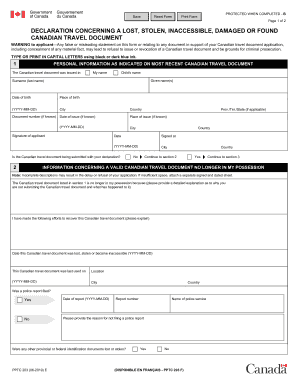
- In the first section, provide your personal information as it appears on your most recent travel document, including your given name(s), surname, date of birth, place of birth, and document number if known.
- Indicate if the Canadian travel document is being submitted with your declaration by selecting 'Yes' or 'No' and then proceed to the appropriate section.
- If your travel document is lost, stolen, or inaccessible, fill out the relevant information by describing why you do not have the document and detailing any recovery efforts. Provide the date it was lost and location of last use.
- In the next section, if your document was damaged or found, explain the circumstances, the date it was damaged or found, and why you need a replacement document.
- Complete your declaration by signing in the designated area and providing relevant details such as your daytime telephone number and place of signing.
- Review all the information entered to ensure accuracy. Save your progress in the form, and once completed, you can download, print, or share your form as needed.
Complete your documents online to streamline the process and avoid delays.
Get form
Experience a faster way to fill out and sign forms on the web. Access the most extensive library of templates available.
Get This Form Now!
Use professional pre-built templates to fill in and sign documents online faster. Get access to thousands of forms.